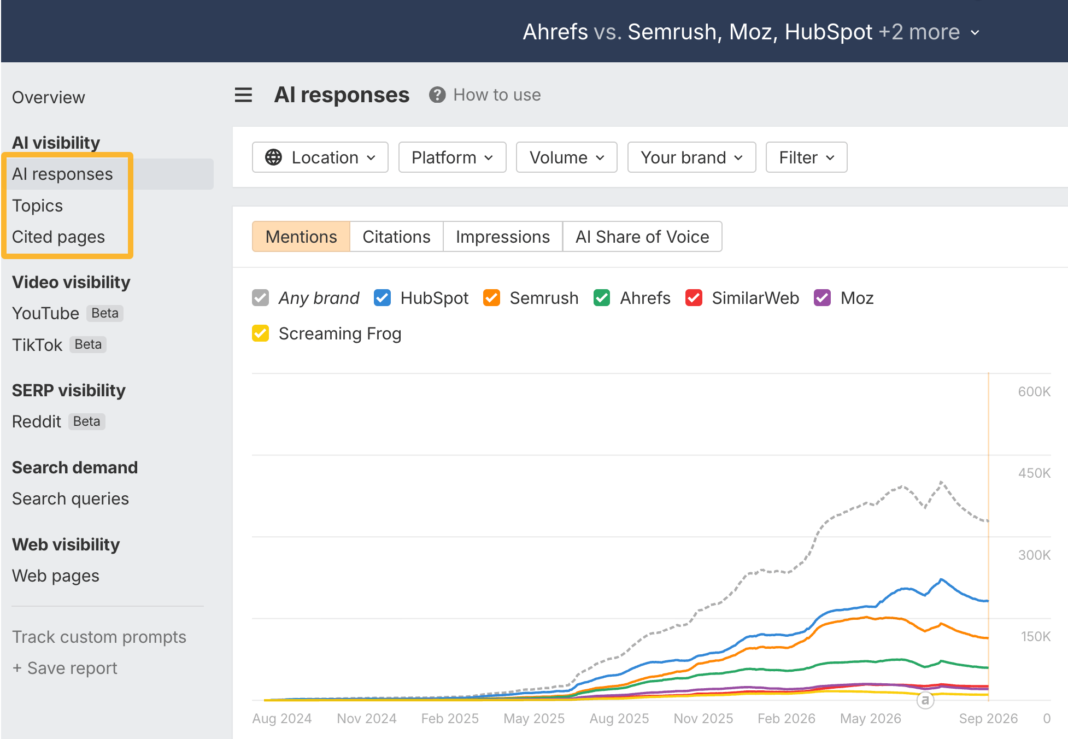

As if we didn’t already have enough dashboards, we had to go and invent “AI share of voice”.
Sigh. Yet another metric marketers have to be raked over the coals for.
Jokes aside, AI share of voice can be useful. It tells you how visible your brand is in AI responses compared with your competitors.
But the number is only as meaningful as the way it’s calculated.
So in this guide, I’ll show you exactly what AI share of voice is, how it’s calculated, how to measure it in Brand Radar, and how not to read more into the number than it can tell you.
AI share of voice (AI SOV) is the share of AI visibility your brand captures compared with the competitors you track, across the prompts you care about.
How AI share of voice is calculated
A common way to calculate it is:
AI SOV = responses that mention your brand ÷ responses that mention any tracked brand × 100
Let’s say you track three prompts about email marketing software on ChatGPT, and compare your brand with two competitors. Here’s which brands each response mentions:
Every brand appears in two of the three responses, so each has 2 ÷ 3 = 67%.
But that treats every prompt equally, and “best email marketing software” is asked far more often than the ecommerce automation question. Appearing in that first answer puts you in front of many more people.
So in Brand Radar, we weight each prompt by AI-adjusted volume: the monthly Google search volume of the keyword behind the prompt, multiplied by a platform ratio. The ratio reflects how much traffic each AI platform sends to websites compared with Google organic search, based on Ahrefs’ traffic data.
For ChatGPT, it’s currently 0.115, so a 20,000-search keyword becomes 2,300 on ChatGPT.
When a response mentions your brand (or cites your website), that prompt’s AI-adjusted volume counts toward your estimated impressions. Your AI share of voice is your impressions divided by the impressions of all responses that mention any tracked brand (here, 2,300 + 920 + 115 = 3,335):
Same responses, same brands, but your share drops to 31% because your mentions come from the prompts people ask least. Impressions are a modeled estimate of exposure, not a count of people who saw an answer.
What about other AI platforms?
Each platform gets its own ratio, because people use them very differently: currently 0.115 for ChatGPT, 0.011 for Gemini, and 0.01 for Perplexity. So the same 20,000-search prompt carries 2,300 impressions on ChatGPT but only 220 on Gemini.
We calculate AI SOV per platform, and when you combine platforms, the overall score is a weighted average where platforms with more impressions count for more.
For example, let’s say the same prompts give you 28% AI SOV on ChatGPT and 11% on Gemini. Because ChatGPT carries roughly ten times the impressions, your combined score lands at about 26.5%, which hides the Gemini weakness almost completely.
So check each platform on its own before looking at the combined number.
Always report the scope
Every number above depends on choices: which prompts, platforms, and competitors you track, where, and when.
Change any of them and the percentage changes, which is also why two tools can report different AI SOV for the same brand without either being wrong.
- “Our AI SOV is 24%.”
- “Our AI SOV is 24% across 500 tracked prompts in ChatGPT and Gemini, against three named competitors, during August.”
Only the second tells you what the 24% actually refers to.
AI share of voice is useful when you want to answer questions like:
- Are we more or less visible than our competitors in AI responses?
- Is our relative visibility increasing over time?
- Which competitors appear most often for topics we care about?
- Are we more visible on one AI platform than another?
- Which groups of prompts are we weak or strong for?
For example, let’s say you track 200 prompts around “email marketing software.” Your brand has:
- 12% AI SOV overall
- 24% AI SOV on “best email marketing tools” prompts
- 5% AI SOV on “email automation” prompts
That tells you something useful: your brand is relatively visible for broad comparison prompts but weak around the specific sub-topic of automation. That’s a much better use of SOV than treating the overall 12% as the only number that matters, because it tells you where to act. Automation is the gap, so that’s where new content, comparison pages, and third-party mentions should go first.
Then you can track those prompts to see whether the gap closes.
But remember: visibility isn’t the same thing as outcomes. AI SOV doesn’t tell you whether mentions are positive, whether AI actually recommends you, whether you get traffic, or whether that traffic converts.
Brand Radar gives you two ways to measure AI visibility: explore our broad index of pre-collected AI responses, or track a focused set of prompts you choose yourself.
The broad index is available immediately. Tracked prompts start collecting data after you add them.
Whichever route you use, the result only makes sense when the brands, competitors, prompts, platforms, location, period, and dataset are clear.
1. Add your brand and competitors
Open Brand Radar, enter your website, and click Analyze.
We’ll suggest your brand and commonly associated competitors. Review those suggestions rather than accepting them blindly.
If you want full control, choose Add your brand and competitors manually.
For each entity, add the main brand name, genuine name variations, and the associated website or websites. You can group several names and sites into one entity, which is useful for rebrands, abbreviations, or product names that should count together.
2. Use the broad index for immediate discovery
When you click Explore, we do not generate a new batch of AI responses for your brand.
We search our existing corpus of responses collected from search-backed prompts, match your brand and competitor entities, and calculate the report from that data.
That is why the results appear immediately. Brand Radar can populate AI responses, mentions, citations, cited domains and pages, estimated impressions, and AI Share of Voice without waiting for a new collection run.
In this view, AI Share of Voice represents the brand’s share of estimated impressions within the filtered Brand Radar corpus, relative to the competitor entities you are tracking.
3. Define your market and platform scope
Use the report filters to define the scope you actually want to describe. Depending on the question, that may include:
- country or location (e.g. United Kingdom, or London)
- AI platform (e.g. ChatGPT, or Gemini)
- topic, query, or response terms (e.g. only prompts about “email automation”, or only responses that mention “pricing”)
- date or reporting period (e.g. last 30 days, or a single month such as August 2026)
- Dataset (e.g. Ahrefs prompts from our broad index, your Tracked prompts, or both)
Platform selection matters because the same brand can perform very differently across ChatGPT, Gemini, Perplexity, Copilot, Google AI Overviews, and Google AI Mode.
For example, let’s say the same measurement set produces 28% AI SOV on ChatGPT and 11% on Gemini. If you only looked at ChatGPT, you might conclude your visibility was strong. If you only looked at the combined result, you could miss the platform-level weakness.
In Brand Radar, you can filter by AI platform and inspect the underlying responses behind the score.
4. Create a saved report
If you want to revisit the same setup, click Save report in the sidebar, followed by Create report. The saved report preserves your entities, filters, and location.
To use Tracked prompts, map the report to one of your Ahrefs projects. Choose carefully: once a report is mapped to a project, you can’t switch it to a different one.
In Report settings, you can also review your brand, competitors, market or niche, location, filters, report name, AI assistants, and tracking frequency.
5. Build your own prompt set
The broad index is useful for discovery across our existing response corpus. Tracked prompts are better when you want to monitor a smaller set of commercially important questions.
Click Track custom prompts, add one prompt per line, choose one or more locations, and review the estimated checks before clicking Add prompts. Set which AI assistants should run the prompts and whether they should update daily, weekly, or monthly.
One check equals one prompt execution on one AI assistant in one location. For example, five prompts checked on three assistants in two locations use 30 checks each time the set runs.
You can also use Generate to suggest prompts from your brands and focus areas. Treat those suggestions as a starting point. Edit them and keep only the questions that represent what your customers actually care about.
Useful prompt groups may include:
- high-value product categories;
- problems customers are trying to solve;
- comparison questions;
- use cases;
- branded and non-branded questions.
AI responses vary, so groups of relevant prompts are usually more useful than individual answers.
Further reading
6. Understand the metrics
The Overview report shows mentions, citations, estimated impressions, and AI Share of Voice side by side.
They answer different questions.
- A mention is counted once when a brand appears at least once in an AI response.
- A citation is counted when a page appears as a cited source in an AI response.
- Estimated impressions sum the AI-adjusted volume of prompts whose responses mention the brand.
- AI Share of Voice compares those impressions with the other tracked brand entities. Across several platforms, the overall result is impression-weighted.
From the Overview, open AI responses, Cited domains, or Cited pages to see the actual answers that mention each brand, the websites AI cites most often, and the specific pages it links to.
A brand can be mentioned without its website being cited, and a page can be cited without the brand being recommended.
7. Keep the measurement consistent
Once you have a setup you trust, stop changing it every five minutes. The moment you make any changes, you’re no longer making a like-for-like comparison.
For example, let’s say your AI SOV is:
- June: 18%
- July: 26%
Looks great.
But then you realize that in July you:
- removed your biggest competitor;
- added 50 prompts where your brand already performs well;
- dropped one platform where you were weak.
That 8-point increase no longer tells you much about whether your actual visibility improved. You improved the report. But not your visibility.
Return to the same saved report for each comparison. Once Tracked prompts have data, use the Dataset filter to view Ahrefs prompts, Tracked prompts, or both. For reporting, it is usually clearer to keep broad-index findings and Tracked-prompt trends separate.
Whenever you report the result, record the brands, aliases, competitors, market, location, platforms, dataset, prompt group, tracking frequency, and date range alongside it. That makes the number reproducible and much harder to misread.
There isn’t a universally good AI share-of-voice score.
Think about it: If you compete against one other brand, 20% SOV means something very different than if you compete against nine brands.
Likewise, 20% from one prompt set isn’t automatically comparable with 20% from another tool using a different methodology.
Always ask what 20% is relative to. But relative to what? There are three comparisons I’d pay attention to.
Compare against your competitors
Suppose your SOV is 18%.
There’s no way to know what that means.
Now add the competitor data:
Now the number tells a story.
You’re behind two competitors, but only slightly ahead of one.
That gives you a much more useful benchmark than some generic “20% is good” rule.
Compare against yourself
Suppose your SOV looks like this:
- January: 14%
- February: 17%
- March: 21%
- April: 22%
If the prompt set, platforms, competitors, and methodology stayed roughly the same, that trend is potentially meaningful.
Now compare that with this:
- January: 14%
- February: 17%
- March: 35%
and in March you removed your two biggest competitors.
That trend is much less useful.
Use industry benchmarks carefully
Suppose an industry report says the average AI SOV in your category is 25%. Your score is 18%.
Are you underperforming?
Maybe. But first ask:
- Did the study track the same AI platforms?
- Did it use similar prompts?
- Did it include the same number and type of competitors?
- Did it use the same formula?
- Was the data collected during a comparable period?
If the answer is “no” to most of those, the 25% benchmark may not tell you much.
Otherwise you’re comparing two percentages that happen to have the same symbol after them.
You checked your report last month: 20%. This month: 27%. Before you pop the champagne, work out which of three things moved it.
1. Your visibility genuinely changed
You tracked the same prompts, competitors, and platforms in both months, and your brand now appears in 95 of 300 responses instead of 60.
Because the setup didn’t change, that’s strong evidence your visibility genuinely improved. Maybe new content started getting picked up, or competitors lost ground.
2. You changed the measurement
If you added prompts, removed a competitor, or dropped a platform in between, you’re not making a like-for-like comparison (see step 7 above).
You changed the ruler, not your visibility. Document every scope change so you can tell the difference later.
3. The AI systems changed
Let’s say you track the prompt “What are the best SEO tools for a startup?” One week, ChatGPT says, “Ahrefs, Semrush, and Ubersuggest are strong options.” The next week, with no change to your setup, it says, “Semrush, Moz, and SE Ranking are worth considering.”
That doesn’t mean your SEO got worse in seven days. The model may have been updated, its retrieval may have pulled different sources, or the answer may simply have varied between runs.
Across hundreds of prompts, that noise adds up, so trust trends that persist across several reporting periods rather than one-off spikes.
Further reading
Final thoughts
AI share of voice will probably get more useful as AI search matures.
We’ll get better data, better sampling, better ways to estimate demand, and better ways to separate a passing mention from meaningful visibility.
But I don’t think the core problem will change.
The number will still depend on what you chose to measure.
So the real advantage won’t come from obsessing over who has 22% versus 24% SOV this week. It’ll come from building a measurement setup you trust, watching how it changes over time, and understanding why it changed.
That’s where AI share of voice becomes genuinely useful.
Not as another score to chase, but as an actual way to understand how your brand’s position in AI responses is evolving.
If you want to see where you stand, track important prompts, and check your AI share of voice, sign up for Brand Radar today.