

This post was originally published on this site.
If you run a newsletter, no moment matters more than the one where a reader decides to subscribe. You’ve got a few seconds to make your case before they click away.
Now, you can customize what readers see at that moment: add a welcome message in your own words, describe what each tier offers, and choose whether to offer a free plan alongside your paid newsletter.
Welcome new subscribers
When your Subscribe block uses the Button only style, clicking the button opens a pop-up with a heading above the email field. Use that space to give readers one more reason to sign up.
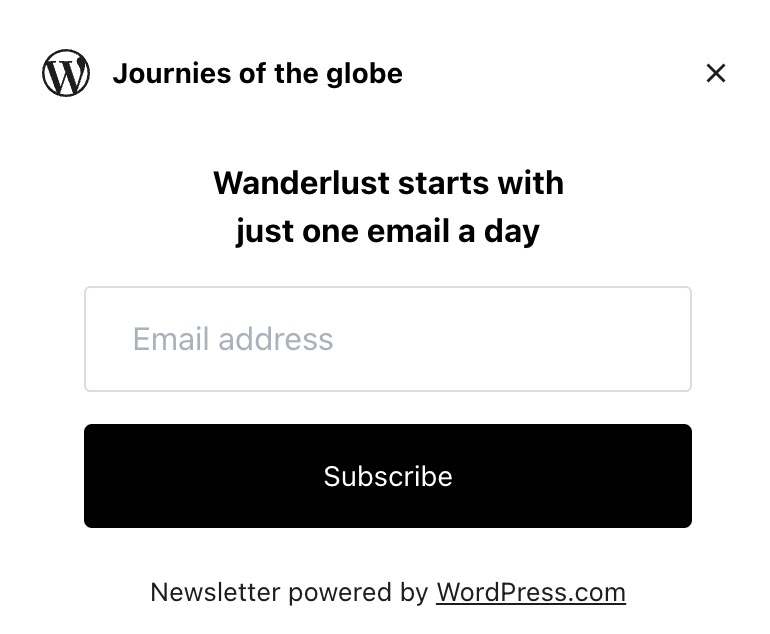
In your Newsletter settings, set the Subscribe modal heading to whatever you like, or leave it blank to keep the default.
Tell readers what they get
When someone is deciding whether to pay for your newsletter, they want to know what they’re actually getting.
Add a description to your free and paid tiers to explain why a paid plan is worth it. Descriptions support multiple lines and bullet points, so you can lay out what’s included in a clear way.
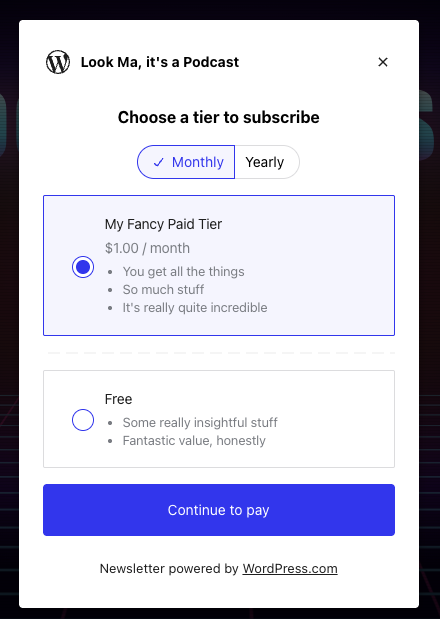
To add descriptions, open Jetpack → Monetize in your sidebar and click the Payment Settings tab. Edit any paid plan to add its description. For the free tier, find it in your list of payment plans, click the three dots, and choose Edit.
Show only the plans you want
If you run a paid newsletter, showing a free option alongside paid tiers can distract from the plans you want new readers to consider.
You can now hide the free tier, so potential subscribers see only the paid options you offer. Edit the free plan under Jetpack → Monetize → Payment Settings and turn on Hide the free plan from the options shown to new subscribers. Anyone already subscribed for free stays subscribed.

Running a newsletter on WordPress.com
Customizing what subscribers see is one more piece of the Jetpack Newsletter toolkit that keeps getting better. If you haven’t started emailing your followers or set up paid subscriptions yet, here’s what you can do right now on WordPress.com:
- Start a newsletter on any plan, including free.
- Send unlimited emails to unlimited subscribers, for free.
- Add paid tiers with your own monthly and yearly pricing.
- Collect payments through Stripe with creator-first pricing.
- Manage subscribers, track email performance, and organize content with categories.
- Own your content and subscriber list. Export everything, anytime.
Start Customizing Your Newsletter Signup Flow
These customization options are available now for any newsletter on WordPress.com.
Ready to put your best pitch in front of new subscribers? Open your Newsletter Settings to get started.