
There’s no single right answer to how often you should run AEO prompt tracking, because the answer depends on what you’re trying to detect. But the question has two parts that people often blur together: how often data gets collected, and how often your team makes decisions from it.
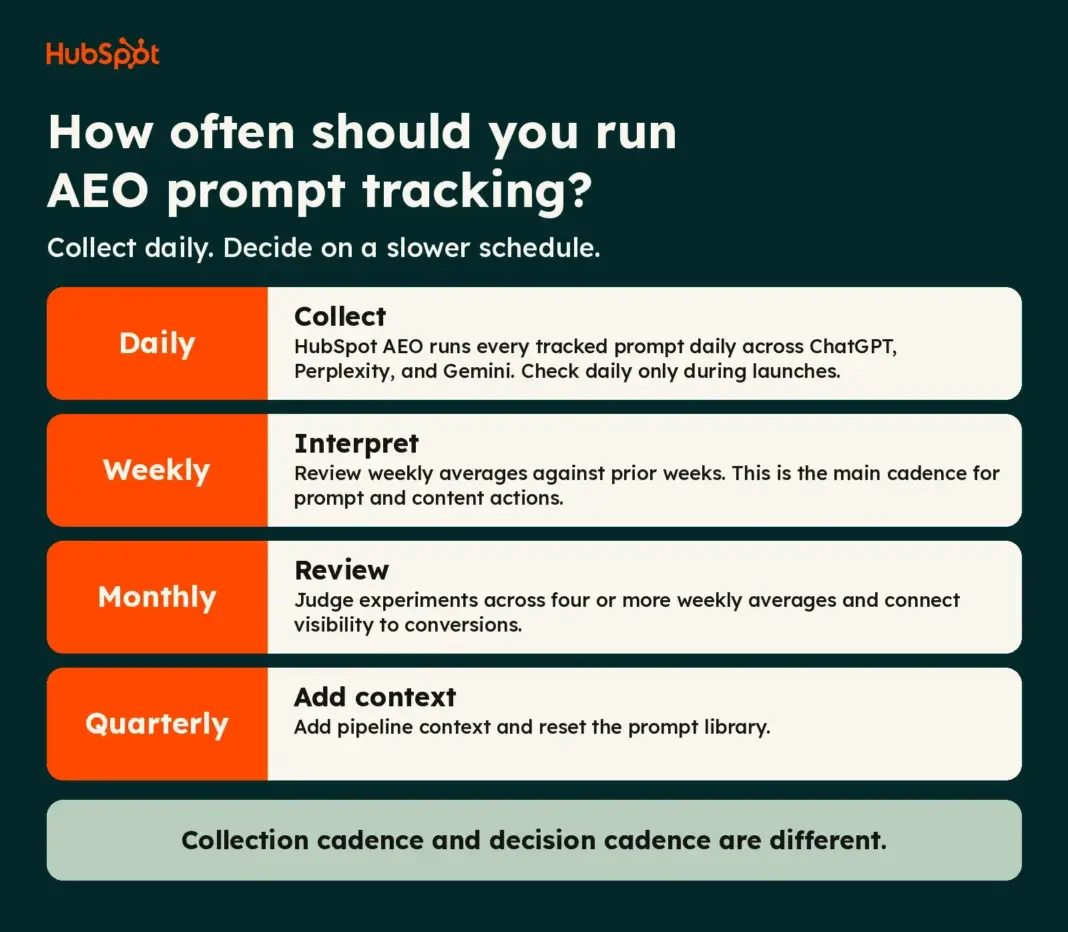
Here’s the short version, and it’s a simple one: collect daily where your tool supports it. interpret weekly. Use monthly reviews for conversion and experiment results, and quarterly reviews for pipeline context. Go to daily monitoring only during launches or major changes.
Buyers are doing more of their research in answer engines, which makes this rhythm matter. In a 2026 HubSpot survey of 3,063 CRM software purchase decision makers, 42% said they use AI search as part of their evaluation. If that’s where your buyers look, a measurement habit that confuses noise with movement will send your content team in the wrong direction.
HubSpot AEO runs each tracked prompt daily across ChatGPT, Perplexity, and Gemini, so we’ll use it as the working example throughout. The framework applies to any tool.
Table of Contents
How often should I run AEO prompt tracking?
HubSpot AEO collects tracked-prompt data daily. You don’t need to schedule anything to get that. What you decide is how often to look at the data and act on it.
For most teams, the right rhythm is:
- Daily: Data collection runs in the background. Check it for gaps, or watch it closely during a launch or major site change.
- Weekly: Review weekly averages and compare them against prior weeks. This is the main decision cadence for prompt and content actions.
- Monthly: Assess experiments and connect visibility trends to conversion data.
- Quarterly: Add pipeline context and decide whether the prompt library still reflects how buyers ask questions.
The reason to separate collection from decisions comes down to variability. AI answers change from run to run. A study on non-deterministic drift ran repeated-run experiments on two models and found that nondeterminism persists even at a temperature setting of 0.0, so identical prompts don’t always produce identical outputs. One answer on one day tells you very little, as the results above show.
What Factors Should Set My AEO Prompt-Tracking Cadence
Four factors do most of the work: how often you change things, how volatile your answer surfaces are, how many prompts you track, and what you’re trying to learn. Work through them in order and your cadence usually becomes obvious.
Identify publishing velocity and change frequency.
Your review cadence should follow how often you change something the engines could notice. If you publish a few pages a quarter, weekly reviews will mostly show you the same line. If you ship new content, update comparison pages, and run third-party placements every week, a weekly review matches the pace of your changes.
Geographic scope belongs here too. If you launch in a new country or language, you’ve changed what you’re measuring, so treat the first several weeks as a new baseline.
The same logic applies to broader SEO planning. How often to revisit your SEO strategy comes down to how fast your market and your content move, and prompt tracking works the same way.
Estimate model volatility for your surfaces.
Answer engines don’t behave like a rankings table. In January 2026, SparkToro published research on AI recommendation consistency. Across 2,961 runs of 12 prompts on ChatGPT, Claude, and Google’s AI features, the odds of getting the same list of brands twice were under 1 in 100, and the odds of getting the same list in the same order were closer to 1 in 1,000. The runs took place in November and December 2025, by volunteers using default settings.
Two details from that study matter for cadence. First, the author concluded that visibility percentage across many prompts, run multiple times, looked like a reasonable metric, while ranking position didn’t. Second, the study hasn’t been peer reviewed, and the authors said larger samples are needed to answer how many runs a prompt needs. Treat it as a strong directional signal, not a settled standard.
The practical takeaway: volatility is a property of the surface and the category, so watch your own data. In your first four to six weeks, note how much your weekly averages swing when nothing has changed. That swing is your noise floor.
Size and segment your prompt library.
Library size controls how much data each weekly review has to work with. A larger library gives you more answers per segment, but only if you segment it. A single blended score across 100 prompts can hide a drop in one product line.
The tool you use also sets practical limits. HubSpot AEO includes 25 prompts on its free 28-day trial, and teams can add prompt capacity as they grow. Your cadence should match the number of answers each segment generates, which the worked example in the next section shows.
Define your measurement goal.
What you’re trying to detect changes how often you look:
- Baseline monitoring: weekly or monthly reviews are enough, since you’re watching for drift.
- Campaign or content impact: weekly reviews during the campaign, then a monthly read once enough weeks have accumulated.
- Trend shifts: multi-week windows. A trend needs several data points before it counts.
- Launch or incident response: daily checks for a defined window, with a plan to return to weekly interpretation afterward.
How to Choose a Daily, Weekly, or Monthly AEO Prompt-Tracking Rhythm
Start with the decision tree, then check it against the comparison chart.
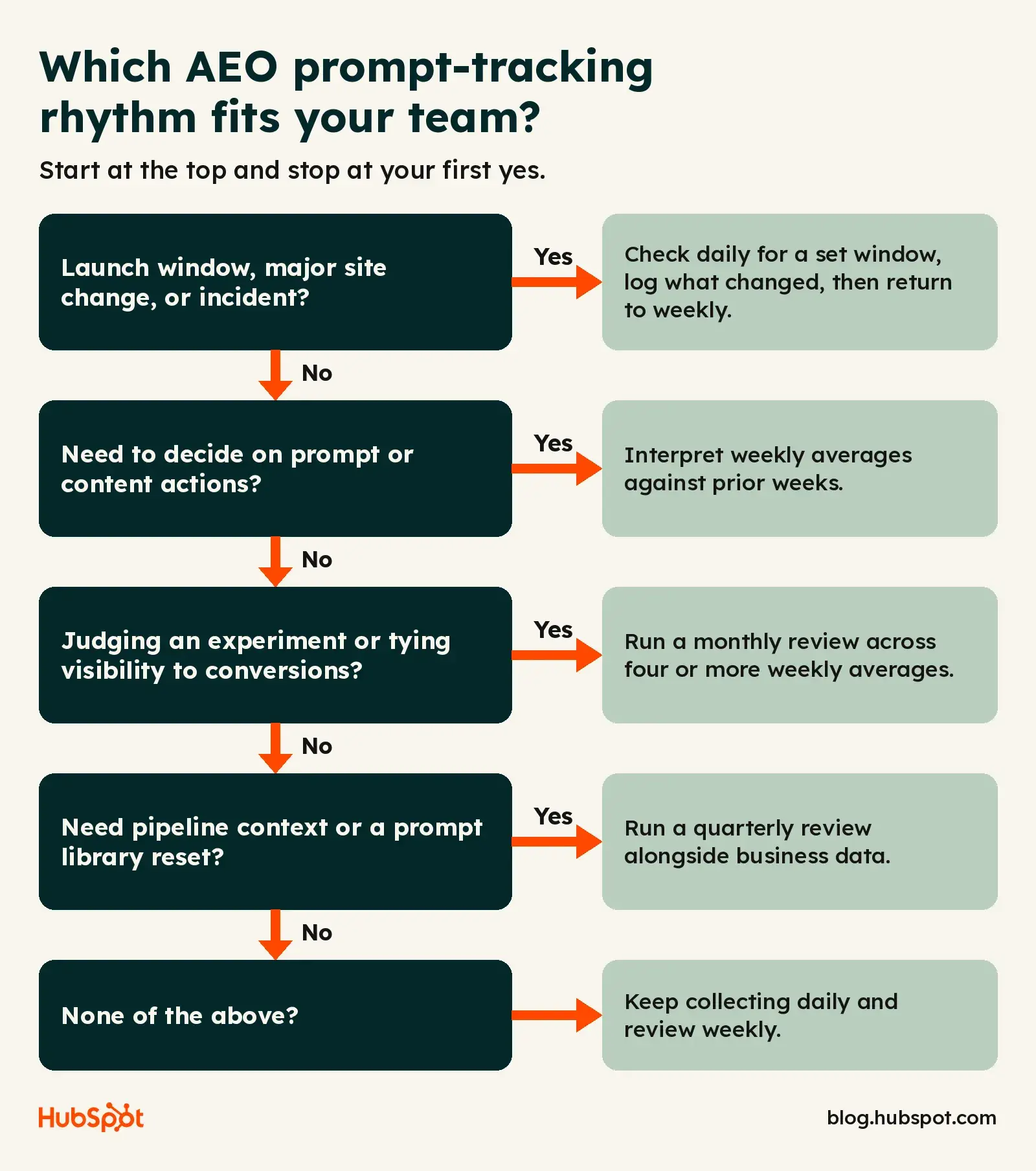
Decision Tree
- Are you in a launch window, a major site change, or an active incident? If yes, check daily for a set period (for example, the launch week), log what you see, and return to step 2 when the window closes. If not, go to step 2.
- Do you need to decide on prompt or content actions? If yes, interpret weekly averages and compare them against prior weeks. If not, go to step 3.
- Do you need to judge an experiment or connect visibility to conversions? If yes, run a monthly review across at least four weekly aggregates. If not, go to step 4.
- Do you need to understand pipeline context or reset the prompt library? If yes, run a quarterly review. If not, keep collecting and reviewing weekly.
Comparison Chart
Reliability here means three things: how much data is aggregated, how complete that data is, and how long the time horizon is. It isn’t a universal score.
Worked Example: Prompts × Engines × Days
This is illustrative math, not a benchmark. Say you track 25 prompts in HubSpot AEO, which runs each across three engines daily.
- One day: 25 prompts × 3 engines = 75 answers. Each individual prompt has only 3 answers that day, one per engine.
- One week: 25 prompts × 3 engines × 7 days = 525 answers. Each prompt now has 21 answers.
- Four weeks: each prompt has 84 answers (3 × 28).
Now to segment. If 10 of those prompts are unbranded and solution-seeking for one product line, that segment produces 210 answers a week. That’s a workable base for a weekly average. A segment of two prompts produces 42, so read it with more caution and lean on a longer window.
For context, SparkToro’s takeaway was that you generally need to ask the same prompt many times, often 60 to 100, and then average. Four weeks of daily runs across three engines lands in that range for a single prompt, though the study’s authors didn’t establish a required number. Daily collection is what makes a weekly read possible.
Pro tip: Write down your minimum answer count per segment before your first review, such as “no weekly read on any segment with fewer than X answers.” Pick X from your own baseline, then keep it fixed so you aren’t tuning the rule to fit the result.
How to Reduce Noise and Confirm Trends in AEO Prompt Tracking
Noise is the default state. Your job is to set rules that stop a random swing from becoming a roadmap change.
Four habits cover most of it: use weekly aggregates, wait for several weeks of evidence, check data completeness before reading a chart, and keep prompt definitions stable. If you need a refresher on why sample size matters, statistical significance explains the basics behind the “how much data is enough” question.
Confirm movement across weekly aggregates.
Don’t act on one week’s move. Look at whether the weekly average moved in the same direction across several consecutive weeks and whether the change is larger than the swing you saw during your baseline period.
HubSpot’s guidance on AEO measurement points the same way. Its AEO guide recommends monitoring your brand visibility score week over week as you act on recommendations.
A confirmation rule is a team policy, not a product setting. HubSpot AEO doesn’t apply to you, so write your own and keep it consistent. A reasonable starting point is: a change counts as confirmed when it holds across several consecutive weekly averages, data was complete in those weeks, and no prompt changes happened during the period.
Also, check completeness. HubSpot notes it can’t guarantee an answer from every engine every day because of technical constraints with the underlying providers. If a week has missing runs, say so in your report and read that week with caution.
Separate brand vs. non-brand prompts.
Unbranded, solution-seeking prompts support overall brand-visibility measurement, while branded prompts help you assess positioning against competitors. They answer different questions, so report them separately.
In HubSpot AEO, prompts that contain your brand name show N/A instead of a visibility score and don’t count toward your overall brand visibility score. That’s by design, since an engine will almost always mention your brand when you ask about it directly. Branded prompts still earn their place for comparison queries like “[Brand] vs. [Competitor],” because they show how engines position you when a buyer is already evaluating you.
Mixing the two into one number hides both stories. Keep unbranded prompts as your visibility trend line, and read branded prompts as a positioning check.
Add a rotating exploratory set safely.
You’ll want to test new prompts without breaking your trend line. Keep a small exploratory set that’s separate from your core library, and give each prompt a start date and a review date.
Rules that keep it safe:
- Never fold exploratory prompts into the core trend until they’ve run long enough to have their own weekly aggregates.
- Retire prompts where no brand is mentioned. HubSpot’s documentation notes that a prompt where no brands appear usually isn’t worth tracking for visibility, since the score will sit at zero regardless of what you do.
- Don’t track several wordings of the same question unless the answers differ in a way that matters to you.
How HubSpot AEO Collects and Helps You Interpret Prompt-Tracking Data
HubSpot AEO runs each tracked prompt against ChatGPT, Perplexity, and Gemini every day. From each response, it captures the answer text and, when the engine triggered a web search, the sites cited in the answer. It then analyzes each answer for brand mentions, competitor mentions, and sentiment, plus the makeup of the citations. Data collection starts when you finish onboarding.
Two relationships are worth keeping in mind. Daily prompt collection supports weekly averages and stronger trend analysis over several weeks. And because AI answer variability is high, aggregated results are more useful for trend interpretation than a single manual run.
Two more concepts carry the interpretation. Share of voice measures your brand’s portion of mentions relative to competitors in tracked answers. Citation analysis shows which domains, pages, and content types influence tracked answers and recommendations. Together with your visibility score, they tell you whether a change came from your own presence, a competitor’s gain, or a shift in what engines cite.
A few limits apply, and you should plan around them:
- HubSpot says it can’t guarantee a response from every engine every day.
- Retrieval depends on the AI providers. HubSpot says it uses a combination of official APIs and scraping and maintains multiple retrieval approaches, but access can change.
- At the time of writing, HubSpot AEO tracks ChatGPT, Gemini, and Perplexity. Other engines are in private beta, so don’t assume coverage until it’s available to you.
For a one-time reference point before you start tracking, the AI Search Grader provides a directional snapshot of how engines represent your brand. It’s a single report with its own pre-built queries, not ongoing monitoring, and it relies on engine training data for some scores, so don’t compare its numbers directly with your tracked prompts.
Review daily collection and weekly averages.
Think of the dashboard as two views of the same data — one fast, one slow. The daily layer tells you whether the collection ran and whether something dramatic happened. The weekly layer tells you what your visibility looks like once variability is averaged out.
A single manual check in ChatGPT is one draw from a distribution. The current trend view in HubSpot AEO is many draws, collected the same way each day, with every response logged. When the two disagree, trust the trend view and use the manual check as a spot-test or a source of new prompt ideas.
How to Align Cadence to Weekly, Monthly, and Quarterly Reporting
Match each review to the decision it supports. If you need a broader template for what to report and when, this marketing metrics schedule is a useful starting point.
- Weekly visibility review. Look at weekly averages for your unbranded prompt segments, share of voice against your named competitors, and new citation patterns. Output: a short list of prompt and content actions, such as updating a page, creating a missing comparison asset, or adjusting a segment.
- Monthly review. Look at four or more weekly aggregates side by side. Assess whether content or placement experiments moved visibility, and connect the trend to conversion data where you have it, such as AI referral traffic and form fills. Correlation isn’t causation here. A visibility lift that lines up with a conversion lift is a lead worth investigating, not proof that one caused the other. Run your library hygiene check monthly too.
- Quarterly review. Add pipeline context. For Marketing Hub users, AEO data can sit alongside campaign metrics, which makes it easier to compare visibility trends with demand. Keep the claims you make in this review modest, and don’t promise rankings, citations, or pipeline impact from visibility changes. Use the quarter to look at seasonality, model updates logged during the period, and whether the library still matches how your buyers ask.
Reporting itself takes time, and AI can shrink reporting time when you’ve settled the structure. Settle the cadence first, then automate the summary.
How to Build a Stable AEO Prompt Library Without Bias
Treat your library as a sample for measurement, not a complete record of every buyer question. Buyers write prompts in wildly different ways, so no library covers everything. A good library is representative, stable, and documented.
For help writing prompts that sound like real buyers, see how to write AI prompts.
Segment prompts by intent, product, and ICP.
Group prompts into intent clusters such as problem exploration, solution comparison, and evaluation. Tag each by product or service and by ICP. HubSpot AEO lets you filter by answer engine, buyer’s journey phase, and product or service relevance, which makes the weekly review per segment practical.
Aim for coverage across the funnel. Prompt-library bias creeps in when a team writes only the prompts it expects to win.
For Marketing Hub Pro and Enterprise users, CRM data informs relevant prompt suggestions. HubSpot’s documentation says the tool doesn’t expose verbatim customer language as tracked prompts. It uses structured summaries of your business context to suggest prompts. Don’t paste real customer quotes or personal data into prompts, and check your privacy and consent obligations before you use customer-sourced language in any prompt.
Maintain consistent measurement conditions.
Trend lines only work if the conditions stay constant. Keep these steady:
- Country and ICP settings. HubSpot AEO sends prompts as if from the country in your ICP setting. Changing an ICP after prompts have been running skews that prompt’s history before and after the change. HubSpot also recommends reinforcing location in the prompt text.
- Prompt wording. Edits create a new measurement. If you must edit, log it and note the break in the trend.
- Brand variations. Brand name matching is case-sensitive, and it’s good practice to keep legacy brand names after a rebrand or merger so older references still count.
Geographic variation is real. Answers can differ by country and language, and in markets where engines cite fewer sources, raw answers may be less detailed. Report regions separately.
Record changes and review coverage.
Keep a change log with the date, what changed, who approved it, and why. Log site launches, major content releases, and known model updates there too, so you can read a trend later with context. Good data tracking habits apply here: consistent definitions, one source of truth, and documented changes.
Run a monthly hygiene review. Check for prompts that return no brand mentions, duplicates, stale product references, and gaps in funnel coverage. Store screenshots or exported responses for any prompt behind a major decision so you have evidence if someone asks later.
How to Operationalize Alerts and Actions
A trend only matters if it leads to a decision. Define what counts as a confirmed change, who owns the response, and where the finding goes. Use your team’s approved reporting and workflow tools for routing. HubSpot AEO surfaces the data and recommendations, and the routing to owners happens in your own tools and process.
Set thresholds for confirmed changes.
Base thresholds on your own baseline, since a number borrowed from another team won’t match your noise level. A workable structure:
- Watch: The weekly average moves outside your normal swing once. Note it and wait.
- Confirm: The move holds across several consecutive weekly averages, data was complete, and no prompt changes explain it.
- Act: A confirmed change on a segment tied to revenue priorities, with an owner and a next step assigned.
Pro Tip: After a confirmed drop, check citation analysis before you rewrite anything. If a competitor is gaining citations from a source type you don’t publish on, the fix may sit outside your own site.
Route findings to the right owner.
Assign each finding to the person who can change the thing that moved. Content updates go to the content lead, third-party placement gaps go to PR or partnerships, and prompt-library changes go to whoever owns measurement. Each finding should state the segment, the evidence (weeks and answer counts), the suggested next step, and a review date.
Human oversight matters throughout. Recommendations are inputs, not orders, and someone who knows the business should check them against what you know about your market before the team acts.
Frequently Asked Questions About AEO Prompt-Tracking Cadence
Does HubSpot AEO run prompts daily?
Yes. HubSpot AEO runs each tracked prompt daily across ChatGPT, Perplexity, and Gemini. HubSpot notes that it can’t guarantee an answer from every engine every day because of technical constraints with AI providers, so check for gaps before reading a weekly average.
Can I choose weekly or monthly run frequency in HubSpot AEO?
HubSpot’s documentation describes daily runs and doesn’t list weekly or monthly run settings. What you control is your review cadence: collect daily, then interpret weekly, monthly, and quarterly. HubSpot also says it’s exploring paid options for additional daily runs, though they aren’t available now.
Should I monitor daily during a product launch?
Yes, for a defined window. Daily checks help you confirm tracking started and catch large shifts early. Keep in mind that a single day is a small sample, so wait for weekly averages before you judge the launch’s effect. Set an end date for daily monitoring so it doesn’t become your default.
How should I adjust interpretation after a model update?
Log the date and treat the following weeks as a possible new baseline. Compare weekly averages before and after, check whether competitors moved the same way, and hold off on content changes until the shift holds across several weeks. If everyone moved together, the cause is probably the engine, not your content.
What if my prompt library keeps growing?
Grow it in segments and keep the core stable. Add new prompts to an exploratory set first, then promote them once they have enough weeks of data. Track prompts that matter to buyers, since more prompts spread the same weekly attention thinner. If you need more capacity, HubSpot AEO lets you add prompts in packs.
How do I split brand and non-brand prompts without bias?
Decide the rule before you look at results: a prompt is branded if it names your brand, and unbranded if it doesn’t. Report visibility trends from unbranded prompts and use branded prompts to see how engines position you against competitors. Don’t move prompts between groups after seeing their scores.
Pick a rhythm and start collecting.
A good cadence is boring: data collected daily, a weekly look at averages, a monthly look at experiments, and a quarterly look at business context. The framework above gets you there, but you need consistent data to run it.
HubSpot AEO runs your tracked prompts daily across ChatGPT, Perplexity, and Gemini and helps you interpret visibility, competitor, and citation data over time. You can start with a free 28-day trial. If you’re a Marketing Hub Pro or Enterprise customer, AEO in Marketing Hub adds CRM context to prompt suggestions and recommendations.