

This post was originally published on this site.
Managed hosting means your hosting provider takes care of the technical maintenance of your website, including updates, security, and performance.
I didn’t realize how much that mattered until I built my first site. I thought my job was just to write and publish — then the updates, security alerts, and performance issues started piling up.
In this guide, I explain what managed hosting includes, how it compares to regular hosting, and its advantages.
What is managed hosting?
Managed hosting is a type of web hosting where the provider takes care of the technical work behind your site for you.
Instead of dealing with things like updates, security, and ongoing maintenance yourself, you rely on the host to handle them.
Here’s what you typically get:
- Automatic updates: The host takes care of important system and platform updates in the background.
- Security monitoring: Your site is checked for security issues and protected against common threats.
- Regular backups: Backups are handled automatically by the host, making it easier to recover your site if something goes wrong.
- Uptime monitoring: Your site is monitored to make sure it stays online, and issues are caught early.
Tip: WordPress.com offers managed hosting out of the box. The technical setup is handled for you, so you don’t need to worry about maintenance or configuration.
Managed hosting vs. unmanaged hosting
The key difference is who handles the technical work. With managed hosting, your provider takes care of it; with unmanaged, you do everything yourself.
This applies across hosting types — VPS, dedicated, cloud — as any of them can come in a managed or unmanaged version.
In practice, managed hosting gets you up and running faster and keeps the technical workload off your plate long-term.
Here’s how the two compare across key areas:
| Feature | Unmanaged hosting | Managed hosting |
| Technical setup & management | You install software, configure the server, secure it, and keep everything updated. | Your provider manages setup, configuration, updates, security, and ongoing maintenance. |
| Maintenance | You manage backups and troubleshoot issues yourself, often using plugins or external tools. | Your host takes care of backups, monitoring, and security tasks. |
| Performance | Performance depends on how well the server is configured. | Built-in optimization for faster, more reliable performance. |
| Security | You add protections manually. | Built-in protections like SSL, firewalls, and malware scanning. |
| Support | General hosting support; expertise varies. | Support teams are familiar with the platform your site runs on. For example, WordPress.com offers 24/7 expert support from specialists who know WordPress inside and out. |
When is managed hosting the right choice?
I recommend managed hosting if you want a reliable website without taking on the technical overhead of running it.
WordPress.com users, for example, often choose managed hosting so they can focus on building their site and publishing — not troubleshooting updates or security issues.
Here’s how managed hosting helps me day to day:
- No surprise maintenance tasks: Routine updates and server work happen automatically.
- Fewer disruptions: Issues are handled before you ever notice them.
- Stable, predictable performance: No juggling settings or extra tools.
- More time for real work: Publishing, designing, or growing your business takes center stage.
- Peace of mind: You’re not the one troubleshooting issues.
Key features of managed hosting to look for
If you consider opting for managed hosting, look for features that keep your site running smoothly with minimal maintenance.
These are the ones that make the biggest difference:
Server management
Check that setup, configuration, and ongoing server maintenance are included.
A managed host should give you a ready-to-use environment without requiring server knowledge, while still letting you access server settings when needed.
Performance optimization
Look for built-in performance features like caching and server-level tuning.
These help keep your site fast and stable, with less need for extra plugins or manual setup.
For example, WordPress.com includes server-level caching by default, so key performance optimizations are handled at the hosting layer.
Tip: If your audience is global, also check whether the host provides edge caching or a distributed data-center network. On WordPress.com, Global Edge Caching across 28+ data centers helps pages load quickly for visitors worldwide.
Security and backups
Look for built-in security protections and automatic backups that run without manual setup.
A managed host should handle malware scanning, firewalls, and regular backups so that you don’t need to worry about running scans or remembering backup schedules.
Tip: WordPress.com includes SSL certificates, malware detection, and brute-force protection on all plans. Business and Commerce plans add real-time backups with one-click restore and advanced security features.
Support and expertise
Check what the support team is trained to help with — for example, whether they have experience with your specific CMS.
Managed hosting often includes support that’s familiar with the software your site runs on, which can be helpful when issues go beyond basic hosting questions.
With managed WordPress hosting, this usually means access to WordPress-specific support.
Tip: All WordPress.com paid plans include direct support from WordPress experts. Business and Commerce plans also include priority 24/7 support.
Scalability and reliability
Opt for hosting that can handle traffic spikes and keep your site stable as it grows, without you having to manage servers or make technical decisions.
For example, WordPress.com runs your site across multiple locations worldwide, so pages load quickly for visitors everywhere.
When traffic spikes, the system automatically handles the extra load — and you don’t need to add any manual changes.
How to select the best managed hosting provider
The best managed hosting provider will make running your site easier and take most of the technical work off your hands.
Because “managed” can mean very different things depending on the provider, I recommend focusing on how much responsibility they take off your plate and whether they fit your setup.
Here are a few questions to guide your decision:
- How much technical work does the host handle for you?
The more setup, updates, and security they manage, the less you have to worry about.
- Is the hosting environment optimized for your platform — e.g., WordPress?
For instance, some hosts simply install WordPress on a generic server and leave the rest to you.
Others, like WordPress.com, are optimized for running WordPress, so your site runs faster and stays stable without extra tuning.
- What kind of support will you receive?
Support teams familiar with your website platform can solve problems faster and with less back-and-forth.
- Will the hosting grow with your site?
Your site should be able to grow and receive more traffic without forcing you to switch plans or providers. For instance, WordPress.com includes unmetered traffic on every plan, so your costs don’t increase as your audience grows.
- How transparent is the pricing?
Look for plans where essential features — like backups, security, and SSL — are included upfront, so you’re not surprised by extra charges as your site scales.
- Does the host keep your site online if something goes wrong?
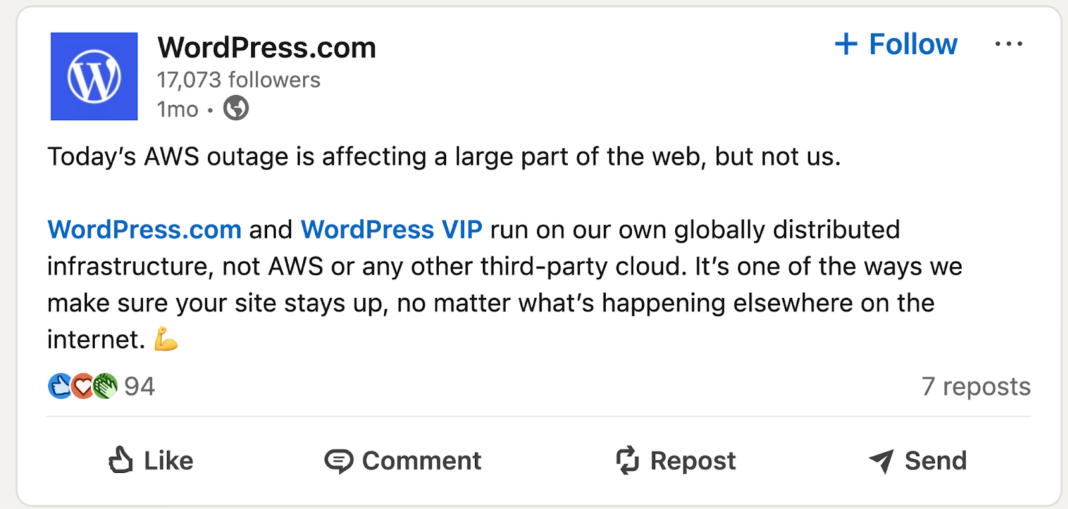
Some managed hosts use a distributed infrastructure, so your site stays available even if a server in one region has issues.
For instance, during a recent AWS outage that took many websites offline, WordPress.com sites continued running without interruption:
Get started with WordPress.com managed hosting
If you’re building a site with WordPress, managed hosting can take a lot of work off your plate — from updates and backups to security and basic maintenance.
On WordPress.com, managed hosting is built in, so you don’t need to set up servers, install performance tools, or manage updates yourself.
That’s the setup I wish I’d had when I started. Once I made the switch, the updates, security alerts, and performance issues that used to eat up my time disappeared. Now I just focus on the site itself.
Sound like something you’d benefit from?