
This post was originally published on this site.
Hiring rarely feels simple inside a small business. The same person who writes the job post may also screen resumes, coordinate interviews, follow up with candidates, and keep the hiring manager updated. When that work sits in separate systems, the process gets slower. A recruiter may find a potential candidate on LinkedIn, then switch to the applicant tracking system to check whether that candidate already exists, update a record, add notes, or confirm the current hiring stage. Each extra step creates room for missed context, duplicate profiles, and delayed outreach.
The Zoho Recruit and LinkedIn Recruiter System Connect integration aims to remove that friction, connecting Zoho Recruit with LinkedIn Recruiter so hiring teams can work across both platforms with more shared context. For small businesses, that matters because hiring speed and candidate experience affect whether strong candidates stay engaged. A lean team may not have a recruiting operations role, but it still needs an organized process that keeps job, candidate, application, and communication data aligned.
Why This Matters for Small Business Hiring
Small businesses often hire in bursts. One month, the team has no open roles. The next month, it needs a salesperson, a developer, and a customer support representative at the same time. That sudden workload can overwhelm a manual process. Spreadsheets, inbox folders, and disconnected notes may work for one opening, but they become harder to trust once several people take part in the decision.
Zoho Recruit gives businesses a structured place to manage the hiring journey, from job creation through interviews and offers. LinkedIn Recruiter helps teams source and evaluate talent where many candidates maintain professional profiles. RSC brings those workspaces closer together. Instead of forcing recruiters to bounce between tabs and re-enter information, the integration helps the systems share relevant recruiting activity.
That shared view can help small businesses move faster without acting on outdated information. A candidate may be contacted twice because a recruiter did not see an existing ATS record. A hiring manager may review someone without knowing the current pipeline stage. The integration reduces those low-value tasks so the team can focus on judgment, communication, and fit.
What Zoho Recruit Brings to the Process
Zoho Recruit functions as an applicant tracking and recruitment management system for both in-house teams and staffing agencies. A small employer can use it to create job descriptions, publish openings, collect applications, manage candidates, schedule interviews, and move offers toward approval and signature. Staffing firms can use the same platform to manage client requirements, candidate pipelines, and multiple open roles.
The platform also supports automation and AI-assisted work. Teams can generate or refine job descriptions, save reusable templates, use career pages and job boards to collect applicants, and organize candidate profiles in a central database. Once candidates enter the system, recruiters can review summaries, compare fit against open roles, and move people through a customizable pipeline. Automated email, SMS, WhatsApp, and workflow actions can help teams keep candidates and internal stakeholders informed.
For small businesses, the practical value is consistency. A hiring process should not depend on one person’s memory or a private inbox. Zoho Recruit gives the team a shared operating system for hiring, while still leaving room for human judgment.
What LinkedIn RSC Adds
LinkedIn RSC connects Zoho Recruit with LinkedIn Recruiter and supports data synchronization across jobs, candidates, applications, notes, and interviews. Recruiters searching in LinkedIn Recruiter can see whether a candidate already exists in Zoho Recruit, review key ATS context, and export candidate information back to the ATS when appropriate. This makes sourcing more direct.
The integration also gives teams a better view of conversations and candidate status. InMail activity can be visible from Zoho Recruit, and LinkedIn Recruiter can show ATS details such as application status, pipeline stage, notes, resumes, and interview feedback. That context matters when a small team has several people involved in a hire. The recruiter, owner, hiring manager, and interviewer do not need to rebuild the story each time they open a profile.
The candidate experience can improve as well. When teams have a more complete picture, they can avoid asking for the same information repeatedly, follow up with more specific messages, and move faster after interviews.
Where RSC+ Fits
RSC+ adds another layer for teams using LinkedIn Hiring Assistant. Its Connected Projects feature links ATS job requisitions to LinkedIn Recruiter projects so applicants from both systems land in one unified pipeline for evaluation and review. For a small business, this can help standardize early screening when applications come in quickly.
RSC+ should support, not replace, hiring judgment. A company still needs to assess skills, culture fit, compensation alignment, availability, and long-term potential. The value comes from giving the team a clearer starting point and reducing repetitive work.
Before You Activate the Integration
Before starting setup, confirm that the right administrator has access to both Zoho Recruit and LinkedIn Recruiter. Review user email addresses so seatholder matching works cleanly. Finally, choose a setup window when someone can monitor the initial sync and respond to any failed records. A little preparation helps the activation go smoothly.
Activation Tutorial: How to Turn On LinkedIn RSC in Zoho Recruit
The steps below walk through the activation flow. Interface labels may change as the integration evolves, but the core process follows a clear path: start in Zoho Recruit, authorize LinkedIn Recruiter access, enable the integration inside LinkedIn, review user mapping, and begin the sync.
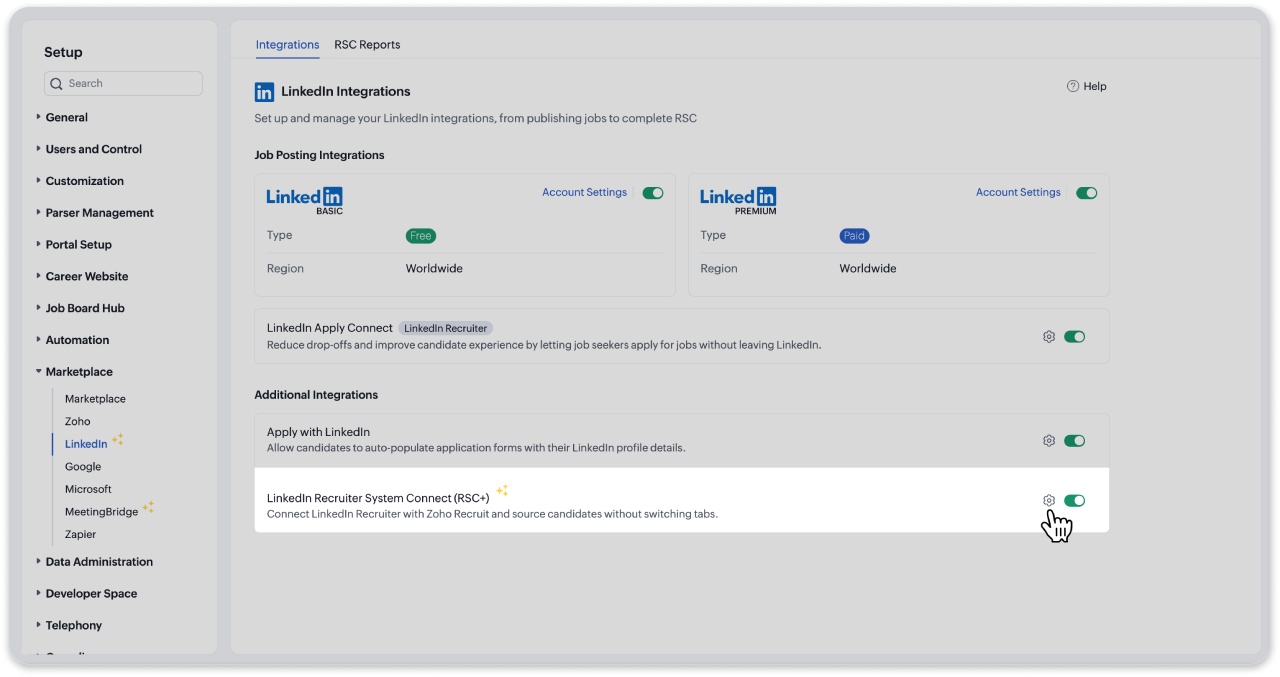
Step 1: Open the LinkedIn marketplace settings in Zoho Recruit
Sign in to Zoho Recruit as Recruiter Admin, go to Setup, open Marketplace, and select LinkedIn. Find LinkedIn Recruiter System Connect in the LinkedIn integration area. Activate the toggle to start the RSC setup workflow.
Step 2: Review the RSC overview and proceed
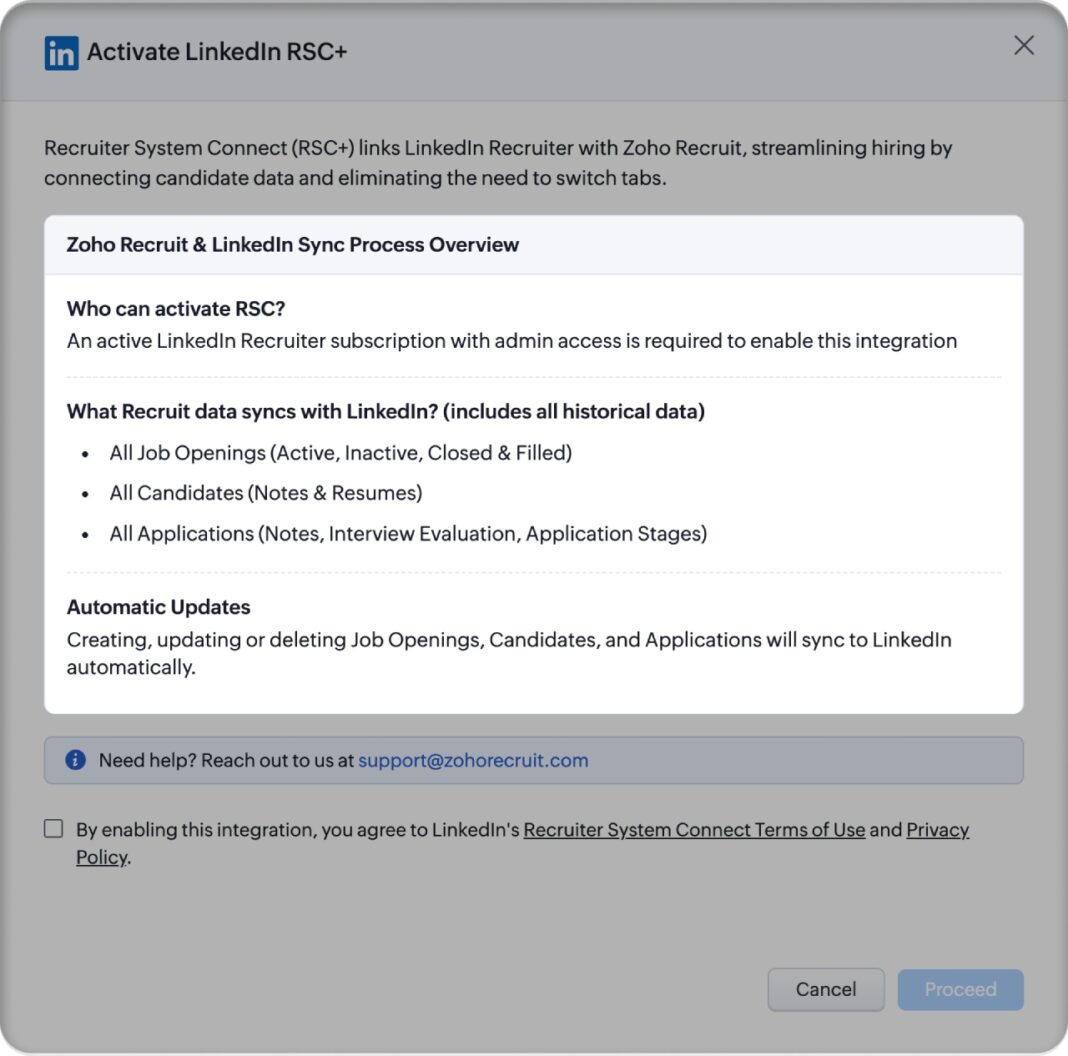
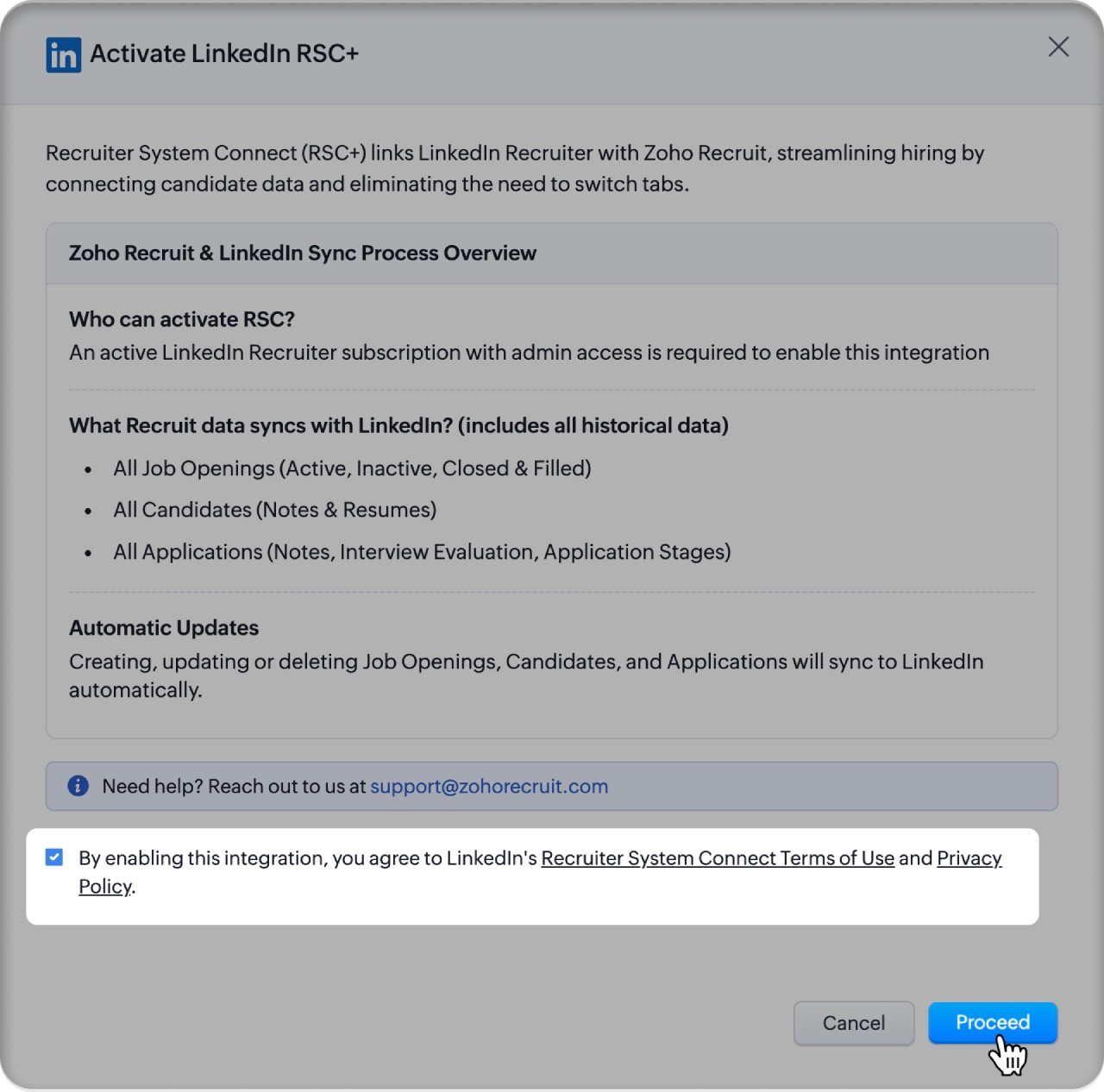
Zoho Recruit displays a setup overview before activation continues. Read the information about eligibility, synced data, automatic updates, and user roles. Select the agreement checkbox for LinkedIn terms, then choose Proceed to move into the activation process.
Step 3: Authorize access with LinkedIn Recruiter
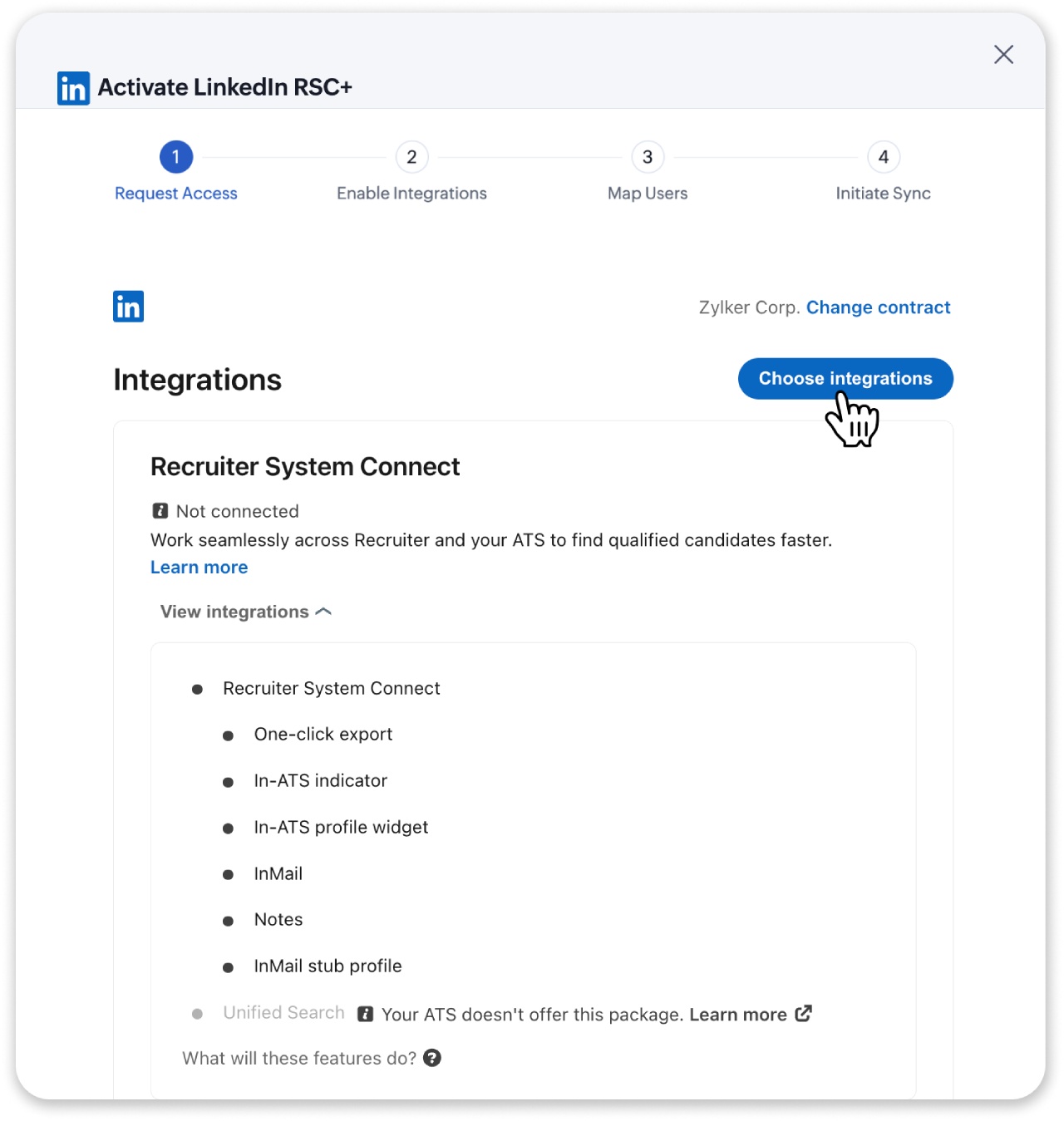
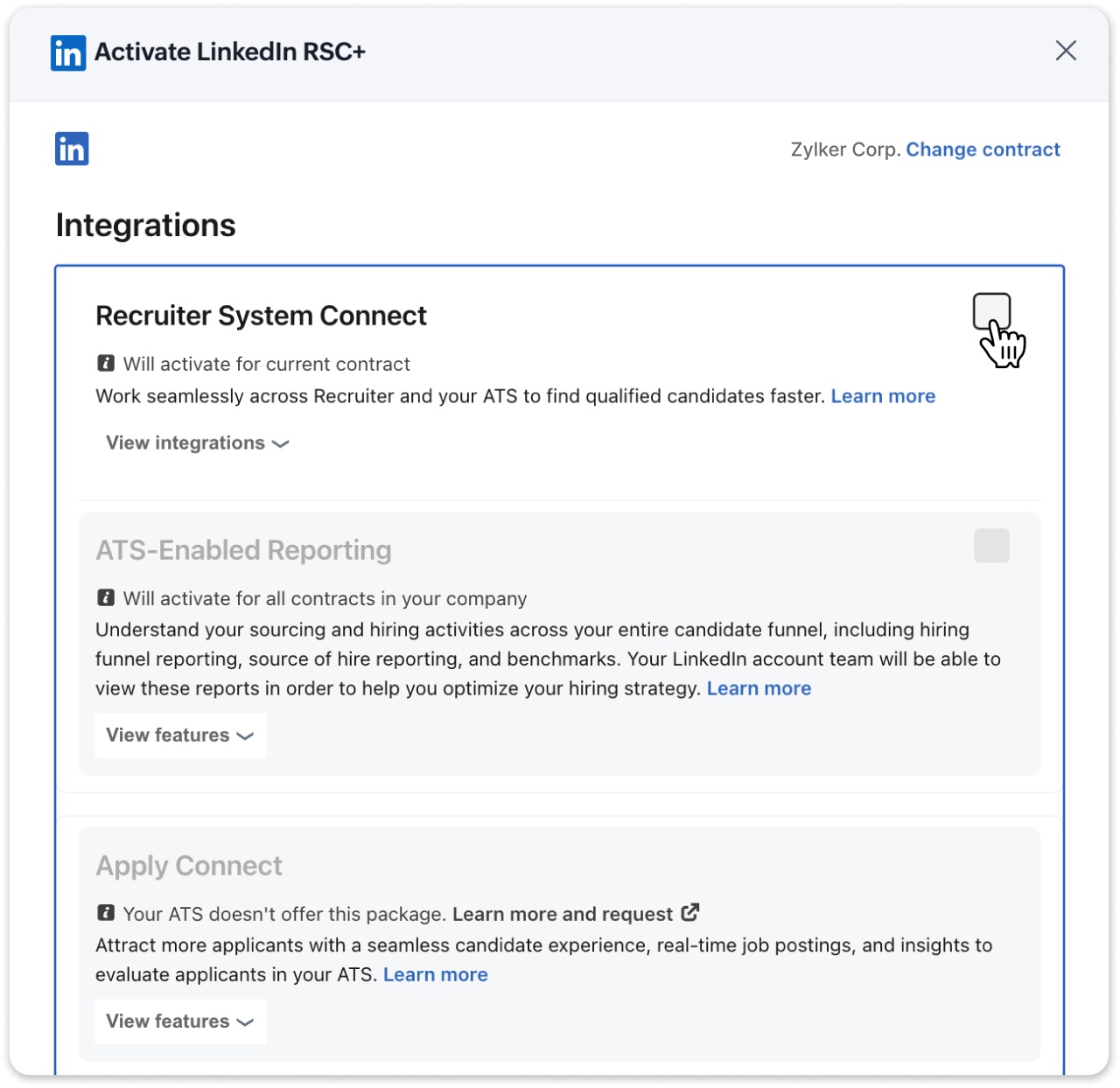
Choose Authorize Access and sign in with LinkedIn Recruiter credentials. After authorization, Zoho Recruit opens the Activate LinkedIn RSC flow. Select Choose Integrations so you can enable the correct integration package for the LinkedIn contract connected to the business.
Step 4: Enable Recruiter System Connect
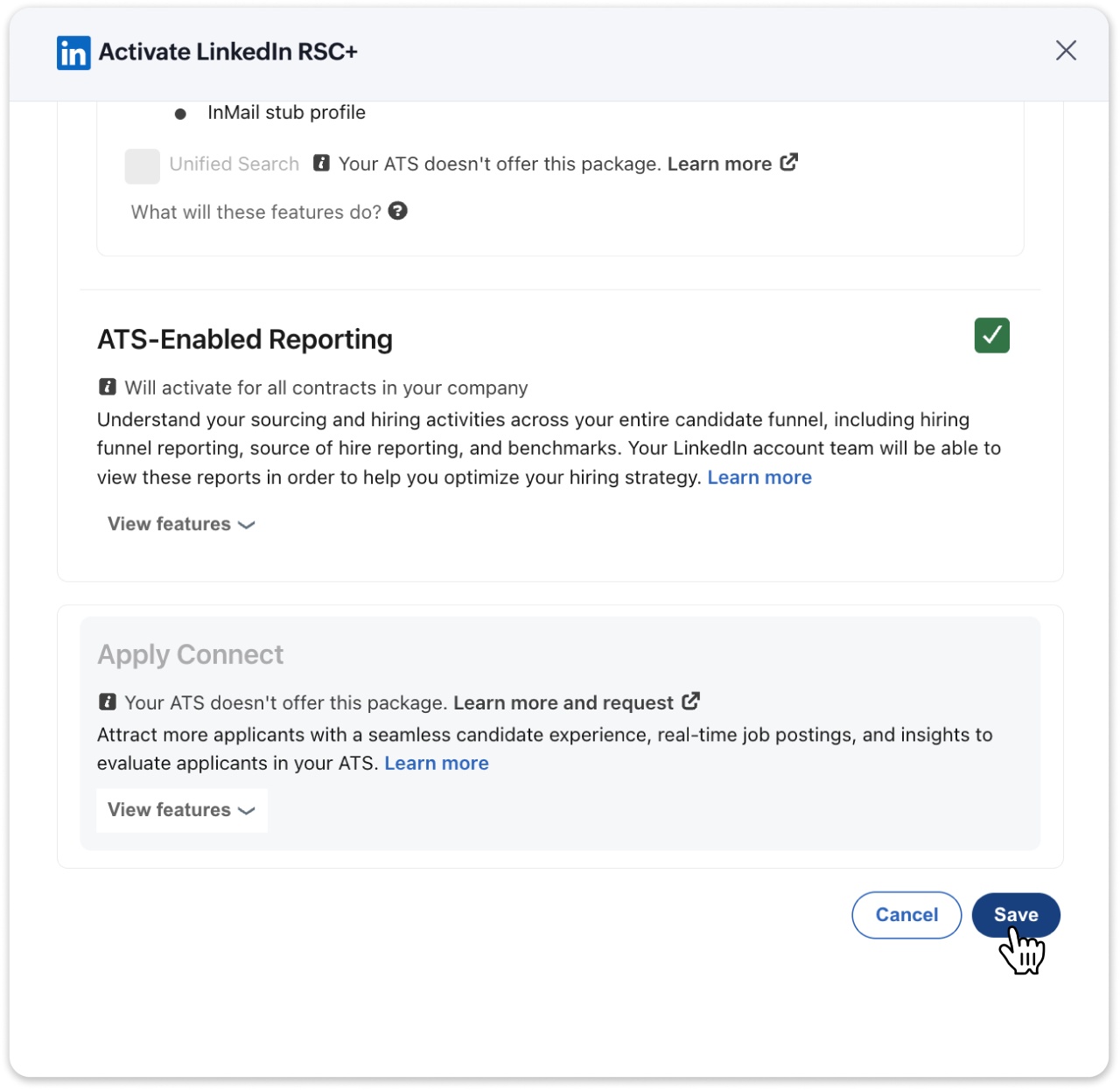
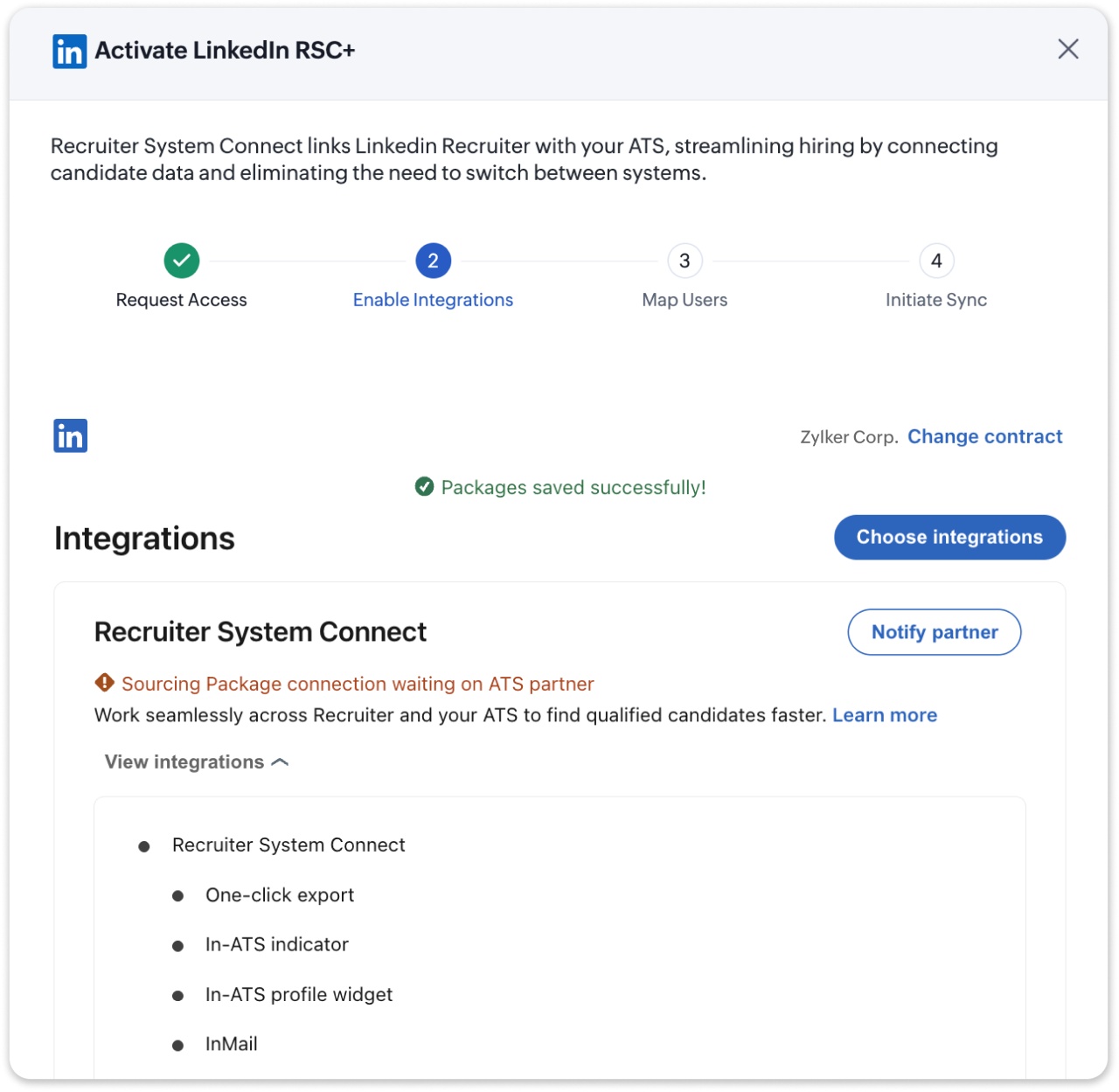
In the integration package selection screen, turn on Recruiter System Connect. Review any additional packages available to the contract, such as reporting options. Select the packages the business wants to activate and save the configuration. Once Zoho Recruit confirms that the configuration has saved, proceed to the next step.
Step 5: Complete the LinkedIn Recruiter admin settings
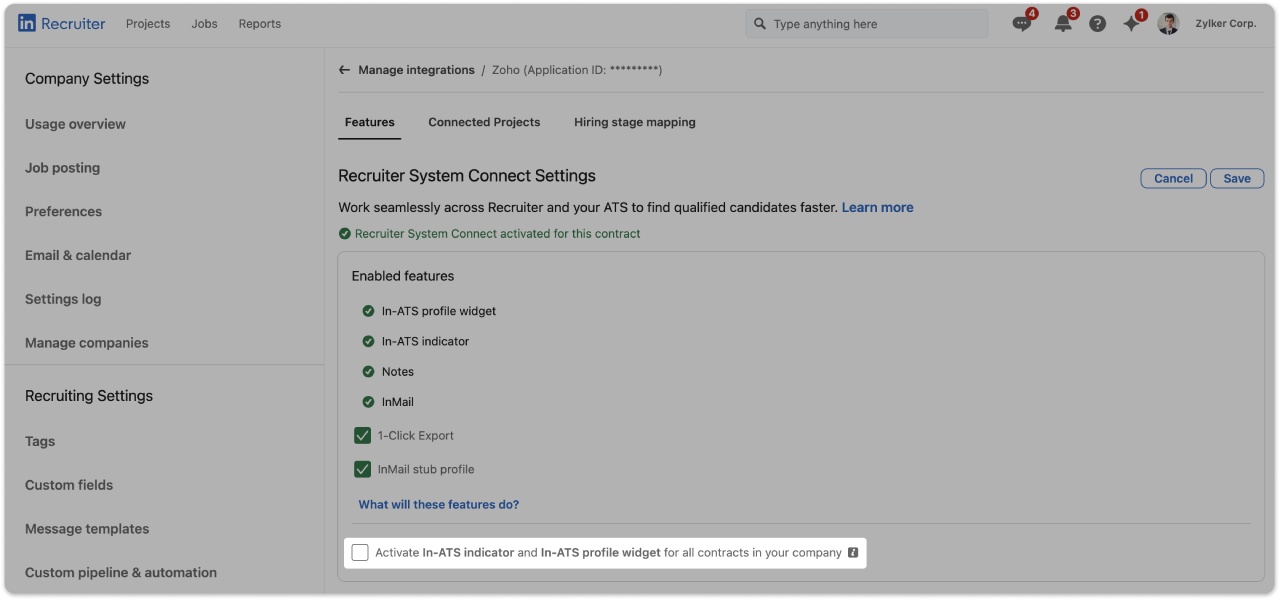
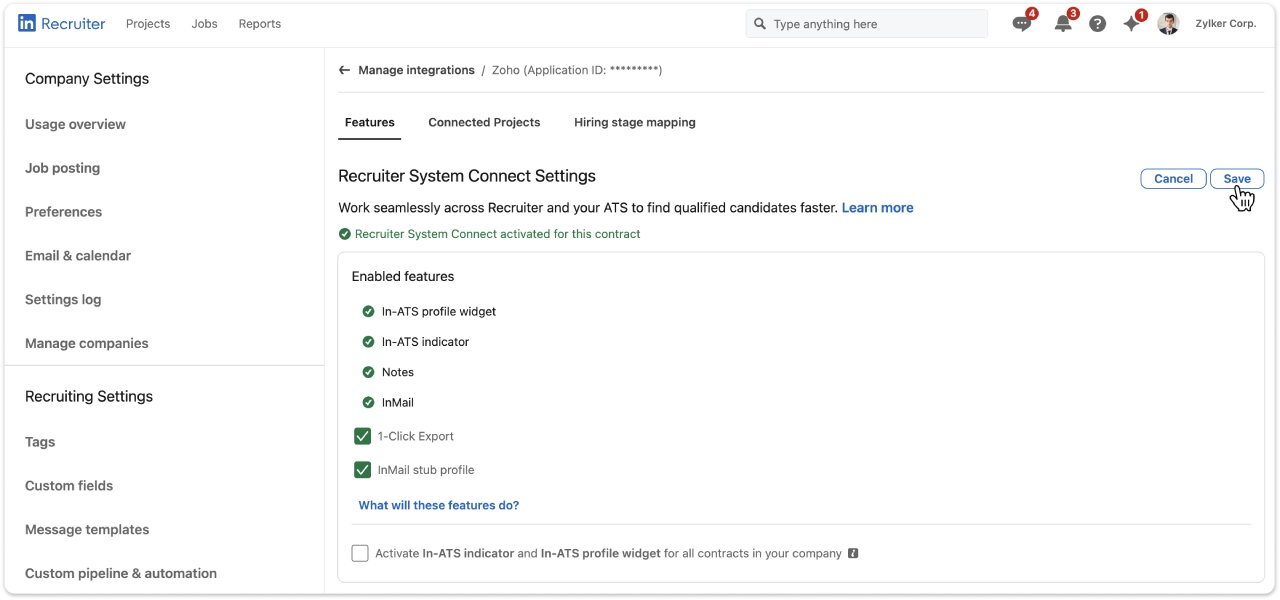
Open LinkedIn in a separate browser tab and sign in as an administrator. Use the Recruiter icon to enter LinkedIn Recruiter. From the profile area, open Product settings, go to Integrations, and Manage integrations. Find the Recruiter System Connect section and open the details for the contract associated with Zoho Recruit.
Confirm that the key RSC features remain enabled for the contract. The setup screen includes options such as 1-Click Export and InMail stub profile. If the company uses multiple LinkedIn Recruiter contracts with RSC, review the contract options carefully before saving. Then return to Zoho Recruit, check the confirmation box, and continue.

Step 6: Review seat holder mapping
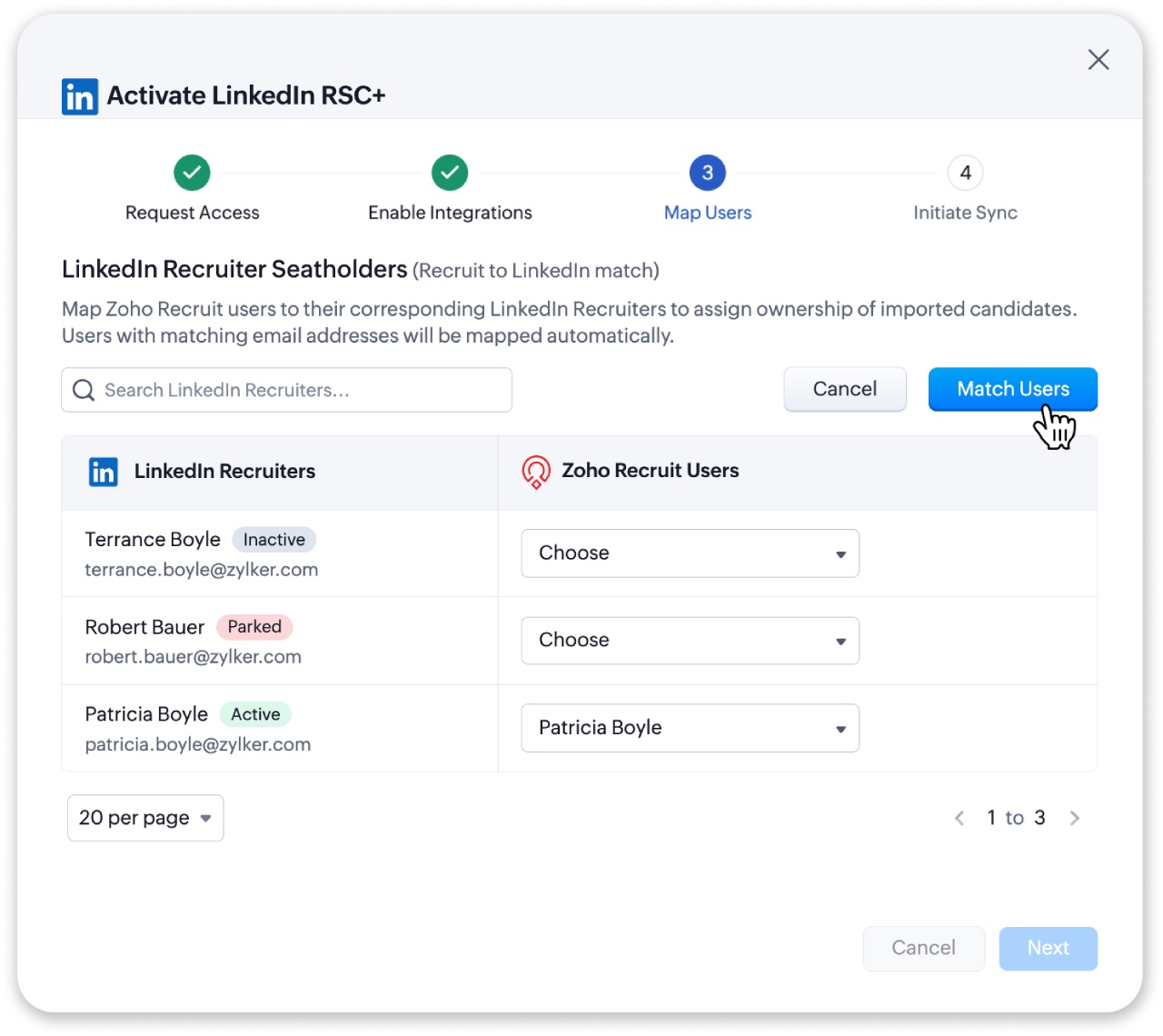
Zoho Recruit matches users to LinkedIn Recruiter seat holders by email address. Review the list carefully. A user with the same email in both systems should map automatically. A user with different email addresses may show as not matched. Resolve mismatches before depending on the integration for daily sourcing and candidate management.
Step 7: Begin the initial sync
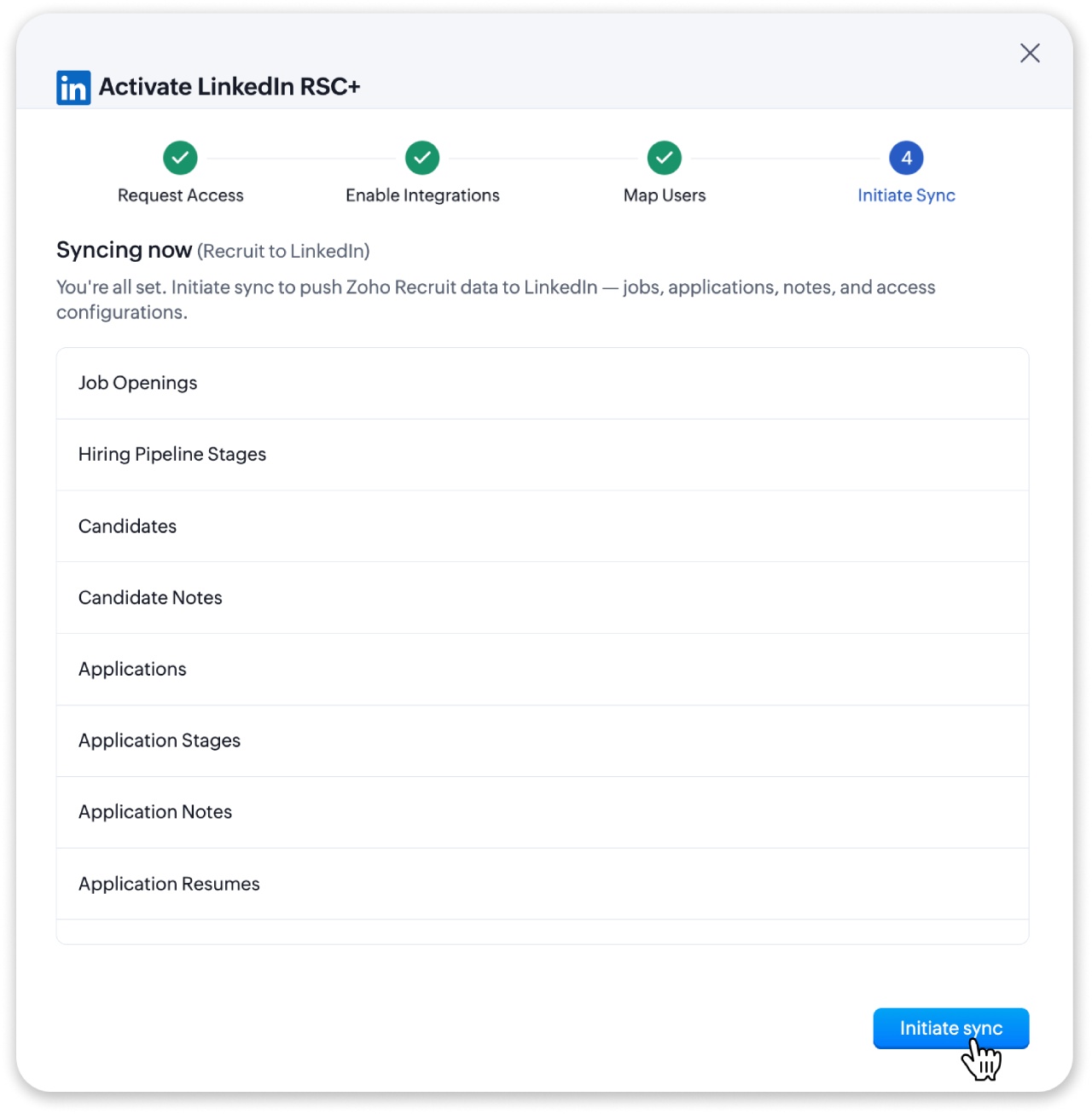
Select Begin Sync to start moving the initial recruiting data from Zoho Recruit to LinkedIn Recruiter. The setup flow shows sync progress for categories such as jobs, candidate applications, notes, activity, and user role mappings. Allow the process to finish before judging whether the integration is ready for regular use.
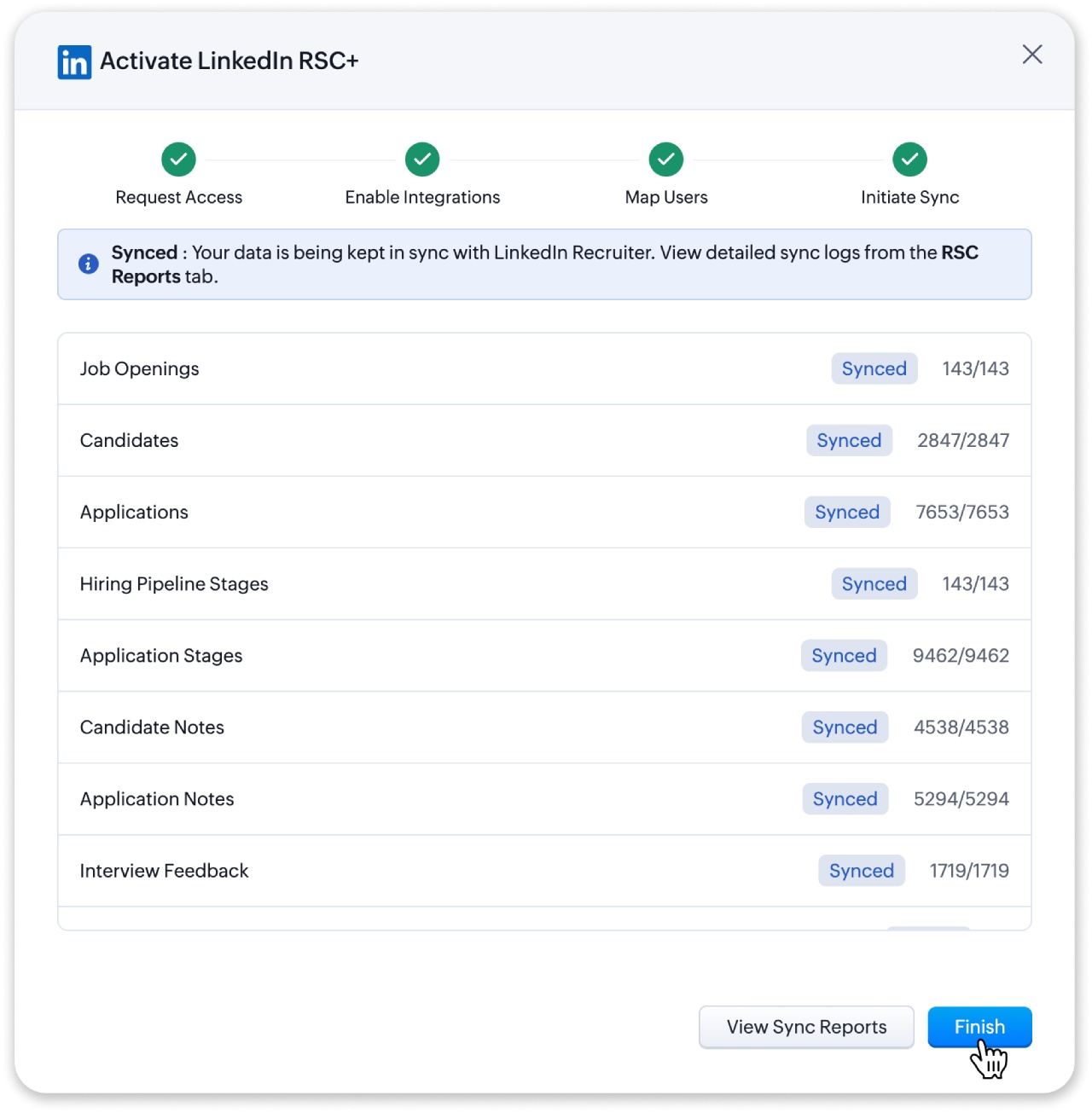
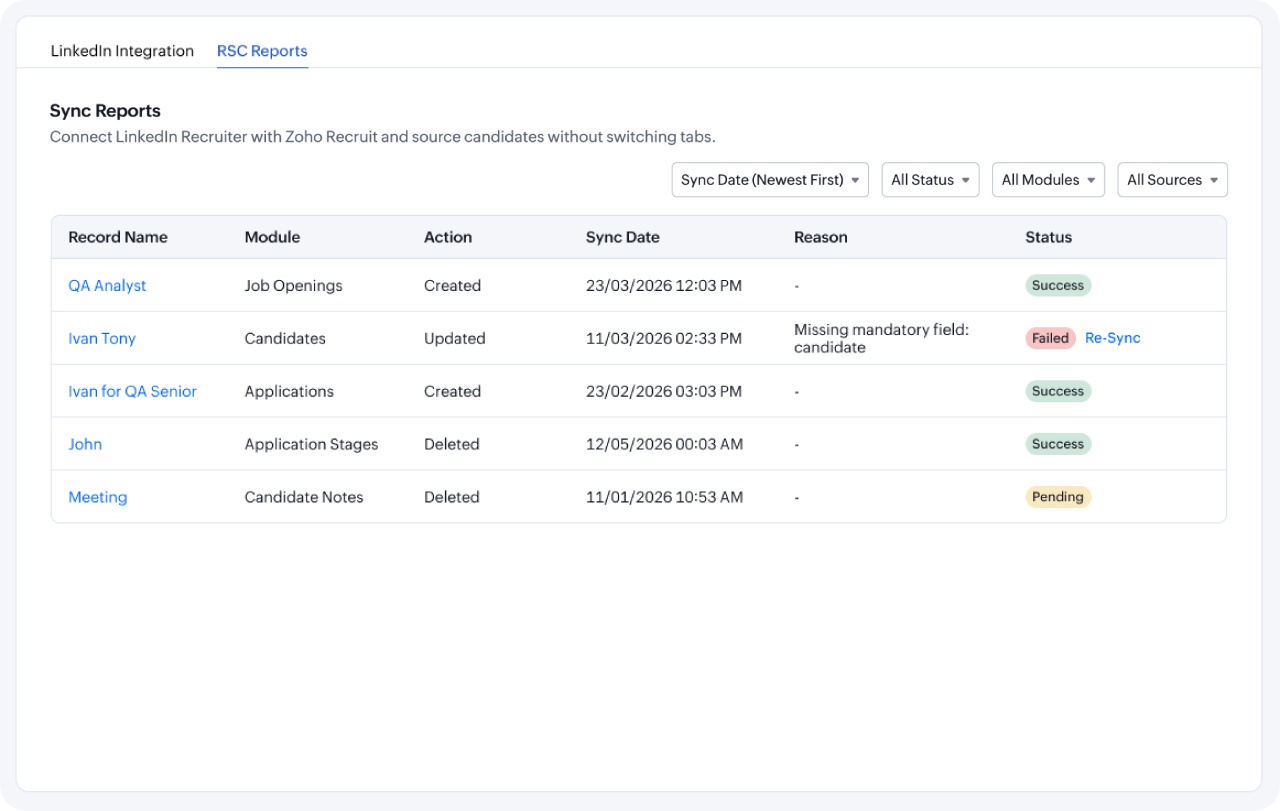
When sync completes, select Finish Setup. After activation, open the RSC Reports sub-tab to review the sync results. If any records fail, use the report to identify them and re-sync failed records. This final check helps the team start with cleaner data. It may take up to an hour for the sync to begin on Zoho Recruit’s side, and completion time depends on the volume of records.
Tips for Small Business Teams After Activation
After the integration goes live, set a few team habits. First, decide where recruiters should make specific updates. For example, the team may source and message in LinkedIn Recruiter while managing stages, interviews, and offers in Zoho Recruit. Clear rules help people trust the sync and avoid duplicate edits.
Second, check RSC Reports during the first week. A sync failure does not always mean something serious has gone wrong, but it does deserve attention. Fixing early issues keeps recruiters from forming workarounds that weaken the process.
Third, train managers on the parts of the workflow they actually need. A small business does not need every stakeholder to master every feature. A hiring manager may only need to review candidate summaries, add interview feedback, and understand the status pipeline. Keep training practical and role-based.
Fourth, protect candidate experience. Use the extra visibility to personalize outreach and avoid repetitive questions. When recruiters and managers know what the candidate already shared, they can run a more professional process.
The Bottom Line
Zoho Recruit and LinkedIn RSC give small businesses a better way to connect sourcing with applicant tracking. The integration reduces the need to switch between platforms, helps keep candidate records current, and gives recruiters more context inside the tools they already use. RSC+ can add further value for teams using LinkedIn Hiring Assistant by connecting job requisitions, projects, applicant evaluations, and Zoho Recruit workflows.
Small businesses do not need to hire like large enterprises, but they do need a reliable process. A connected recruiting workflow helps a lean team move faster without losing control. When Zoho Recruit and LinkedIn Recruiter work together, the business can spend less time chasing information and more time building the team it needs.