
It’s no longer just an experiment. AI Mode now has its own report in Search Console, its own opt-out setting, its own shopping cart, and agents that work in the background.
Here’s everything SEOs and content marketers need to know about it.
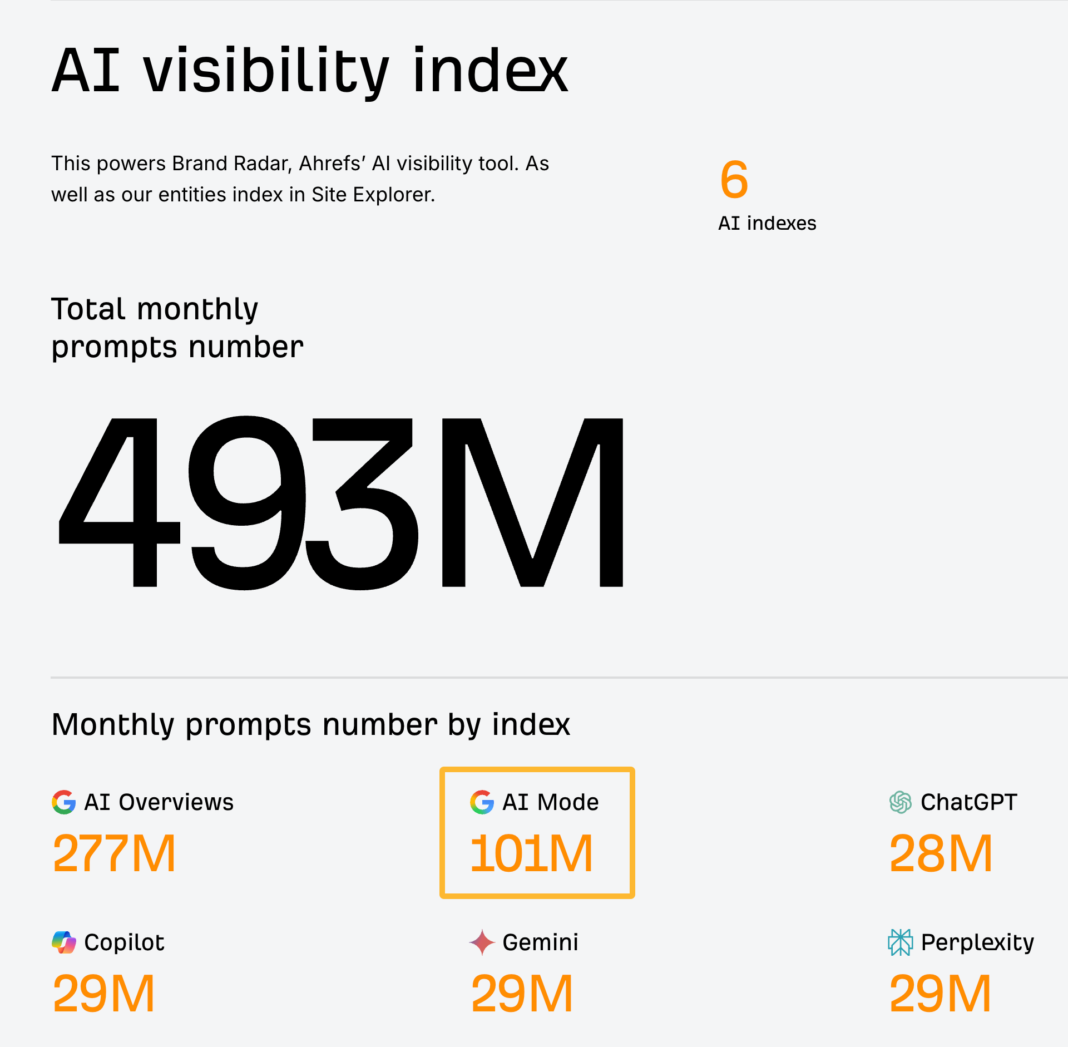
Explore our index of 101 million AI Mode prompts in Ahrefs’ Brand Radar.
What is Google’s AI Mode?
AI Mode is Google’s conversational search experience. You ask a question, and instead of a list of links, you get an AI-generated answer with links to the sources it used. Then you can keep asking follow-up questions.
In classic Google search, you get a list of links and have to click through one or more of them. If you don’t find what you need, you search again. In AI Mode, the searching happens behind the scenes, and you get the answer directly.
Which AI model powers AI Mode?
At I/O 2026, Google made Gemini 3.5 Flash the default model for AI Mode globally.
Google AI Pro and Ultra subscribers can also pick Gemini 4 Argon, Google’s most capable model, for harder multi-step questions.
However, this can change whenever Google releases new models.
What can AI Mode do?
AI Mode isn’t just a chat box anymore. Here’s what it can do:
-
Search with any input: Type, speak, upload images and files, paste a URL to ask about a page, or add Chrome tabs.
-
Search Live: Have a voice and camera conversation with Search in the Google app. Available everywhere AI Mode is.
-
Generative UI: AI Mode can build interactive visuals, charts, calculators, and simulations on the fly. Launched globally in English in August 2026. To get one, ask for it (“show me an interactive simulation of…”).
-
Info monitoring: Ask AI Mode to keep you updated on a topic, and it watches the web in the background and sends you updates.
-
Agentic booking: AI Mode can find restaurant reservations, event tickets, local appointments, and experiences, and link you to book them. For some categories, like home repair, beauty, and pet care, it can call businesses on your behalf (US).
-
Shopping: Conversational shopping powered by Google’s Shopping Graph (60B+ product listings), agentic checkout with Google Pay at eligible US merchants, and AI that calls local stores to check stock and prices.
-
Universal Cart: One cart for products from different retailers, across Search and the Gemini app. It tracks price drops and flags deals. Launched in the US on 15 October 2026.
-
Connected apps: Link Instacart, Canva, or YouTube Music and act on them inside AI Mode (US).
-
Notebooks: Organize sources and past AI Mode threads in a notebook inside Search.
The agentic features are the ones to look out for. When an agent books the table or adds the product to a cart, the user may never visit your website at all.
AI Mode vs. AI Overviews
AI Overviews are the AI summaries that appear at the top of regular search results. AI Mode is a separate, conversational experience.
Google says the two “may use different models and techniques, so the set of responses and links they show will vary.”
In other words, getting cited in AI Overviews doesn’t mean you’ll be cited in AI Mode.
At I/O 2026, Google merged the two into “one, seamless AI Search experience”. You can now go from a regular search, to an AI Overview, to a follow-up question in AI Mode, without ever leaving the results page.
The history of Google AI Mode
How does AI Mode work?
In classic search, Google takes your query and ranks pages for it.
AI Mode uses a technique called query fan-out. In Google’s words, it divides “your question into subtopics and [searches] for each one simultaneously across multiple data sources.” It then combines the results into one answer.
For example, a prompt like “Could you suggest Bluetooth headphones with a comfortable over-ear design and long-lasting battery?” could fan out into:
-
Best Bluetooth headphones with over-ear design
-
Top-rated over-ear Bluetooth headphones with long battery
-
Most comfortable over-ear Bluetooth headphones
-
Bluetooth headphones with the longest battery life
-
Which Bluetooth over-ear headphones charge fastest?
How many searches does it run? Research by Seer Interactive and Nectiv found an average of 9–11 fan-out queries per prompt, with some prompts triggering up to 28.
Once AI Mode has the results, it pulls the relevant parts (paragraphs, tables, images) from each source and writes one answer. It then grounds the answer by linking claims to the pages they came from.
Google says these features rely on “our core Search ranking systems to retrieve relevant, up-to-date web pages.” So the pages AI Mode can draw from are pages Google can find and rank.
How do follow-ups and personalization work in AI Mode?
It appears that Google treats every follow-up question as a new search.
At least according to Google’s Search Console documentation: “if a user asks a follow-up question within AI Mode, they are essentially performing a new query. All impression, position, and click data in the new response are counted as coming from this new user query.”
So two signed-in people asking the same question can get different answers. Even the same person can get a different answer on a different day.
When we ran a study on 43,000 AI Overview keywords, we found that AI Overviews change their wording about every two days, and 45.5% of cited URLs change between updates. However, the meaning stays consistent.
Expect AI Mode to behave similarly.
How does AI Mode choose which sources to cite?
When I first wrote this post, nobody really knew. Now we have Google’s own explanation and some solid data.
According to Google, AI Mode relies on “our core Search ranking systems to retrieve relevant, up-to-date web pages from our Search index.” It then reviews those pages and links the ones that support its answer.
Since query fan-out widens the pools, there is some research showing that ranking for the original query matters less than you’d think. A Moz study of ~40,000 queries found only 1 in 10 AI Mode citations matched a URL in Google’s top 10 for the same query.
But overall search visibility still counts: SE Ranking found a site’s Google traffic was the strongest predictor of how often AI Mode cited it.
AI Mode also prefers citing UGC content. If we look at the top 10 most cited domains in AI Mode, Reddit, YouTube, Facebook, Instagram, Quora, and TikTok make up more than half:
Finally, from May 2026, users can now add Preferred Sources to AI Mode. Links from those sites get a “Preferred” label, and people are twice as likely to click them. If you have a loyal audience, ask them to add you.
How does AI Mode impact SEO?
Our study showed that the presence of an AI Overview reduced clicks to top-ranking content by 58%.
We expect this to be worse with AI Mode. Similarweb found AI Mode sends visitors to websites on only 1.6–2.5% of queries, compared with 17–19% for traditional Google search.
It makes sense. In AI Mode, users can keep asking questions without clicking anything.
Google argues that the clicks AI features do send are “higher quality.” I’ll leave it up to you to decide if you want to believe Google.
How do I track my performance in AI Mode?
Google originally lumped AI Mode in with regular search and gave you no way to see it separately. Fortunately, that’s changed.
1. Search Console
-
Impressions only. An impression is counted each time a link to your site is shown to someone in an AI Overview or AI Mode answer, whether they click it or not. The report doesn’t show clicks, CTR, or the queries that triggered those impressions.
-
AI Overviews and AI Mode combined. You can’t separate them.
-
Breakdowns by page, country, date, and device, plus a filter for text vs. image searches (Lens, Circle to Search).
One thing to watch out for: these impressions aren’t extra. Google still counts them in your main Performance report too, mixed in with your regular search results under the “Web” search type. The new report just shows you which part of that total came from AI features.
For example, say your main report shows 100,000 impressions and the generative AI report shows 20,000. You had 100,000 impressions in total, and 20,000 of them came from AI Overviews or AI Mode. You did not have 120,000.
2. Ahrefs Brand Radar
Search Console only tells you how often your pages showed up in AI Overviews and AI Mode combined. It can’t show you which prompts you appeared for, what AI Mode said about your brand, or whether you were mentioned without a link. It also can’t show you how your competitors are doing, relative to you.
That’s where Ahrefs Brand Radar comes in. It separates AI Mode from AI Overviews, shows you the full responses that mention or cite you, and lets you compare your visibility against any competitor. You can also see which sites AI Mode cites instead of you.
Click through this demo to see how you can use Brand Radar for your business:
If you prefer a written playbook, follow this -> Go to Brand Radar, and under Explore, enter your brand and hit Analyze.
Brand Radar will suggest the competitors you should compare against. Feel free to correct the record or suggest more competitors.
You’ll see the prompts where you’re mentioned or cited, your AI Share of Voice, and how you compare with competitors.
Click on any of the numbers to dive deeper into the exact prompts where you’re mentioned (or cited if you click the Citations tab).
How can I optimize for Google’s AI Mode?
Beyond that, here’s what we recommend.
1. Check that AI Mode is saying accurate things about your brand
AI can get things wrong. So the first step is to see what AI Mode says about you.
Enter your brand in Brand Radar and look at the AI Mode responses. Are they accurate? If not, note the prompts with errors, what’s wrong, and which sources were cited.
To make this easier, click on the Agent A button in this report and ask Agent A to do this for you.
Sometimes, errors come from inconsistent brand assets, like old logos or taglines across your site and social profiles. I recommend following Despina’s brand SEO process to fix this.
Other times, AI gets it wrong because there’s too little information about you. You may need to fill the gap. That’s one reason we published “How to pronounce Ahrefs.”
If AI Mode is citing outdated third-party pages, update your profiles on sites like YouTube, G2, and Google Business Profile.
2. Get your brand mentioned across the web
Citations are one thing. Being mentioned in the answer is another. We studied 75,000 brands across ChatGPT, AI Mode, and AI Overviews to see which factors correlate with how often a brand is mentioned in AI responses. AI Mode showed the strongest link to brand signals of the three.
You can build mentions by:
-
Getting featured in “best of” lists and industry roundups
-
Encouraging customers to mention you in reviews and case studies
-
Creating original data and research that people cite
-
Running digital PR campaigns
-
Building a product people talk about on their own
To find PR opportunities, open the Cited pages report in Brand Radar and go to All domains to see which sites AI Mode cites most for your topics. Those are the publications worth pitching.
Further reading
3. Show up on YouTube and Reddit
We didn’t start our YouTube channel to rank in AI search, but we’ve benefited from publishing consistently since 2018. Our keyword research tutorial, for example, is one of the sources AI Mode cites for “how to do keyword research.”
At our inaugural Ahrefs Evolve conference, Sam Oh, our YouTube maestro, shared his best YouTube tips:
-
Add target keyword to your title and description
-
Mention relevant keywords in your content
-
Cover necessary subtopics in your content
-
Use timecodes or chapters with relevant keywords
-
Hold people’s attention as long as possible
I also recommend watching his YouTube video that walks you through our entire YouTube strategy:
Reddit is harder. Redditors hate blatant marketing. The only way to win is to be a genuine member: leave useful comments, take part in discussions, and share helpful content. I wrote a guide to marketing on Reddit the authentic way a few years ago that still holds up.
Further reading
4. Create content AI can’t easily replace
AI Mode can summarize anything that’s common knowledge. It’s already replacing a lot of the reference content people used to click through to. If your page says what ten other pages say, AI Mode can answer without you.
Google’s advice is to create “non-commodity” content — “unique, expert-led content that provides value beyond common knowledge.” That means things AI can’t make up on its own:
Here’s the data behind the chart (Google AI Mode answers in the US, October 2026):
5. Put the answer first (for readers, not robots)
But starting each article and section with a direct answer (Bottom Line Up Front) is still a good idea, because people scan before they read. BLUF lets readers get the answer and decide whether to keep going.
6. Keep important content up to date
Here’s the data from that study. Gemini, Google’s own AI assistant, cited pages that were updated 216 days more recently than Google’s organic results, on average:
So, our research suggests that keeping your content updated could be useful in being cited by AI Mode.
You can find content worth updating by entering your domain into Ahrefs’ Site Explorer, going to the Top pages report, and setting a filter for declining traffic over a date range (typically six months to a year.)
Or use Agent A to find you these pages.
7. Get the technical basics right
AI Mode can only cite pages that are already in Google’s index.
Google says a page just needs to be indexed and eligible to show a snippet in regular Search. So there’s nothing new to set up. You just need to make sure nothing is stopping Google from crawling, rendering, and reading your pages:
-
Make sure Googlebot can crawl your pages, both in robots.txt and in your CDN or firewall settings.
-
Put important content in text, not just images or video.
8. Keep your product and business data up to date
If you’re a retailer or local business, your website isn’t the only thing AI Mode looks at. Its shopping and local answers also pull from structured data feeds.
Google recommends keeping your Merchant Center feed and Google Business Profile accurate and complete. Retailers can also enable Business Agent, a branded chatbot in Search, and check how they appear in AI Mode with Merchant Center’s AI performance insights.
Final thoughts
When I first wrote this post, I thought AI Mode would become the default search experience, with web search as a separate tab.
To my surprise, we’re not there yet.
AI Mode is still a separate option. But Google has made it effortless to slide into AI Mode from any search, put it at the center of I/O, and given it agents that act for you.
My take hasn’t changed. I expect search to just answer any query. The genie isn’t going back in the bottle.
What has changed is that we can now measure it, control it, and optimize for it with real data instead of theories. So start by checking where you stand: see how you’re performing in AI Mode and what it says about your brand in Brand Radar.
FAQs
Do I need an llms.txt file?
No. Google says it ignores them, and our study found 97% of llms.txt files never got a single request.
Do I need special schema for AI Mode?
No. Google says there’s no special schema, and our study found no meaningful lift in AI Mode citations from adding it.
Should you opt out of AI Mode?
For most sites, opting out is a bad trade. AI Mode is growing, and your competitors will still be there.
But if you’re a publisher whose content is being summarized without clicks, and you heavily dislike it, it’s now a real option.
-
Include (the default): your content can appear in and help ground AI answers
-
Exclude: your content won’t appear in AI Overviews, AI Mode, or Discover’s AI features, and you won’t get any traffic or impressions from them
-
Inherit from parent: follow the setting of a parent property
A few things to know:
-
It works per Search Console property. You can exclude a section (like /blog/) by setting it on a URL-prefix property, but you can’t exclude individual pages yet.
-
Google says it isn’t a ranking signal for the rest of Search.
-
Changes take effect within a few days.