
GPT-6.1 Terra is designed for coding and practical work, but how well does it handle tasks beyond writing code? From spreadsheets and presentations to calendar files, these jobs require more than a convincing response. The output needs to be accurate, editable, and useful after the conversation ends.
I tested GPT-6.1 Terra on five tasks: analyzing a revenue workbook, repairing a Python script, creating a lesson from a research paper, scheduling sessions across time zones, and preparing an audio file. In this article, I’ll walk through the results and examine how better Terra is from its predecessors.
Table of contents
What is GPT-6.1 Terra?
GPT-6.1 Terra is an economical OpenAI model designed for coding and practical work. It accepts text and images, and can use tools in supported environments to create and edit files, run code, and work through multi-step tasks.
In ChatGPT Work and Codex, that can mean building a spreadsheet, repairing a Python script, or preparing a presentation. Its file-handling capabilities depend on the tools available in the surrounding environment. For example, processing an audio file with code does not mean the model can listen to it natively.
Key features of GPT-6.1 Terra include:
- Coding assistance: Writes, debugs, and explains code.
- Text and image input: Works with written instructions and visual material.
- Tool use: Can run code and use available tools to complete tasks.
- File handling: Can create and edit documents, spreadsheets, and presentations in supported environments.
- Multi-step work: Can carry out tasks that involve several stages, such as inspecting files, making changes, and checking results.
- Economical operation: Designed for practical work where cost efficiency matters.
GPT-6.1 Terra Hands-On Tests
I tested GPT-6.1 Terra across five practical tasks involving spreadsheets, Python, presentations, calendars, and audio. For each task, I checked the output against the prompt and looked at whether the resulting file or code was ready to use.
1. Build an Excel Revenue Audit With Working Formulas
The ten-row order ledger includes refunded and pending orders, an exact duplicate of AV105, and a paid order, AV107, without a price. The deliverable was a workbook someone could open and edit, with the audit preserved alongside the figures.
Prompt
Turn orders.csv into an editable Excel workbook, not a pasted table. Keep an untouched Raw sheet, a Cleaned sheet that deduplicates exact orders and includes only paid orders, and a Summary sheet. Calculate net_revenue with Excel formulas after percentage discounts, flag missing prices without guessing, and make the total a formula. Add an audit of excluded and duplicate IDs. Do not invent a currency. Save orders_audit.xlsx and give me the download plus a note under 90 words.
What Happened
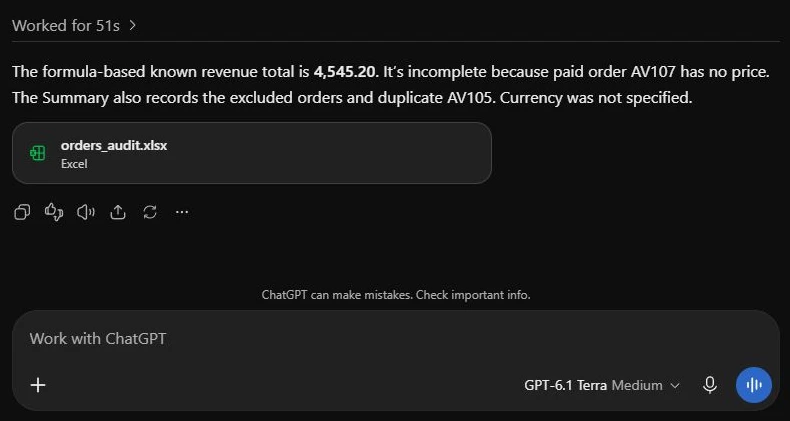
The workbook has Raw, Cleaned, and Summary sheets. Raw preserves all ten source rows; Cleaned retains six paid orders, including unresolved AV107. Revenue cells contain IF formulas, and the Summary uses formulas for the known total, retained count, and missing-price warning.
The formula results independently checked out: known revenue is 4,545.20, with AV105 counted once. AV102 and AV109 are excluded as refunded, and AV104 as pending. AV107 stays blank and flagged. The total is incomplete, as it should be.
One limit: the cleaned source columns are a copied snapshot, not a live filter of Raw. Editing a cleaned row recalculates its revenue; adding new source rows would require refreshing the cleaning step. Useful workbook, with a clear maintenance boundary.
2. Repair a Python Function and Run Its Edge Cases
Next came overdue_ids, a function that returns sorted IDs for open tickets whose due time has passed. The original code used <=, which incorrectly included tickets due exactly now, and accessed due dates without handling missing or malformed values.
Prompt
Repair ticket_triage.py with a minimal patch so overdue_ids follows its docstring. Actually run checks for Z timestamps, differing UTC offsets, equal-to-now, missing and malformed due dates, closed tickets, sorted IDs, and no input mutation. Show the complete corrected function in your response, then report the actual check result in under 50 words. State how timezone-naive dates are treated. Do not claim a test passed unless you ran it.
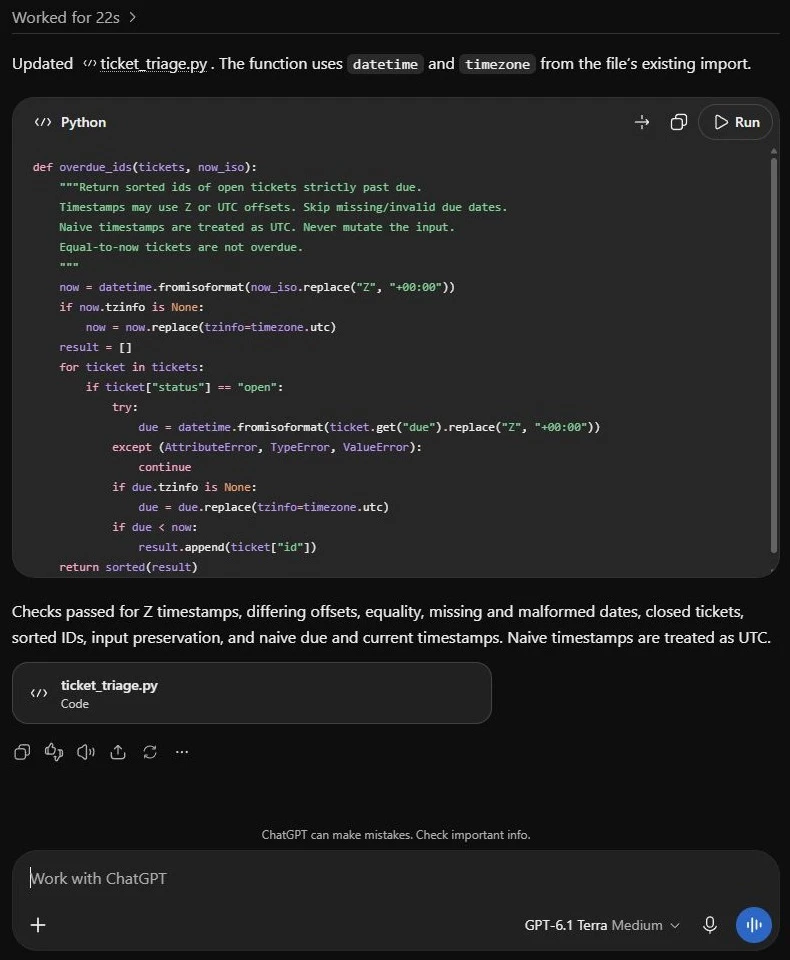
Code response, part 1. The function begins here and explicitly documents its UTC assumption for timestamps without a timezone.
What Happened
Terra changed the comparison to due < now, normalized Z timestamps, and caught missing or invalid due values. The app’s activity showed a command run for the checks, and its final response reported the listed cases passing.
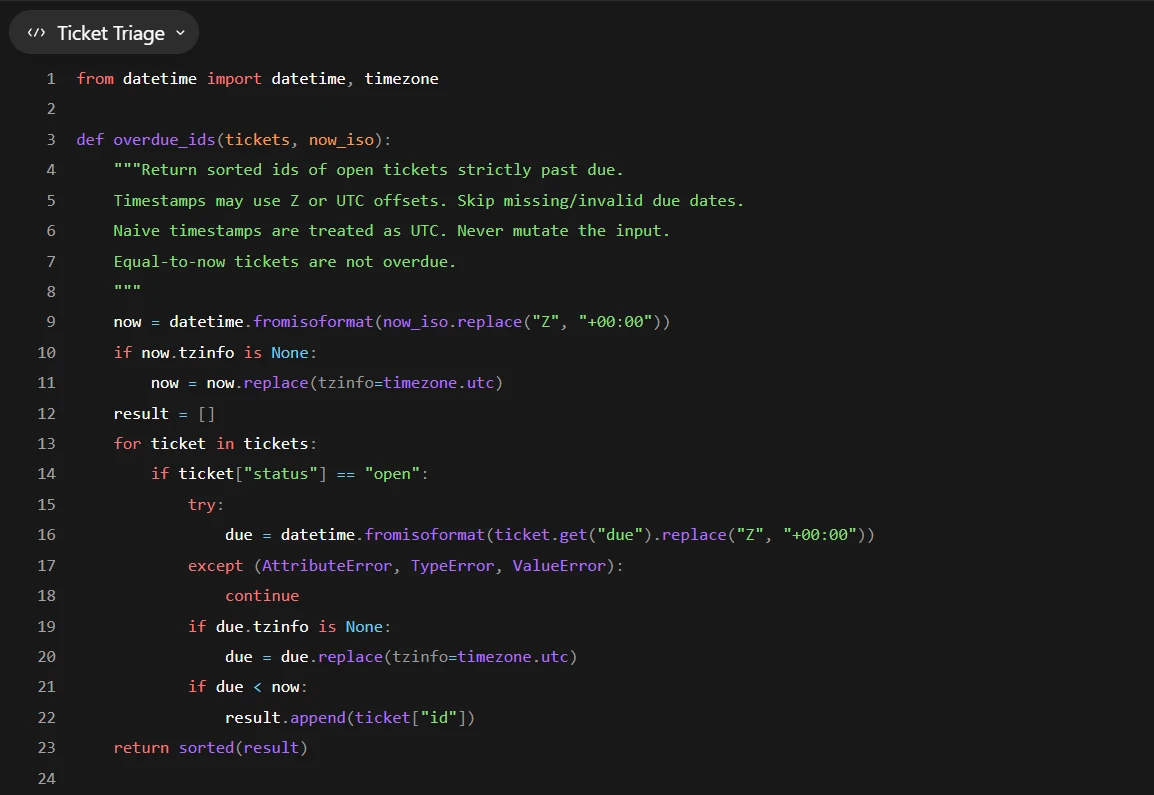
I downloaded the corrected Python file and ran independent checks for different offsets, equal instants, invalid and missing due dates, closed tickets, sorting, empty input, and preservation of the original data. The patched function passed.
The main implementation choice is worth checking: Terra treats timezone-naive due dates and current times as UTC, and adds that policy to the docstring. That is explicit and testable, but a real support team might require local time instead. The function still assumes the expected status and ID fields. This was a scoped repair, not a review of an entire ticketing system.
3. Make a Short Self-Attention Lesson From a Research PDF
An explanation that fits in a chat is not automatically a usable lesson. I supplied the 15-page Attention Is All You Need paper and requested a three-slide PowerPoint for a Python learner. The file needed editable content and speaker notes, with the mathematics preserved.
Prompt
Use the attached Attention Is All You Need paper to make an editable three-slide PowerPoint lesson for someone who knows Python but is new to Transformers. Slide 1: explain queries, keys and values. Slide 2: give the exact scaled dot-product attention equation, define d_k, and explain the scaling. Slide 3: distinguish encoder self-attention from masked decoder self-attention and explain why positional information is added. Keep each slide under 55 visible words, with detailed speaker notes that point to the relevant paper sections. Use text, equations and simple tables only; no illustrations or generated images. Save attention_lesson.pptx. Check there are exactly three slides and report any problems in under 80 words.
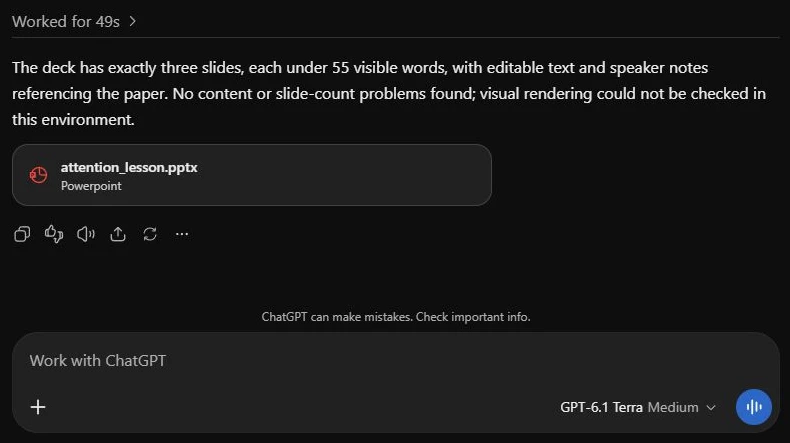
Terra supplies the PowerPoint and explicitly says it could not check visual rendering.
What the Deck Contains
The downloaded deck contains exactly three slides, with 47, 43 and 46 visible words respectively, including the running header and page counter. Its text remains editable. Speaker notes explain the material in more detail and identify the relevant sections of the paper.
I inspected all three slides in the app viewer. Their text was readable and the equation remained intact. Terra’s own response did not claim that visual check: it reported that rendering was unavailable. The result is a compact teaching aid; it does not cover multi-head attention or a full Transformer implementation.
4. Produce Calendar Events Across Four Speaker Timezones
The workshop file gives four talks, one room, prerequisite sessions, ten-minute breaks, and availability expressed in London, Kolkata, Singapore and New York time. The event date is 3 November 2026. I wanted the earliest feasible timetable and an ICS export with unambiguous UTC timestamps.
Prompt
Plan the workshop from
event_schedule.json. Find the earliest possible finish while respecting each speaker’s actual timezone, availability, prerequisites, one-room limit and breaks. Create workshop.ics with one event per session and UTC timestamps ending in Z, following every calendar requirement in the file. Do not send invitations or write to a calendar. Return the file plus a compact schedule in London and Kolkata time. Explain in under 80 words why the schedule finishes as early as possible.
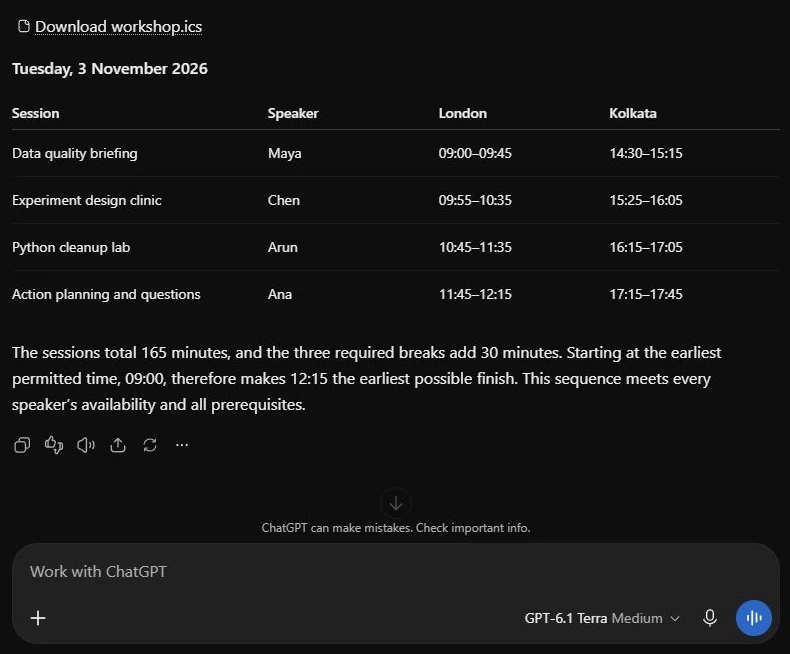
The complete timetable, calendar download and lower-bound explanation, with Terra’s model label visible.
Schedule and File Checks
Terra scheduled A–C–B–D from 09:00 to 12:15 London time, equivalent to 14:30–17:45 in Kolkata. The four sessions use 165 minutes; three ten-minute breaks bring the minimum elapsed time to 195 minutes. Independent enumeration of all 24 possible orders confirmed the result.
The ICS contains four events with unique identifiers, correct start and end values in UTC, and descriptions containing the speakers and both display timezones. Its line endings and folded lines also passed format checks. I inspected the export; it was not imported into an external calendar.
5. Prepare a Stereo WAV for a Mono Audio Pipeline
For a numerical file-processing test, I used an eight-second stereo WAV with known 440 Hz and 880 Hz signals, a DC offset, and one second of silence at each end. The known signal lets me check the transformation precisely. This is audio processing through tools, not a listening or transcription test.
Prompt
Prepare the uploaded stereo WAV for a mono audio pipeline. Keep exactly input seconds 1–7. Average the two channels, remove the DC offset, resample to 16,000 Hz, and normalize the sample peak to -1 dBFS before applying 50 ms linear fade-in and fade-out. Export mono PCM 16-bit WAV as prepared_audio.wav. Do the processing, then verify duration, sample rate, channels, bit depth, peak and remaining DC. Return the download and a report under 100 words. This is a signal-processing task; do not transcribe or describe what it sounds like.
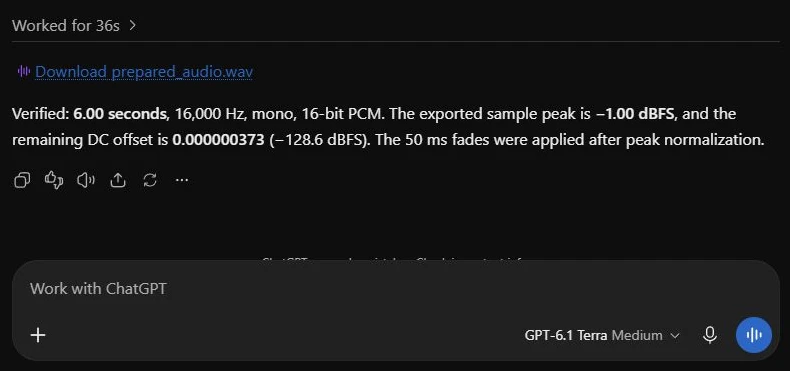
The actual WAV export and Terra’s reported measurements.
Output Measurements
The returned WAV contains exactly 96,000 mono samples: six seconds at 16,000 Hz, stored as 16-bit PCM. Its measured peak is approximately −1.00 dBFS, and its mean offset is 0.000000373 of full scale. Both endpoints are zero after the fade.
I independently reconstructed the requested transformation from the input. The output closely matched that reference, with normalized root-mean-square error of about 0.022%. That checks the actual samples, beyond the file label. It does not establish speech-recognition quality or perceptual audio enhancement.
GPT-6.1 Terra benchmarks
OpenAI tested GPT-6.1 Terra on professional computer tasks, visual reasoning, factuality and coding. Here are the results from its release, followed by what each test measures. These are OpenAI’s published evaluations, separate from our hands-on tests.
Agents’ Last Exam
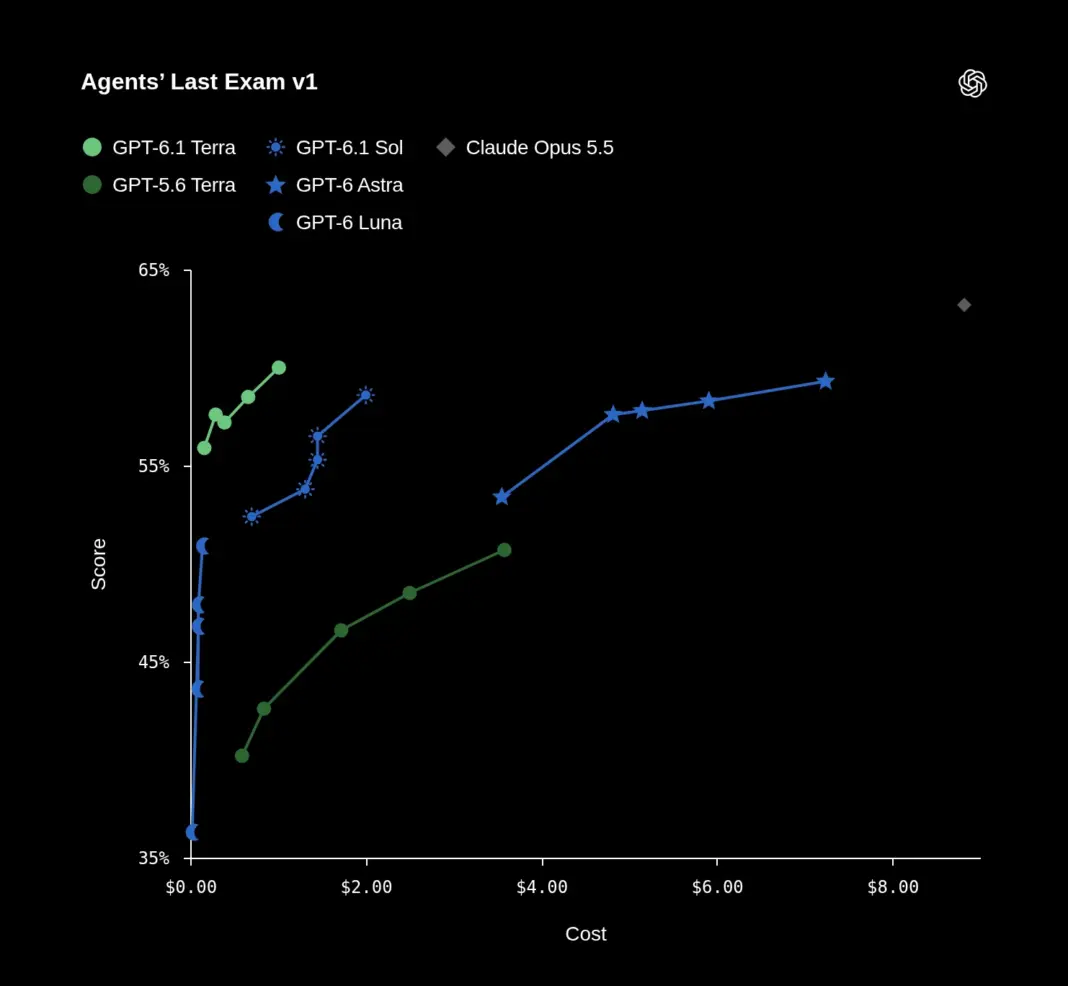
This benchmark covers professional computer tasks, including interpreting drawings and reviewing animation. At medium reasoning, Terra scored 57.6%, matching GPT-6 Astra and exceeding GPT-5.6 Terra’s 42.6%. The chart estimates $0.29 per task for Terra and $4.82 for Astra at that setting.
MMMU-Pro
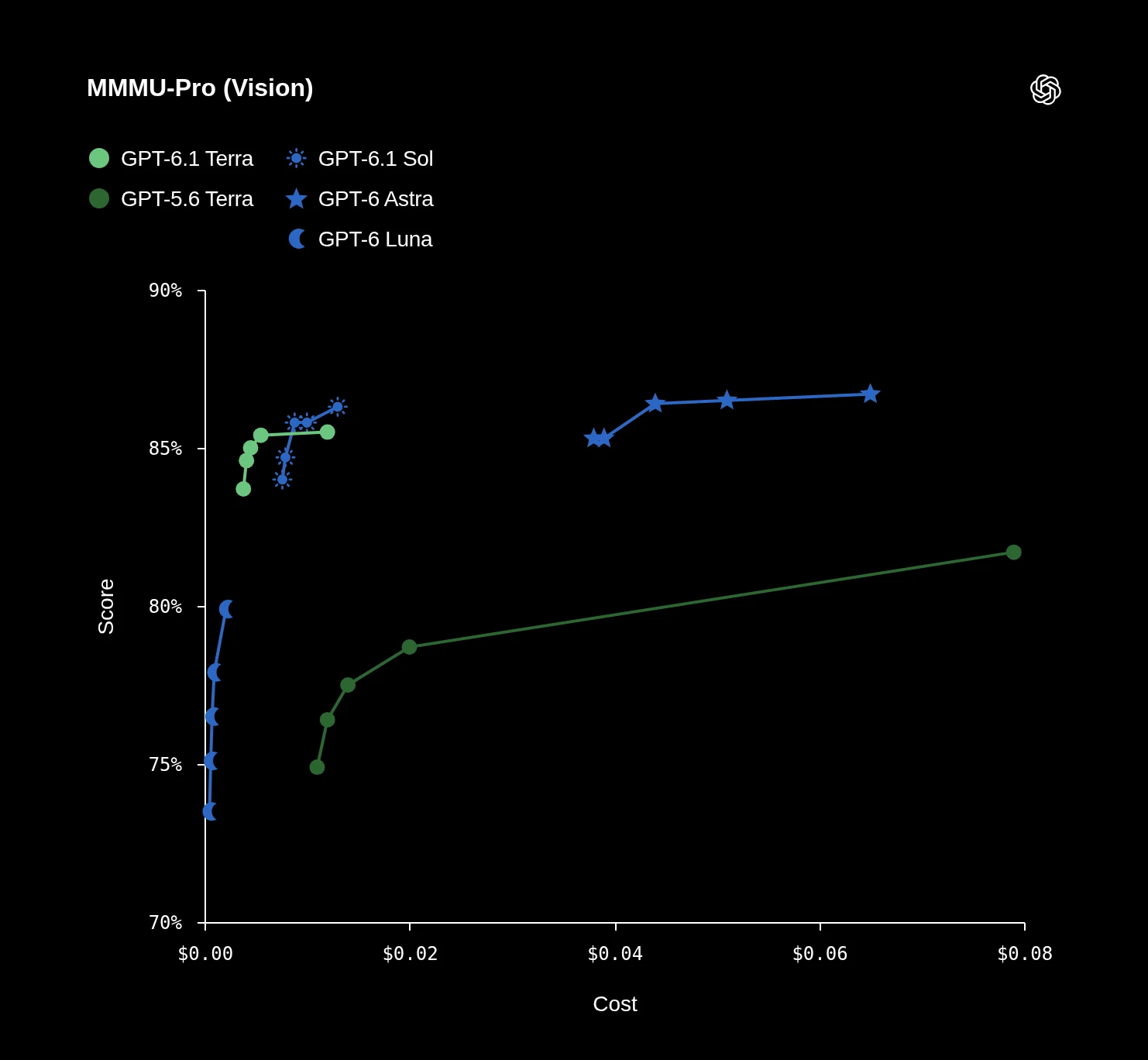
MMMU-Pro evaluates visual reasoning. Terra outperformed GPT-5.6 Terra across reasoning settings. At maximum effort, it scored 85.5%, compared with 86.3% for GPT-6.1 Sol and 86.7% for GPT-6 Astra.
OSWorld 2.1
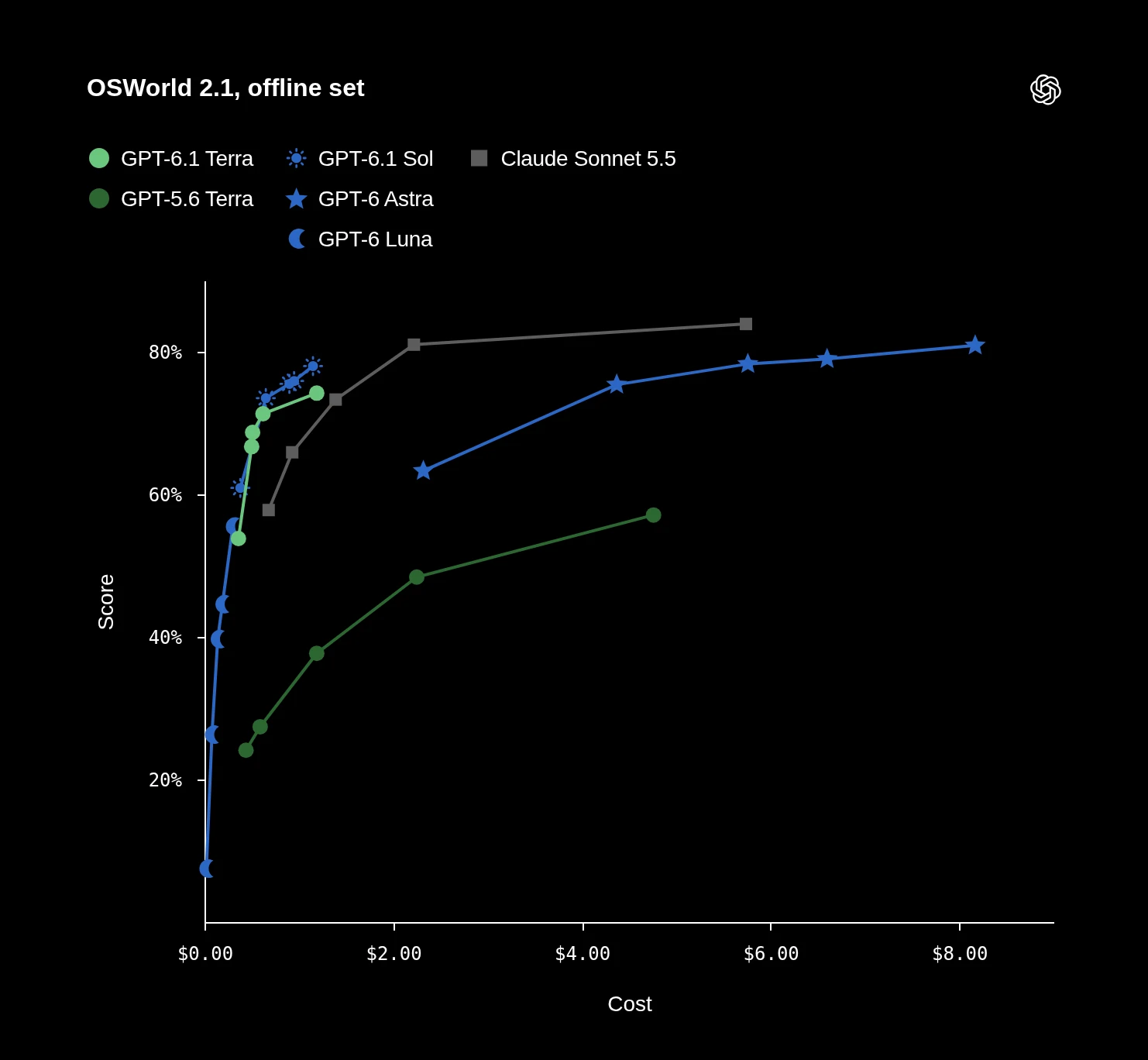
OSWorld tests multi-step work in desktop applications. OpenAI reports that Terra at medium effort surpassed GPT-5.6 Terra’s best score at a fraction of the cost per task. The chart shows the offline set.
Factual errors
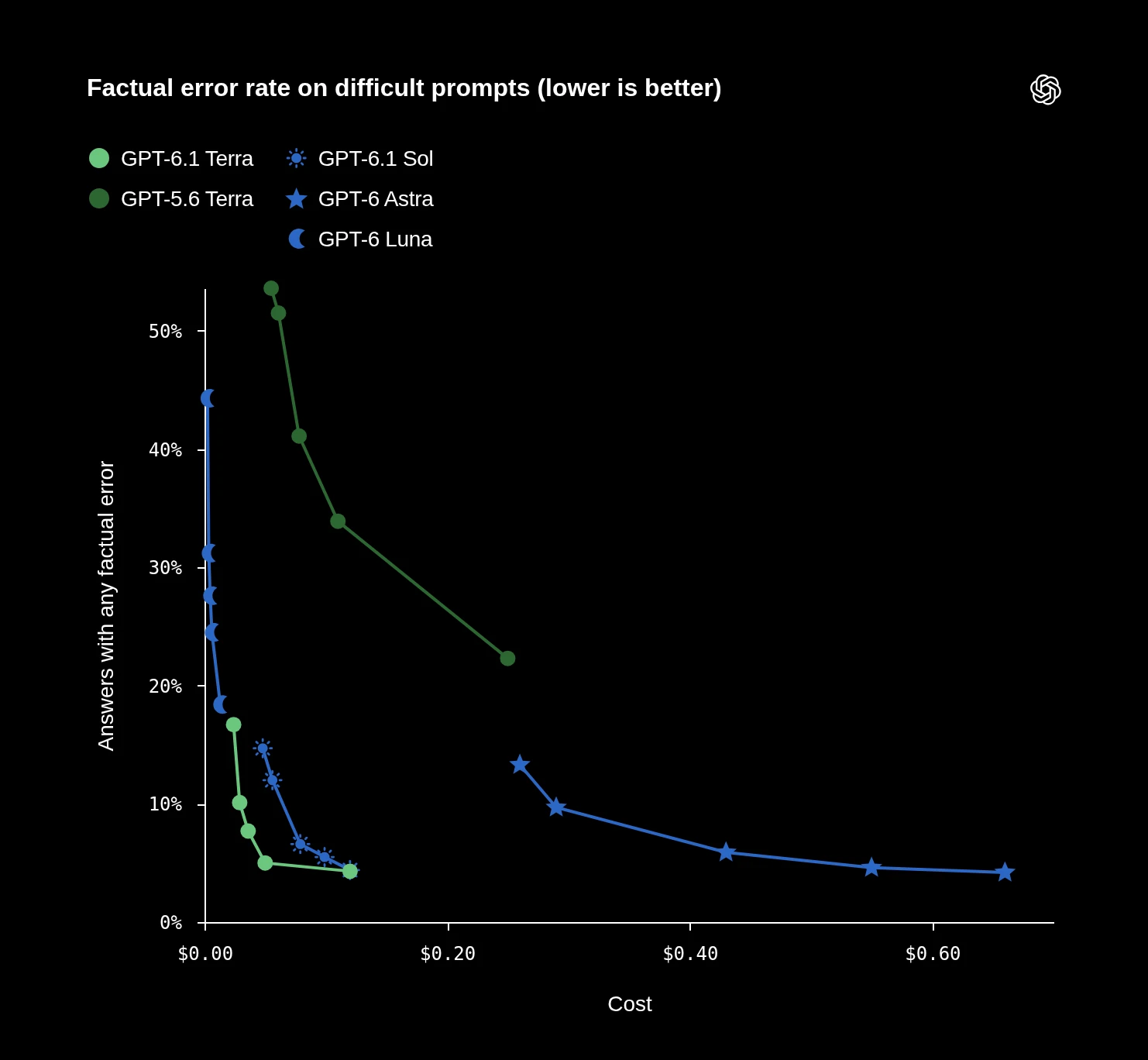
On OpenAI’s internal set of error-inducing prompts, Terra’s low-effort error rate was 16.7%, down from 53.6% for GPT-5.6 Terra. At maximum effort it was 4.3%. Lower is better; this selected set does not represent an error rate across ordinary requests.
A Fixed Token Budget
For Terra’s Standard API text-token rates, one million fresh input tokens cost $1, and the same volume of output costs $5. To give the economy a concrete unit, I priced a workload containing 80,000 uncached input tokens and 20,000 total output tokens.
Token Cost Comparison
Compare calculated token charges against the Terra baseline.
| Model | Token Charge | Relative Cost |
|---|---|---|
|
Terra BASELINE |
$0.18 |
1× |
| Sol | $0.36 |
2× |
| Astra | $1.80 |
10× |
Relative cost is normalized to Terra = 1×.
The observation was made on Codex using the OpenAI API.
Conclusion
GPT-6.1 Terra handled a range of practical tasks in these tests, from fixing Python code and building a spreadsheet to creating a lesson, calendar, and audio file. Its value lies in producing files you can inspect, edit, and use beyond the conversation.
The results also show why review matters. The workbook left AV107’s price unresolved, while the Python patch documented UTC as its default. Those details are visible in the files, so users can check them before relying on the output.
For everyday coding and file-based work, Terra looks like a useful option when paired with the right tools. These tests are a small sample, though, and don’t establish how it will perform on larger tasks or whether it will be cheaper for a particular job.
For context on the wider lineup, see ourGPT-6 Astra explainer. TheOpenAI Dot walkthrough explores the app experience around tool-driven work.
Frequently Asked Questions
A. No. Cleaning is a snapshot. Existing revenue formulas operate on Cleaned rows; additional source rows need another cleaning step.
A. UTC for timestamps without an offset. The docstring records that policy so it can be changed deliberately.
A. UTC. Event descriptions also give London and Kolkata times for the workshop date.

Studying, evaluating, and explaining AI systems for over 6 years.
“𝘖𝘯𝘤𝘦 𝘮𝘦𝘯 𝘵𝘶𝘳𝘯𝘦𝘥 𝘵𝘩𝘦𝘪𝘳 𝘵𝘩𝘪𝘯𝘬𝘪𝘯𝘨 𝘰𝘷𝘦𝘳 𝘵𝘰 𝘮𝘢𝘤𝘩𝘪𝘯𝘦𝘴 𝘪𝘯 𝘵𝘩𝘦 𝘩𝘰𝘱𝘦 𝘵𝘩𝘢𝘵 𝘵𝘩𝘪𝘴 𝘸𝘰𝘶𝘭𝘥 𝘴𝘦𝘵 𝘵𝘩𝘦𝘮 𝘧𝘳𝘦𝘦. 𝘉𝘶𝘵 𝘵𝘩𝘢𝘵 𝘰𝘯𝘭𝘺 𝘱𝘦𝘳𝘮𝘪𝘵𝘵𝘦𝘥 𝘰𝘵𝘩𝘦𝘳 𝘮𝘦𝘯 𝘸𝘪𝘵𝘩 𝘮𝘢𝘤𝘩𝘪𝘯𝘦𝘴 𝘵𝘰 𝘦𝘯𝘴𝘭𝘢𝘷𝘦 𝘵𝘩𝘦𝘮.” — 𝖥𝗋𝖺𝗇𝗄 𝖧𝖾𝗋𝖻𝖾𝗋𝗍, 𝖣𝗎𝗇𝖾
Login to continue reading and enjoy expert-curated content.