
More than one in five people who sign up for Ahrefs say they found us through ChatGPT or Claude.
That puts AI ahead of YouTube as a source of signups, and second only to Google.
If we’d relied on our referral traffic alone, we’d have badly undersold it.
Most AI influence happens out of sight. A buyer can read about you in Gemini on Monday, Google your brand the following week, and show up in your analytics as organic search.
So if you want leadership to back AI search, you have to find its fingerprints elsewhere in your data.
But that figure only counts tracked revenue, so most of the payoff from AI visibility sits outside it.
This guide shows how to measure AI search visibility with seven signals, and where to find the data for each.
A couple of them help you track the “visible” part of AI attribution (i.e. clicks and referral traffic), and the rest are evidence you can report alongside it.
1. Track AI referral traffic
Sessions from AI assistants behave like any other referral.
But you can also find that data in our free (and far more user friendly) GA4 alternative: Ahrefs Web Analytics.
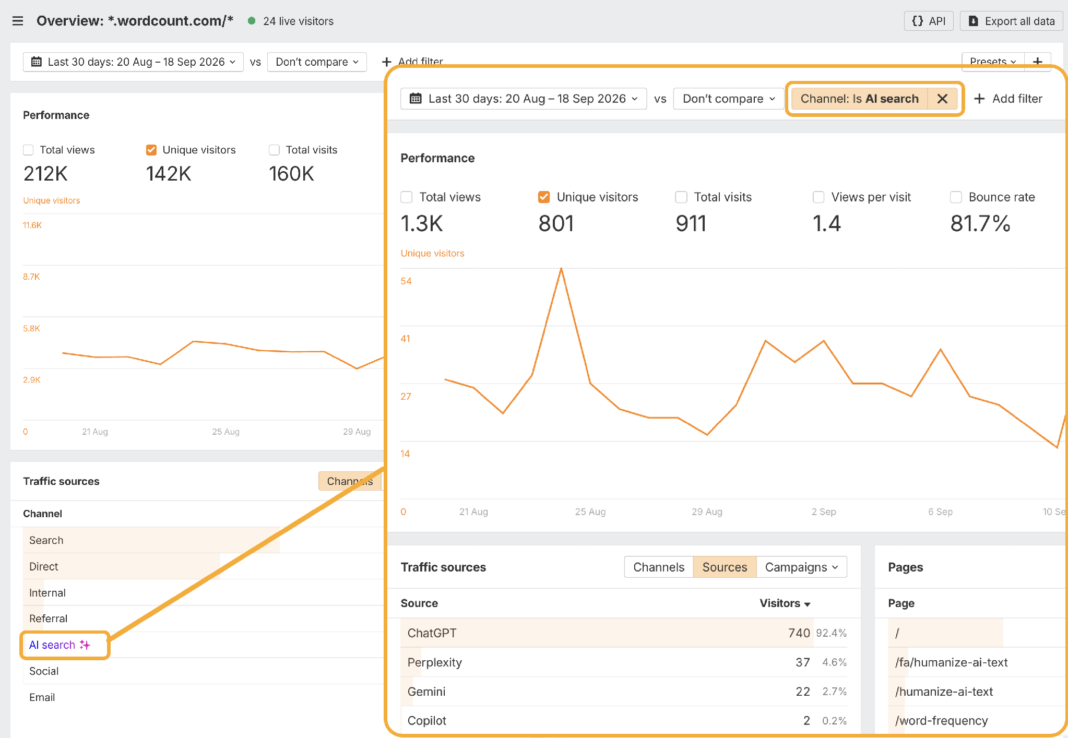
Instead of lots of manual jiggery pokery to configure an AI referral traffic report, just click on “AI search” in the “Traffic sources” section to filter by that channel and see which AI platforms send you the most traffic.
On wordcount.com, an Ahrefs owned site, ChatGPT accounts for 92.4% of AI search visitors, Perplexity 4.6%, Gemini 2.7% and Copilot 0.2%.
This tells us the overwhelming majority of our attributable AI traffic is coming from ChatGPT.
Next, you can check the “Pages” report to see which pages and content formats are picking up the most AI traffic, as well as their respective engagement.
In this example, a handful of tool pages are responsible for most of our AI traffic; each holding a healthy amount of attention when they do.
This kind of data tells you which AI platforms to prioritize, and which content formats to commission more of.
It also gives you top-line traffic numbers to include in your reporting—like total AI visitors, AI’s share of your overall traffic, and how both are changing quarter to quarter.
2. Track AI referral conversions
AI referrals represent just a fraction of the attention happening inside AI platforms.
And, like a Matryoshka doll, attributable AI-influenced conversions represent an even tinier version of that attention.
Small as they are, they’re the clearest link you have between AI visibility and revenue, and the starting point for any AI search ROI estimate.
Just add a “Channel” filter for “AI search”, and from there you can monitor conversion rates associated with events like form fills and demo signups.
For instance, 6% of all our AI search visitors sign up for an Ahrefs Free account—that’s 4X higher than our organic search conversion rate.
Multiply those conversions by your average customer value, and you have a tracked revenue figure you can plug into your ROI calculation.
Ahrefs Free is—you guessed it—free, so a signup isn’t worth anything on its own. In this case, we would look at how many signups go on to become paying customers, and calculate average customer value based on that instead.
Use conversion data to justify further investment in AI search, then focus that investment on optimizing your highest-converting pages for even greater AI visibility.
3. Ask “How did you hear about us” in sales calls and surveys
Instead of stitching together imperfect datasets and trying to infer AI’s impact on your customers, why not just ask them?
Self-reported attribution is by no means perfect, but hearing directly from customers is about as close to the truth as attribution gets.
Thanks to AI, messy qualitative feedback is much easier to analyze at scale—so you can turn hundreds of open-ended responses into patterns you can actually quantify.
Using a conversation intelligence tool like Gong, you can also directly ask your customers in sales calls whether they found you via AI.
Or, during onboarding, add AI tool options in your “How did you hear about us?” drop-down.
This lets you top-up your analytics with data it can’t see and tally it as attributable revenue.
For instance, we now know that Claude and ChatGPT together account for 21.7% of our signups across all our free and paid tools, which is more than YouTube and second only to Google.
Collect customer prompts
During lead forms or surveys, you can also ask customers to supply the AI prompts they used to find your brand.
This will help you work out which products, categories, and areas to invest in for greater return.
4. Watch your direct traffic for dark funnel insights
A permanent chunk of your AI visits are going to land in direct traffic, where you’ll never recognize them.
This shows up as direct traffic in your analytics.
A quick test I ran in Ahrefs Web Analytics, clicking through to an obscure page on the Ahrefs website from Microsoft Copilot
Record your direct and no-referrer traffic before you do any AI work, then watch it after each AI content push.
If your direct traffic trends up after you publish AI content, and nothing else explains the rise (no “non-AI” campaign, no PR, no seasonality), it’s fair to assume the extra traffic came from AI.
To work out what that traffic bump is worth, just use your existing direct traffic conversion rate.
For example, if your direct traffic normally converts at 2%, and you see 1,000 unexplained extra direct visits, you can estimate roughly 20 extra conversions came from AI.
5. Measure the brand demand created by AI search
If branded demand reliably rises after or alongside your AI visibility, you’ve got a directional way to show that AI is generating interest—and a rough sense of how much.
Without this, your reporting only covers trackable clicks and conversions, which is only the visible tip of what’s actually happening.
Check your brand search volume growth in Brand Radar
You can see your brand name search volume in Brand Radar’s “Search demand” tab.
Make sure to hit the “Brand name only” toggle to exclude non-branded category queries.
When you report on AI search, chart your AI mentions and branded search volume data side-by-side.
I built a dashboard to do just this using Letaido and Ahrefs Brand Radar data.
Our AI mentions have grown exponentially for our brand name, but our branded search volume hasn’t quite caught up yet.
We can track this over time to see whether there’s a correlation between growth in our branded AI visibility and our branded search demand.
6. Report web mentions as an early sign of AI visibility growth
AI platforms don’t share much data.
There’s no Search Console for ChatGPT.
The best way to measure visibility is to track a sample of prompts and see who gets recommended.
So it’s worth tracking web mentions alongside your prompts.
They’re easier to measure, and they tend to move before AI visibility does.
AI models learn what to say about your brand largely from what the rest of the web says about you ¹.
In a study I ran, branded web mentions came out as one of the factors most closely tied to AI brand visibility.
The more third-party pages mention your brand (and the more favorably), the more likely AI is to recommend you—and to describe you accurately when it does.
We recently saw this firsthand.
As the number of webpages mentioning us in the AEO tools space grew, so did our visibility in AI answers for that category.
In terms of reporting, this makes web mentions a useful early warning system.
Mentions will likely rise before AI visibility and traffic do, so you can show progress from your PR, content, and outreach work while you’re waiting for the harder numbers to catch up.
Just present it as a leading indicator—e.g. “mentions are up 30%, which tend to precede AI visibility gains”.
Reporting on AI search isn’t just a matter of discussing gains.
It’s also about justifying the perceived losses.
But, if your traffic falls 10% while the rest of the category around you falls 25%, that means you actually gained share that quarter.
Raw traffic numbers will never show you that.
So when someone asks why traffic is down, traffic share by domain is the metric to bring.
You’ll find it in Keywords Explorer, and it shows your site’s performance in context of the market.
Here’s an easy workflow you can follow:
- Head to the Organic Keywords report and select the 10,000 highest ranking keywords for your domain
- Hit “Copy”
- Head to Keywords Explorer and paste them in the search bar
- Pull up the “Traffic share by domain” report
- See how much share you own for your top keywords, vs. the rest of the market
Final thoughts
Nobody can definitively prove the value of AI search—us included.
AI answers influence buyers long before they produce a trackable click, so no single number will tell the whole story.
Pick the signals that fit your business, report them alongside your ROI estimate every quarter, and be upfront about what each one can’t see.
Right now, there’s never been a better time to make a case for your AI search strategy.
AI shopping is creating shorter paths from recommendation to purchase…
…publishers are experimenting with pay-per-crawl models, and Google is now testing “AI Contribution“—a Search Console pilot that pays some publishers when their content “significantly” contributes to answers in AI Overviews, AI Mode, and Gemini.
Your AI content not only creates demand and influences sales—it may now have the ability to earn.
Don’t wait for perfect attribution to measure that value.