

This post was originally published on this site.
I’ll just come out and say it: I’m not very tech savvy—obviously, since I’m writing a piece where I proudly call myself the Worst Coder in the World. But I like to think my technical deficiencies have a bit of a charm to them, almost like I’m a tech ingénue—unsophisticated but genuine and curious. As my editor, Ryan Donovan, put it, “You’re not afraid to ask the simple questions.”
I take this to be Ryan’s very nice way of saying I’m not afraid to ask the dumb questions. And he’s right—I’m not afraid to ask dumb questions. Things like:
- What does node.js do?
- What’s the difference between frontend and backend development?
- How do I upload this file to GitHub?
- Wait, can you check that I actually uploaded it to GitHub or did I do it wrong?
- How do I share my GitHub with you so you can check if I did it wrong?
Luckily, AI has gotten really good at answering these kinds of questions, so curious minds like mine are efficiently and quickly satiated. And really, the barrier to entry for all things tech-related, not just knowledge, has been lowered significantly by AI. Anyone can vibe-code a working app in just a few hours—even people with zero coding experience, like me.
For tech ingénues like myself, it opens up a world of possibilities that were once completely out of reach. The world is my software oyster, so to speak. However, I’m not actually great at coming up with ideas for useful things (e.g. my priorly vibe-coded poop app), and I’m a bit of an AI snob, besides. My hesitancy to use AI tools has probably cost me some Hours of Productivity, but really, I’m just trying to keep my brain from turning to mush—well, mushier than it already is.
Still, I reckon there are plenty of things AI could help me with, including helping me create bespoke AIs that are fashioned to my specific needs. Because I’m not a great generator of useful ideas, and because my lack of technical experience means my imagination for software is quite limited, I actually asked Gemini to come up with ideas for what I could build.
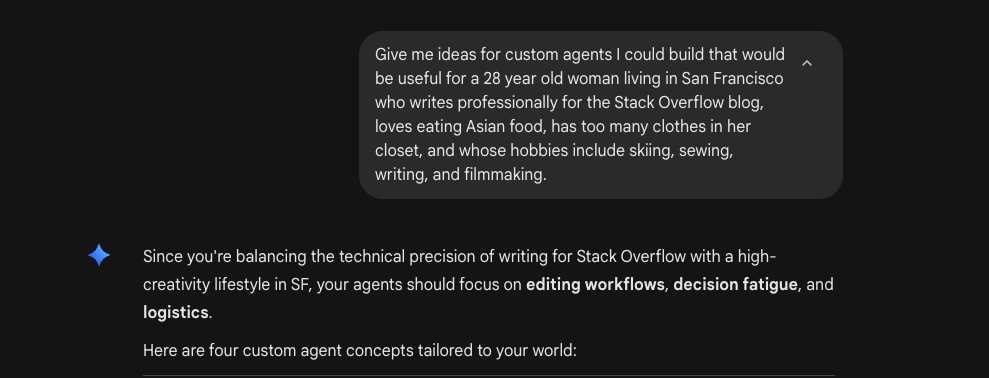
Unfortunately, I wouldn’t call Gemini a great generator of useful ideas, either, based on the nonsensical concepts it created for me. I had to actively fight off the vindication I felt about my AI hesitancy.
So back to the drawing board. I pondered and ruminated on the things a custom AI agent could help me with. What were things I had always wanted to do that I was either too busy, too inexperienced, too insecure, or too lazy to do on my own?

And then it hit me: the Stack Internal Leaderboard.
Okay, context. If you don’t know, Stack Internal is our company’s enterprise knowledge product. It has all the knowledge sharing you know and love from Stack Overflow with the added bonus of not leaking trade secrets to the world. Companies use Stack Internal to store and validate their organization’s information—everything from their PTO policy to their coding guidelines. Teams can document and share their important context with other departments, and people can ask questions or find answers about the happenings at their org. Then, people can accept answers, upvote Q&A pairs, and comment on posts, allowing the best, most important stuff to bubble to the top. We call that human-validation, baby.
Now that agents are a thing, all that knowledge sitting in a company’s Stack Internal has a new use case. Companies can connect their Stack Internal instance—the one bursting at the seams with human-validated context—to their agents via the Stack Internal MCP server.
I promise that wasn’t just a commercial break for Stack Internal. We use Stack Internal company-wide at Stack Overflow, and the people who gain the most reputation points every week get a shoutout in the weekly email from our CEO, Prashanth Chandrasekar. We call this The Leaderboard. I first noticed The Leaderboard rankings when covering for a good Stacker pal of mine on vacation, who tasked me with pulling the weekly Leaderboard stats. The first time, I only recognized a couple of the names placed in this coveted weekly rank, all of them people I had worked with directly. But over time, I started recognizing more and more names. The more I saw those repeating names, the more I got curious about them. I’d look them up on Slack or click on their Stack Internal profiles, reading the questions and answers that had elevated them to their elite seats on The Leaderboard.
I began to wonder—was this the equivalent of being Stacker famous?
In my year here, I had never posted a single question or answer on our Stack Internal instance. I had only been updating existing Q&As with up-to-date information. What a waste of a whole 365 days! I had given away my hard-earned reputation points to posts written by my predecessors, blocking out my own star by laboring away in the name of others. But no longer. I was going to crack The Leaderboard and get into Prashanth’s weekly email. My name would be seen and remembered by my fellow Stackers. If I created an AI agent that connected to our Stack Internal MCP server, my spot on the weekly CEO email—and the well-deserved Stacker fame that would come with it—was just a few careful prompts away. But first, I needed to know…
What the heck is an MCP server?
Although I could have easily found this answer online, I figured it would be a waste of my talent for fearlessly dumb questions. For this one, I took to pestering my pal Ben Marconi, Stack’s Director of Ecosystem Strategy, for answers. I went into our call with a clear end goal—learn as much as possible about MCP so I could create the perfect Leaderboard cracking agent.
I had a lot of questions for Ben. I mean, I really didn’t know much about the tech going into my call with him. I’ll share my full interview with him later on this blog (so keep your eyes peeled for that), but in the meantime, allow me the pleasure of summarizing my learnings for you. To start, I clumsily asked Ben, “Uhhhh, what exactly is an MCP server?” Ben, gracious and patient as ever, explained the following to me:
MCP—which stands for Model Context Protocol—is an AI standard that allows LLMs to securely connect to outside data sources. He told me to think of it as a “standardized bridge that connects new cutting-edge AI functionality to all the other stuff—all the other tools that exist in the software world.” We do this in the name of efficiency and usability. In order to make these AI agents as useful as possible, they need access to outside sources of information and may even need the permissions to act on our behalf in those places.
In the past, when people wanted LLMs to access external information or perform tasks for them, they would have to create custom connectors for their AIs. They’d do this by building a code-based access point, attached to an external company’s API. “You can think of [APIs] as the window between the restaurant and the kitchen,” Ben said. “You can pass information through the window in the form of code, and then that information can be structured. You can repeat this over and over and over again in the two systems you have configured to talk to each other.”
I asked Ben why we didn’t just keep making our own connectors instead of using MCP. Why not build a bunch of windows in the restaurant so all the information could be passed through? Well, that’s because you’d have to build a bunch of windows into your restaurant…by hand. Ben explained that these API connectors needed custom code to be compatible with each tool’s API. Building them has been historically time consuming and extremely complicated. “Let’s say we’ve got software Product A, Product B, and Product C,” Ben said, “These products are from different companies and they all have their own APIs, which allow a person to interact with that system’s data through a programming language. The problem is each of those three APIs are probably configured to work a little bit differently.”
“And let’s say we want to connect them all to a third tool that sits up above them [like an agent]. I want to plumb all of them into one location. Historically, the challenge is it can take a lot of custom configuration to understand Product A’s API, Product B’s API, and Product C’s API. So when you’re building these large interconnected systems, it starts to get pretty difficult and complex. You have to understand how each of these programming interfaces work and how to write the code to structure those communications back and forth.”
I was picking up what Ben was putting down. It all did seem pretty complicated, especially when you consider that hundreds and maybe even thousands of custom connectors would need to be built, just so our agents can access the same suite of tools we use on a daily basis.
So if custom plumbing doesn’t work, why does MCP? As Ben described it to me, MCP sits a layer above existing APIs, standardizing the external data being fed to it. This standardized data is organized so AI agents can automatically understand it, allowing for significantly faster connection to outside tools and data. Basically, instead of creating a custom connector for each API that needs translating, you could plug all the APIs into one universal translator—an MCP server. With much less effort than before, you can hook your LLM up to whatever external data source you want, giving it access to the context it needs to actually be useful to you (id est the context part of Model Context Protocol).
Ben emphasized that MCP is a decently new standard, having only been created by Anthropic a few years ago. Still, he called it a “relatively elegant solution” and one that people are rightfully excited about. “We need a more efficient means of supplying context to the agent layer,” Ben said. “One that could potentially allow agents to share information with each other. Then we can offload some of the work that human knowledge workers had to do in the past to create custom configurations.” He added, “The whole idea is that it’s a more scalable future for using these new tools.”
I left my conversation with Ben enlightened and inspired. He asked me what I was planning to build and I wanted to cackle like an evil genius.
“I’m going to build…” I told him furtively, pausing for dramatic effect, “…an agent that cracks our Stack Internal leaderboard.”
Ben taught me exactly what I needed to create the perfect Leaderboard cracking agent. You see, most people at Stack use our MCP server simply as a beefed-up search tool. I know this because I asked about it on Stack Internal (as reconnaissance, you understand). While it works really well for basic search, Ben explained to me that it’s also very good at finding hot trends, seeing the gaps in existing Q&As, and drafting actually valuable questions and answers. And it’s bidirectional, so not only can it read…oh boy, it can write. That meant I could crack the Leaderboard without ever having to switch tabs. Now, all I had to do was code the thing.
Wait a second…I don’t know how to code!
So, full disclosure, I vibe-coded this agent. Sadly, “coding agent skills” is not part of the default skill settings of a professional writer, even one who works at Stack Overflow. In my last Worst Coder in the World, I was blown away by how quickly my coding agent produced a working—albiet totally unsafe—application based on just a few of my clumsy prompts. Since then, AI coding assistants have only gotten better.
Let’s just be honest: any coding assistant, even a bad one, would code my Leaderboard agent better than me. I mean, they don’t call me the Worst Coder in the World for nothing. Still, I don’t want to be the Worst Coder in the World forever—in fact, I’m not too proud to say I hope to one day be the Okayest Coder in the World. But getting there involves actually learning to code, not just vibe-coding my life away. So I signed up for a Python for Everybody course.
I’ve since graduated from Python for Everybody the same way Warren graduated from Harvard in Legally Blonde: without honors, without a girlfriend, and without any job offers. Okay, maybe not exactly like how Warren graduated. And I did actually learn a lot during my course—for instance, I now know what conditionals and loops are. Shoutout to Cher Hin Chong, my Udemy instructor.
Besides conditionals and loops, here are my big takeaways from the course:
- Python is logic and rule-based.
- Once you get what logic causes what outcome, and what rules you need to follow, you can read the code almost like a book.
- Coding is really hard.
I’m not a particularly logical person, nor do I have a natural talent for learning languages, so I had to spend a decent amount of time studying and practicing, trying to get a couple of simple code blocks memorized. And even with my self-assigned homework…it was pretty fun.
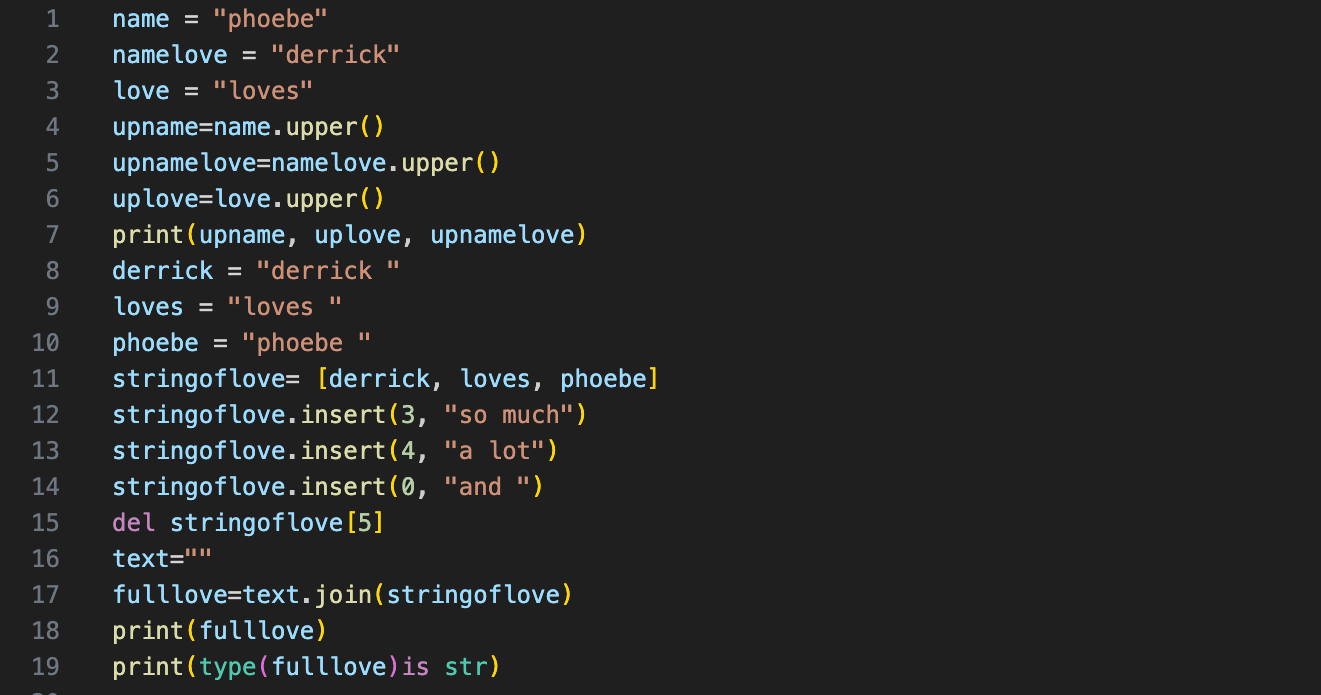
Yet, all the variables, strings, and `text.uppers` at my disposal would not be enough to create my coding agent. My slow attempts at deciphering basic Python were just further confirmation that real coding—the kind that produces actually useful software—needs the kind of logic, architecture, and foresight that I simply don’t possess. I gained a newfound humility from my beginner Python course, and even more respect for the art of coding because, really, I find myself woefully ill-equipped to code anything of worth. Apparently, a 14-hour Udemy course is not a replacement for a computer science degree, let alone years of development experience.

Part of the fun of being the Worst Coder in the World is I get lots of “Aw yeah!” moments from being a beginner. But the advent of AI coding assistants has taken a lot of those moments away. Every time I struggled to get my simple three line code to work, I’d look forlornly at the Claude Code button in my code editor. Even when I got the code to work, the delight of success was muffled by the impatience I felt, knowing there was a way I could circumvent all of this trouble right there in my CLI. I suppose this is just the reality of learning to code in a time when you don’t really need to learn to code.
In the end, I spent about 20 minutes getting Claude Code to build my Leaderboard agent for me. There was plenty of debugging along the way, of course, but first, let me tell you one of the coolest parts of this Worst Coder in the World. I could actually read some of what Claude Code wrote for me.

That was my “Aw yeah!” moment. Even though Cher Hin Chong was an excellent instructor, I honestly didn’t think much of what I learned about Python stuck. But when Claude Code generated everything I would need to crack the Stack Internal Leaderboard, I could understand it. Not all of it obviously—I took a beginner course after all—but I could parse out the basics of what had been created. I could see where and why loops broke, track the general meaning of the conditionals, and decipher the purpose of specific code blocks. For someone who didn’t know what Python was a few years ago, this was all very exciting. Suddenly, I wasn’t just staring at random words and curly brackets spaced out nonsenically—I was reading a story. There was a plot in my code. There were themes, story beats, even a climax and an epilogue.
This made debugging and running my agent all the more interesting. While Claude Code did the heavy lifting, I read through its thinking, trying to follow along with its edits and suggestions. I was lost most of the time, but the moments I understood what needed to be fixed, I felt a spark of pride. Someday I really could be the Okayest Coder in the World.

A Stack Internal secret agent
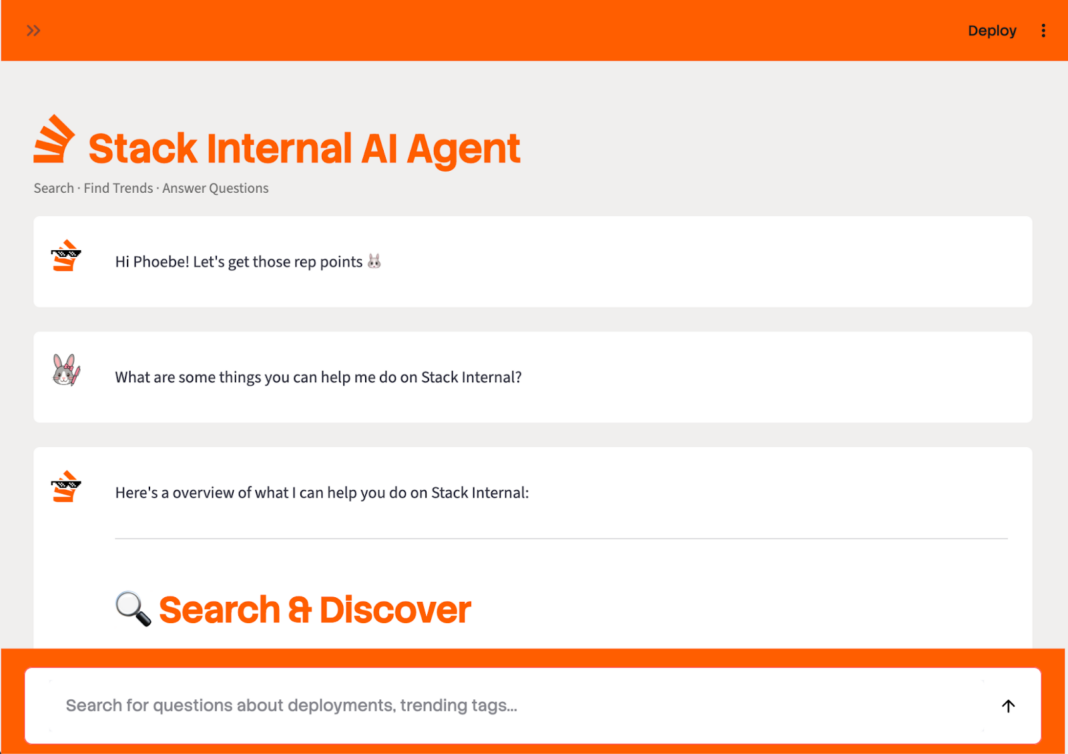
As I’m sure you all know, just because I had code didn’t mean the code worked, especially because I had vibe-coded it. My first task was figuring out how to get the thing to run locally in my browser, so I could see if it actually worked how I wanted it to. This set off a chain of events that included things like installing Streamlit, begging IT to approve my Python 3.14 download, using API keys for the first time in my life, accidentally exposing my API keys to Gemini, getting yelled at by Gemini for being an idiot, begging IT to help me reconnect my Claude Code because I was scared Gemini was going to yell at me again, and finally getting the thing to run on a localhost.

Caption: What’s worse: Claude Code abandoning me or Gemini yelling at me?
There were plenty of nasty little bugs along the way. I spent a lot of time coaxing my Claude Code to get things just right before it would run the way I wanted it to. Admittedly, some of the problems were a skill issue on my part (see: aforementioned API key event). Oh, but when it started working, it was a sight for sore eyes.
My agent could do all the things I hoped it could. Besides being a fast and precise search and discovery tool, it could also surface trends for me, find gaps in our existing Q&A library, make recommendations on what I should post, check for duplicates on a proposed question, score relevance and likelihood for upvotes on drafted Q&As, write and edit questions and answers for me, and post on my behalf.
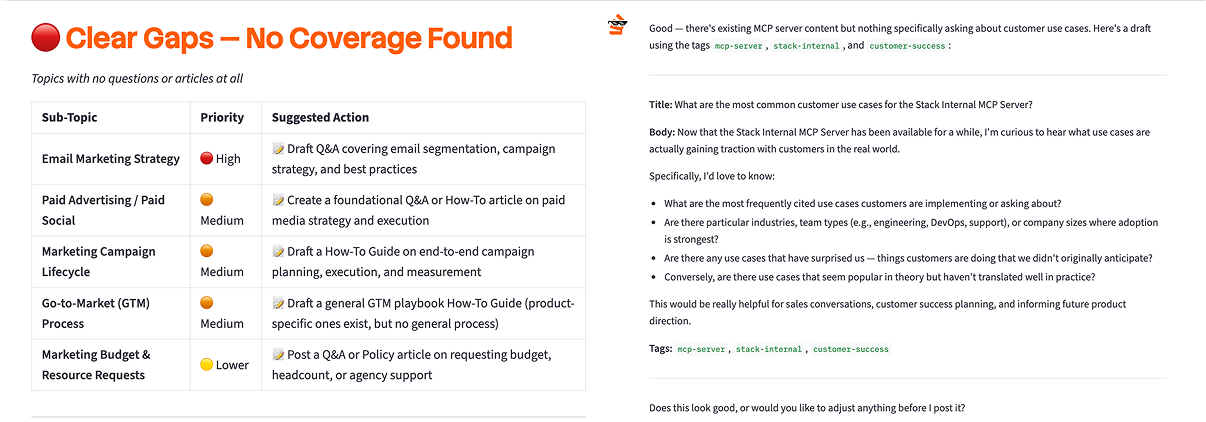
Once I got my agent to work, I ran a demo for both Ben and Johno Hawkinson, the product manager in charge of our MCP server. Probably one of the coolest parts of this whole project was getting to eat the dog food for our product team, giving Johno a few pieces of feedback to improve our MCP server. I like to think I saw a glimmer of pride in both of their eyes during my demo.
Ben’s advice for me was to, “Just let it rip.” Both he and Johno wanted me to try using the Leaderboard agent to its fullest capacity, including having it post for me via our bidirectional server. So I let it rip.
I wrote five questions and one answer during my short two-day experiment. This may not seem like much, but the brief duration was because I had set up some strict rules for myself:
- I was not going to spam or slopify our Stack Internal instance, out of respect for our product and the valuable knowledge in it.
- I would only post questions that were relevant to me and only share answers for things I actually had knowledge about.
- I’d keep my cards close to my chest, only divulging the existence of my agent to a tiny circle of trusted confidants—Ben, Johno, Ryan, and fellow blog writer Eira—to see if my AI use was noticeable to the uninformed Stacker.
The fact I was able to post so much with so little effort in so little time amazed me. And the content my agent wrote on my behalf was actually relevant and useful for my work: the day after I posted questions about our blog and social media, both of those exact topics were discussed in our Marketing all-hands. When I dropped the links for my questions in the chat, I felt like the protagonist of an action movie hacking into the Pentagon and disarming the world destroying superweapon—all in slow motion while Imma Be by the Black Eyed Peas played in my head.
One side effect I was worried about when creating my Leaderboard agent—and part of my initial hesitancy about AI—was that I’d become less engaged. I thought I might pay less attention to Stack Internal and the content my coworkers were posting, instead having my agent digest and summarize it without me ever visiting the actual site. I worried, too, that I might feel less ownership and responsibility over the content being published under my name. Both of these were bothersome potential outcomes to my experiment, with the latter being particularly unpleasant to imagine as someone who writes for a living.
I had no cause for concern. Neither of these fates came to pass; in fact, the opposite happened. Nowadays, I check our Stack Internal more than ever, looking for new questions to answer and obsessively tracking my reputation score. And my agent has improved the precision and clarity of my posts, giving me the confidence to post more authentically. “I love a pointed question in the open,” Ryan said after reading one of my posts.
So…did you crack the Leaderboard?
Great question, thanks so much for asking.
Yes. I did.
Actually, I was #1 on the Leaderboard.
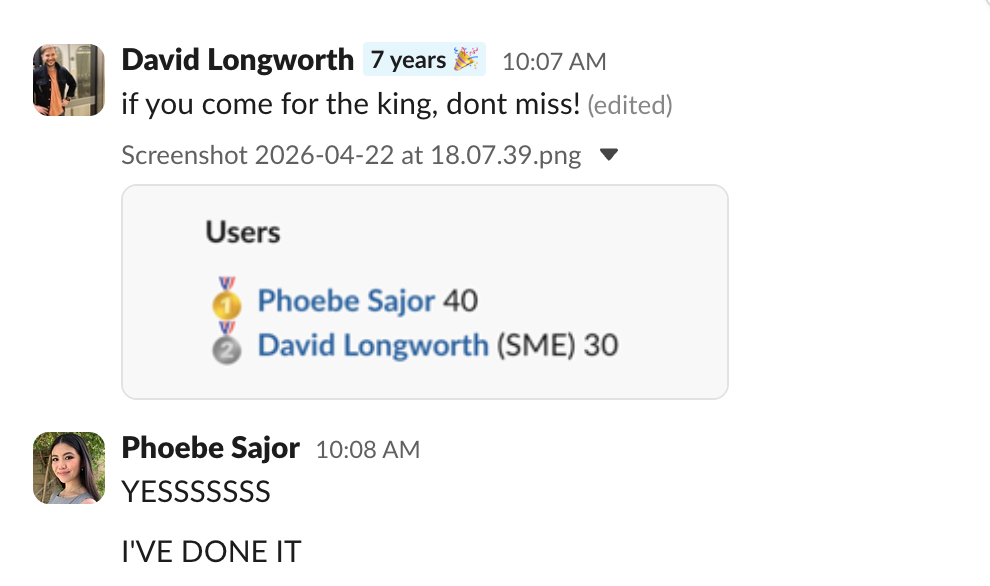
I’m actually incredibly proud of myself for not only getting onto the Stack Internal Leaderboard, but getting to #1. I mean, look at that! That’s me at the top!
Me being the absolute Stack Internal GOAT aside, I’m feeling a very special and unexpected kind of pride for this project. It’s the kind of pride I only feel for my most precious and personal pieces of writing—like I’ve created something really wonderful, just for me.
I had no idea it’d be so joyful to create a simple little piece of software for myself, designed to help me achieve a goal. It’s almost like I gave myself a little gift while saying, “It’s dangerous to go alone! Take this.” And while this project was of no real consequence outside of challenging myself (and getting #1 bragging rights), it showed me a different side of software development, one that feels spiritually closer to the creative craftsmanship I’ve spent my life doing. How cool is that?
After I demoed my agent for him and Johno, Ben took a short pause, then said, “I don’t think you’re the Worst Coder in the World, Phoebe.” I laughed and shook my head, but he continued, “Look at what you made. You should be proud! Don’t sell yourself short…it seems like you’re already pretty good at coding.”
I personally think I have a long way to go before I’m the Okayest Coder in the World, but I guess that doesn’t matter as much right now. I’m proud of what I created and what I was able to do with what I created. And even if I am still the Worst Coder in the World…hey, at least I’m #1 on Stack Internal.