
This post was originally published on this site.
CRM projects don’t fail at the technical level — they fail because the people expected to use the system never bought in, the training was too generic to stick, and nobody owned adoption after go-live. The result is a CRM that costs money to maintain but doesn’t deliver the pipeline visibility or process alignment it was supposed to.

Getting change management CRM implementation right means addressing the people and process challenges before, during, and after launch, not just configuring the software.
This guide covers the CRM change management strategy, team structure, communication plan, and adoption metrics that turn a CRM deployment into a system teams actually use.
Table of Contents
What is CRM change management (and why does it matter)?
CRM change management is the process of helping teams adopt new CRM tools, workflows, and data standards with enough structure, communication, and training that adoption actually sticks. Most CRM implementations don’t fail because of bad software. They fail because the human side is treated as an afterthought.
The data on structured change management is clear. Prosci’s research across 2,600 change practitioners found that projects with excellent change management meet or exceed their objectives at nearly twice the rate of those with poor change management.

That gap is driven by how well the human side of the rollout is planned and executed.
A well-managed CRM rollout produces three compounding benefits:
- Process alignment across marketing, sales, and service. When all three teams work from a shared system with consistent data definitions, handoffs improve and revenue cycles accelerate.
- Customer experience quality. CRM data is the backbone of personalized, responsive customer interactions. Poor adoption leads to fragmented records, resulting in worse customer experiences.
- Pipeline and revenue visibility. Leaders can’t accurately forecast when reps aren’t logging deals. Clean, complete CRM data is a prerequisite for reliable reporting.
The cost of skipping structured change management compounds quickly. Reps revert to spreadsheets. Data degrades. Validity’s 2025 State of CRM Data Management report found that 76% of organizations say less than half their CRM data is accurate and complete. Managers lose pipeline visibility, and within six months leadership is questioning whether the CRM investment was worth it.
Pro tip: For a broader look at change management frameworks, see our overview of change management.
How to Build a CRM Change Management Plan
A CRM change management plan is the operational document that ties your rollout together. It should cover seven core elements: readiness assessment, scope definition, goals, stakeholders, timeline, risk log, and success metrics.
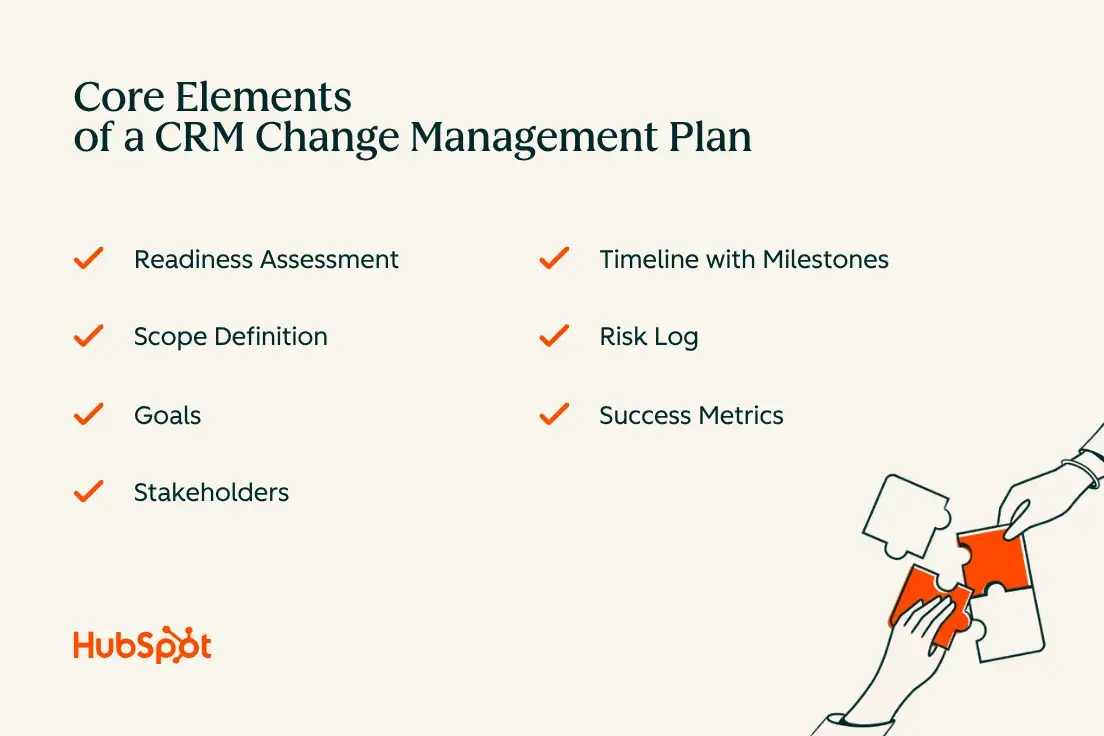
Without all seven of these core elements, you are likely to encounter mid-rollout surprises that slow adoption or derail governance.
- Readiness assessment. Survey teams before you start. Identify resistance hotspots, prior tech project history, and areas of weak leadership alignment. A simple SWOT analysis by team or region works well here.
- Scope definition. Document exactly which teams, geographies, workflows, and data objects are in scope for the first rollout. Every out-of-scope item should be logged for future phases. Scope creep is among the most common causes of delayed go-live dates.
- Goals. Tie CRM goals to business outcomes: pipeline conversion rate, average deal cycle time, CSAT score, or marketing-to-sales lead handoff speed. Vague goals like “improve sales process” are hard to measure and harder to sustain.
- Stakeholders. Map decision-making authority before go-live. Who approves field changes? Who owns data governance? Who has authority to escalate adoption issues to leadership?
- Timeline with milestones. Build in checkpoints at 30, 60, and 90 days post-launch. These are adoption review gates, not project management formalities.
- Risk log. Common CRM rollout risks include vendor delays, data migration errors, leadership turnover, and scope expansion. Assign each risk an owner and a mitigation plan before launch.
- Success metrics. Define what success looks like at each milestone. The section on measuring adoption later in this guide covers the specific KPIs to track.
Which Models Help CRM Change Management
Two frameworks show up repeatedly in successful CRM rollouts: the Prosci ADKAR model and Kotter’s 8-step process. Neither is mandatory, but both offer useful scaffolding.
The Prosci ADKAR Model
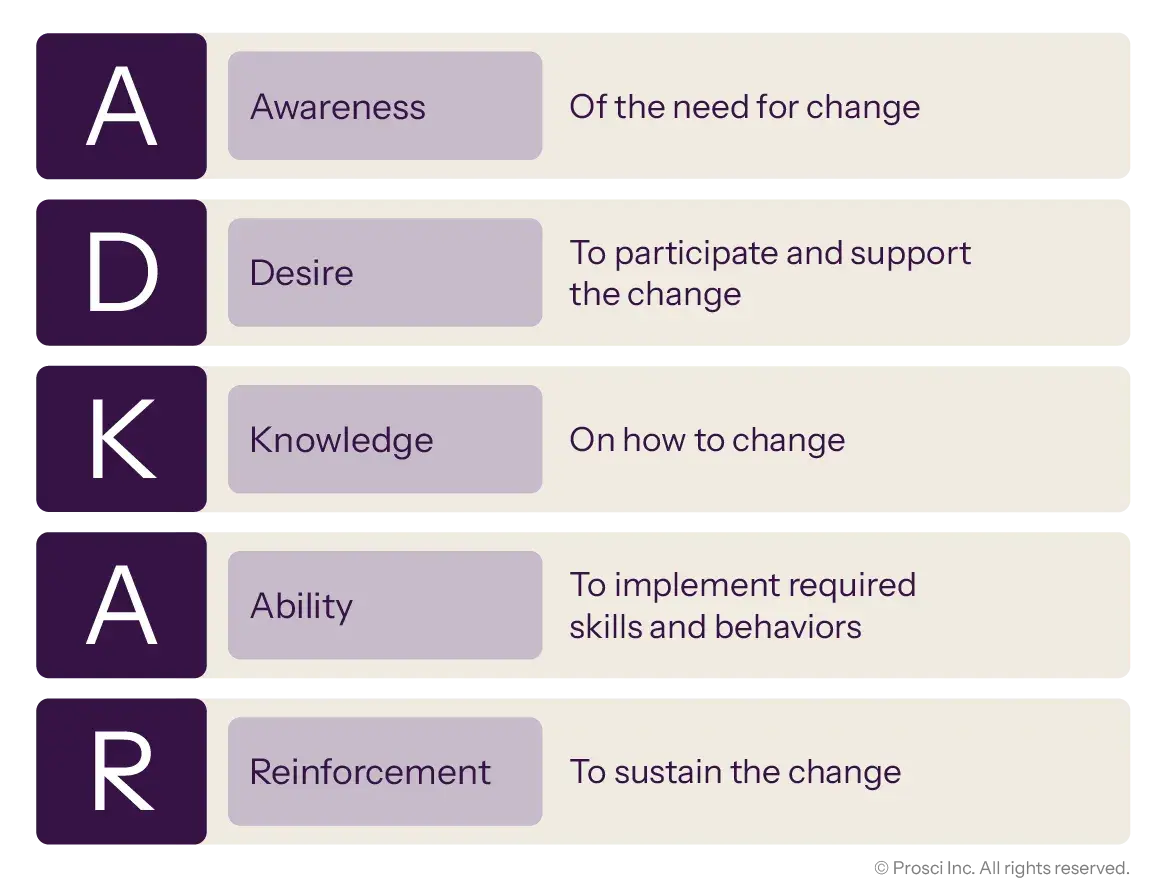
ADKAR stands for Awareness, Desire, Knowledge, Ability, and Reinforcement. It’s an individual-focused framework that helps change leaders diagnose exactly where adoption is breaking down. If a rep knows what the CRM is for (Awareness) but doesn’t believe it helps them (Desire), that is a different problem than a rep who wants to use it but doesn’t know how (Knowledge). ADKAR’s diagnostic value is its strongest feature. It turns “people are not adopting” into a specific, addressable gap.
Pro tip: Run a quick ADKAR self-assessment survey with pilot users before your full rollout. Ask each person to rate their Awareness, Desire, Knowledge, Ability, and Reinforcement on a scale of 1 to 5. A score below 3 on any element is your intervention point. This takes about 15 minutes and saves weeks of guesswork.
Kotter’s 8-step Process
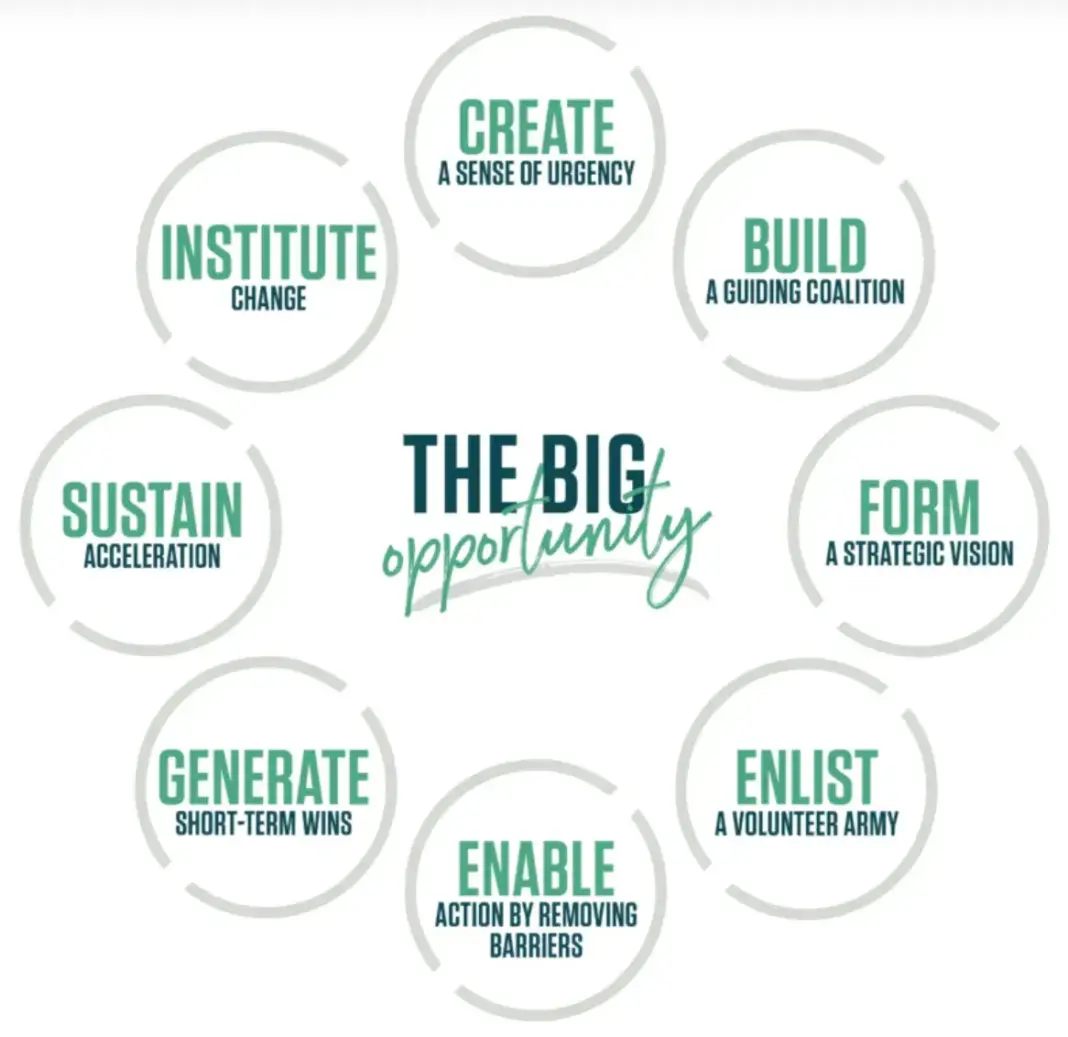
Kotter’s 8-step model operates at the organizational level: create urgency, build a coalition, form a strategic vision, communicate it, remove obstacles, generate short-term wins, sustain acceleration, and anchor change in culture.
For enterprise CRM rollouts across multiple regions or business units, the coalition-building and urgency steps are particularly relevant. Without visible executive sponsorship, adoption requests read as optional.
My recommendation: use ADKAR to diagnose individual-level gaps and run targeted interventions, and use Kotter’s framing to structure your leadership and communication strategy at the organizational level. The two complement each other well.
Who Should Be on Your CRM Change Management Team
CRM change management improves user adoption when the right people are accountable for the right outcomes. A CRM change team includes leaders from marketing, sales, service, operations, IT, enablement, and analytics. The specific roles and responsibilities need to be formalized before launch, not decided on the fly.
The table below shows a practical RACI assignment for a mid-size CRM rollout.
|
Role |
Key Responsibilities |
Accountable |
Consulted |
Informed |
|
Executive Sponsor |
Champion rollout, remove blockers, model CRM use |
Change vision |
Scope decisions |
All milestones |
|
CRM Program Lead |
Manage plan, track milestones, coordinate workstreams |
Plan execution |
Risk decisions |
Exec sponsor |
|
Sales Leader |
Drive rep adoption, reinforce pipeline hygiene norms |
Rep adoption |
Training design |
RevOps |
|
RevOps / CRM Admin |
Configure system, govern data standards, monitor dashboards |
Data governance |
Field requirements |
All users |
|
Enablement Lead |
Design and deliver role-based training, office hours |
Training delivery |
Content accuracy |
Team managers |
|
IT / Security |
SSO, permissions, integrations, compliance requirements |
Technical config |
System design |
Program Lead |
|
Marketing Lead |
Lead-to-revenue mapping, campaign-to-CRM workflow adoption |
Marketing adoption |
Attribution setup |
RevOps |
|
Service Lead |
Ticket workflow adoption, CSAT and case resolution standards |
Service adoption |
SLA definitions |
RevOps |
Adapt the RACI role assignments to your org structure based on your specific team composition. What matters is that every role and responsibility in your change management plan has a clear accountable owner.
- Executive sponsors provide visible support and decision-making authority. Their job is to remove organizational blockers that the program lead cannot. If your sponsor isn’t regularly mentioning the CRM in all-hands calls or leadership reviews, they’re not fulfilling this role.
- The CRM admin or RevOps function owns data governance, not IT. This is a common misconfiguration. IT owns infrastructure and security; RevOps owns what goes into the CRM and how it’s structured.
- Peer champions are underused. Appointing respected individual contributors from sales, service, and marketing as floor-level advocates dramatically improves day-to-day adoption. These are the people their teammates actually ask for help.
Governance cadences should be established before go-live and maintained post-launch. A weekly adoption stand-up for the first 90 days, a monthly steering committee review through the first year, and a quarterly data governance audit form a reasonable starting cadence.
How to Drive CRM User Adoption with Communications and Training
Clear change communications explain what is changing, what isn’t changing, and why it matters. They do this across multiple channels, for multiple audiences, at multiple points in the rollout. A single launch email isn’t a communication strategy.
Start with an audience message map. Revenue operations leaders, sales reps, service agents, and marketing managers each need a different version of the same core message. A rep cares about whether the CRM makes their day easier. A service lead cares about CSAT visibility and SLA tracking. A RevOps leader cares about pipeline hygiene and forecast accuracy. Write the message for each audience, not one generic version for all.
The “What’s Changing / What’s Not Changing” tracker is one of the highest-value, lowest-effort communication tools available. A simple two-column table shared early in the rollout reduces anxiety, focuses attention on actual workflow changes, and prevents the rumor cycle that forms when people don’t know what to expect.
For communication cadence, use a layered approach: a kick-off announcement from the executive sponsor, team-level briefings from managers, and reinforcement via Slack or email from the CRM program lead. Our guide to communication strategy has additional structure for multi-channel communication planning.
On training: role-based training reduces resistance to CRM adoption because it respects people’s time. A sales rep doesn’t need to understand how ticketing works. A service agent doesn’t need deal pipeline configuration training. Training that feels irrelevant creates resistance. Training that maps directly to daily workflow creates confidence.
The most effective training architectures combine four layers:
- Live kick-off sessions. Role-specific workshops of 60 to 90 minutes at or near go-live, focused on the tasks each team will perform on day one.
- In-app guidance. Contextual tips or walkthrough overlays inside the CRM that surface instructions when and where users need them.
- Office hours. Weekly open sessions for the first 60 days where users can ask questions in a low-pressure setting. These surface adoption issues faster than any survey.
- Peer champion network. Named colleagues who serve as the first point of contact for day-to-day questions. Peer-delivered reinforcement consistently shows up as a top driver of sustained adoption in change management research.
HubSpot Academy offers free certification courses in HubSpot CRM, Sales Hub, Service Hub, and Marketing Hub that can be assigned to teams as part of a structured enablement plan. These are particularly useful for onboarding new hires post-rollout.
Pro tip: Build a training completion dashboard before go-live. Track which users have completed which modules, and give managers visibility into their team’s training status. Completion rates drop sharply when nobody is watching them. When managers see the numbers, they follow up.
Feedback loops belong in the communication plan, not as an afterthought. Pulse surveys at 30, 60, and 90 days give you early warning on adoption problems before they become entrenched habits. Anonymous feedback forms capture what users wouldn’t say in a group setting. Both are easier to act on than trying to diagnose low adoption rates after the fact.
Common CRM Change Management Mistakes to Avoid
Most CRM rollout failures are predictable. These are the patterns that derail otherwise well-planned implementations, along with the steps that prevent or remediate each one.
Unclear Ownership
When nobody owns adoption measurement, nobody is accountable for low adoption. This shows up as diffused responsibility: IT thinks sales owns training, sales thinks IT owns configuration, and RevOps is caught in the middle. Preventive step: assign a named CRM program lead with a defined scope of authority before the project kicks off. If you are mid-rollout and ownership is unclear, run a rapid RACI mapping workshop to establish it immediately.
Weak or Absent Executive Sponsorship
Executive sponsors who announce the CRM at launch and then disappear send an unintentional signal: this is optional. Prosci’s research across 2,600 change practitioners found that projects with good change management programs meet or exceed objectives at a 73% rate, versus 39% for fair programs. The difference in visible, sustained leadership advocacy is a primary driver of that gap. Preventive step: build regular CRM updates into existing leadership forums like QBRs, all-hands meetings, and leadership reviews.
Generic Training
One-size-fits-all CRM training wastes everyone’s time and signals that the rollout team did not think carefully about actual user workflows. Preventive step: design training tracks by role before go-live. If you are already past launch, survey frontline users on what they still don’t know how to do, then run targeted micro-sessions on those specific gaps.
Over-customization
Every unnecessary field, every redundant workflow, every custom object that doesn’t map to a real process is a maintenance burden and an adoption friction point. I have watched CRM instances with 400+ custom properties become unusable within 18 months because nobody governed what went in. Preventive step: establish a field request process with a required business case before any new property is added. For existing instances, run a property audit and archive anything unused in the last 90 days.
Poor Data Governance
Bad data produces bad reports, bad reports erode trust in the system, and low trust produces low adoption. Validity’s 2025 research shows 76% of organizations have inaccurate CRM data, which means governance that starts weak gets worse fast. Preventive step: define required fields, data entry standards, and a duplicate management protocol before go-live. Our guides on data hygiene and CRM data maintenance cover the specific practices in depth.
Ignoring Frontline Feedback
Rollouts that treat feedback as a PR exercise by collecting it but not acting on it destroy adoption trust faster than any technical problem. Preventive step: establish a documented feedback review cycle and communicate what you are doing with the input. If you have collected feedback without visible action, run a “you said, we did” communication to rebuild credibility before the next review cycle.
How to Measure and Sustain CRM Adoption Post Go Live
CRM adoption metrics include login frequency, activity completion, data hygiene, and pipeline hygiene. Tracking them at defined intervals, not just at launch, is what separates organizations that sustain adoption from those that plateau.
The 30-60-90 day structure below gives your team concrete benchmarks at each adoption gate.
|
Metric |
Day 30 |
Day 60 |
Day 90 |
|
Login Frequency |
>=60% of users log in weekly |
>=80% log in weekly |
>=90% weekly; login is default habit |
|
Key Activity Completion |
>=50% of deals have a next step logged |
>=75% of deals have stage + next step current |
>=90% compliance; activities logged same-day |
|
Data Hygiene Score |
Required fields complete on >=70% of new records |
Required fields >=85%; duplicates flagged weekly |
>=95% completeness; zero-duplicate audit passed |
|
Pipeline Hygiene |
All open deals have close date + stage set |
Stale deals (>30 days no activity) flagged and reviewed |
Pipeline reviewed weekly; forecast variance <15% |
|
Time-to-First-Value |
First deal or ticket moved through pipeline in CRM |
Team completes first full cycle (lead to close) in CRM |
CRM is the source of truth for pipeline reviews |
|
Case Response Adherence (Service) |
Tickets created in CRM for >=80% of incoming cases |
SLA response tracked in CRM for >=90% of tickets |
CSAT captured in CRM; SLA adherence >=95% |
- Pair login data with activity depth. High login frequency without corresponding activity means users are signing in but not engaging. Track both together, not either in isolation.
- Assign metric ownership. Each row in the KPI table should have a named owner who reviews it weekly and escalates when targets are not met. Adoption dashboards without owners become background noise.
- Make data visible. Publish adoption metrics in team channels or manager dashboards. Visibility drives accountability in ways private reports don’t.
Post-launch governance sustains CRM adoption after go-live. The governance cadences described in the team structure section above become your ongoing operating model. Our guide to feedback management covers how to structure the feedback loops that keep your governance model connected to actual user experience.
How to Combine CRM and Project Management In Rollout
CRM and project management function best as complementary workstreams, not competing priorities. Project management tracks what needs to happen and when; CRM adoption tracking measures whether it’s actually working.
In practice, your project plan should include adoption metric reviews as formal deliverables. A go-live that shows 100% technical completion but 40% user adoption isn’t complete. Build adoption gates into your project plan from the start so that technical and human success criteria are evaluated together.
For complex rollouts spanning multiple regions or teams, a phased project structure reduces risk. Phase one covers the highest-priority team or workflow with the highest executive visibility. Phase two expands once phase one has demonstrated measurable adoption. Document what you learned from each phase before expanding: what training gaps appeared, which communications landed, what configuration decisions need adjustment. Each phase should formally inherit those learnings.
Where AI Supports CRM Change Management
AI plays a practical, specific role in CRM change management. It serves as a multiplier for the activities that change leaders would otherwise do manually, not a replacement for human judgment.
Breeze Copilot, HubSpot’s AI assistant, helps in three specific ways during a CRM rollout:
- Change communications. Breeze can draft role-specific communication messages, “What’s Changing / What’s Not Changing” trackers, FAQ documents, and manager talking points. What takes a change manager several hours to draft can be produced as a strong first draft in minutes, leaving more time for customization and review.
- Enablement content. Breeze can draft training outlines, job aids, in-app tip text, and scenario-based exercises tailored to each role. Role-based training requires role-specific content, and Breeze accelerates that content production significantly.
- Feedback summaries. During the feedback collection phase, Breeze can analyze and summarize open-ended survey responses, surfacing themes and patterns that would otherwise take significant manual review time.
Breeze Agents are HubSpot’s autonomous AI workers that extend this into ongoing operations. The Prospecting Agent researches leads and surfaces activity insights. The Customer Agent resolves support inquiries across multiple channels. The Content Agent drafts ongoing communications and knowledge base updates. As of early 2026, the Run Agent workflow action allows these agents to be triggered by CRM events such as deal stage changes, ticket creation, and form submissions, making them active participants in your post-launch adoption ecosystem.
The most important point about AI in CRM change management is what it doesn’t replace: executive sponsorship, peer relationships, organizational trust, and the judgment calls that define whether a rollout feels supported or imposed. AI compresses the work. People make the change happen.
How HubSpot Accelerates CRM Change Management
HubSpot’s customer platform is designed to reduce rollout friction across every stage of CRM change management. Each product maps directly to a specific adoption challenge.
Smart CRM is the central source of truth. It brings contact, company, deal, and ticket data into a single, unified record that all teams can access and trust. G2 has rated HubSpot CRM as Most Implementable, a distinction that directly addresses one of the biggest barriers to adoption: complexity.
Sales Hub supports pipeline and rep adoption. Features like deal pipelines, playbooks, AI-guided selling, and sales automation give reps tools that make their jobs easier. That creates adoption motivation from within the team rather than relying solely on top-down mandates.
Service Hub supports service process and customer experience adoption. Help desk management, SLA tracking, omnichannel service workflows, and the Breeze Knowledge Base Agent give service teams a system that improves their work rather than adding to it.
Marketing Hub supports internal change communications and campaign coordination. Email tools, list segmentation, and workflow automation can run the CRM adoption communication campaign itself, including launch announcements, training reminders, and milestone updates, directly from the platform you are rolling out.
HubSpot Academy provides free certification courses that serve as a structured enablement resource. Assigning relevant Academy certifications to teams before go-live reduces the burden on internal enablement resources and gives users a self-paced learning option that complements live training.
Teams that combine a phased communication plan, role-based training, and weekly adoption reviews consistently see the steepest gains in the 30 to 90 day post-launch window. The common factors across high-performing rollouts: adoption metrics defined before go-live, a named program lead with executive backing, and a governance cadence that surfaces problems before they become habits.
Frequently Asked Questions About CRM Change Management
How long should a CRM change management rollout take?
Most CRM rollouts follow a 3 to 6 month implementation window, followed by a 90-day adoption stabilization period. Complex enterprise rollouts spanning multiple regions or legacy system migrations may run 9 to 12 months.
Plan for adoption milestones at 30, 60, and 90 days post-launch as formal project deliverables, not afterthoughts.
What are the most important CRM adoption metrics to track?
Track six categories: login frequency (weekly active users as a percentage of assigned users), key activity completion (deals with next steps logged, notes created, tasks completed), data hygiene score (required field completion rate), pipeline hygiene (open deals with current stages and close dates), time-to-first-value (how quickly each team completes their first full workflow cycle in the CRM), and for service teams, case response adherence (tickets created and SLA tracked in CRM). Pair all metrics with named owners who review weekly and escalate when targets are not met.
How do we handle resistance from veteran reps without stalling the rollout?
Veteran reps are your most valuable change management asset and your highest adoption risk, often at the same time. The most effective approach is to involve them early. When experienced reps participate in workflow design or pilot testing, they develop ownership of the system rather than resistance to it.
For reps who remain resistant post-launch, focus on the Desire element of the ADKAR framework. What specific work problem does this CRM solve for them? If you can answer that question credibly, you can usually move them. Mandating CRM use without addressing underlying concerns produces compliance theater, not genuine adoption.
When should we expand training after going live?
Schedule a structured refresher at 60 to 90 days post-launch to address gaps surfaced by your feedback loops and adoption metrics. A second round at 6 months should cover new features, process updates, and common errors identified in data hygiene audits.
After that, embed ongoing training into your onboarding process for new hires and plan an annual review of CRM capabilities. Training that stops at go-live leaves a significant adoption gap as teams turn over and processes evolve.
What’s the best way to run a phased rollout across regions or teams?
Phased CRM rollouts lower implementation risk for complex teams and regions. The most effective phasing strategy selects the first cohort based on two criteria: high executive visibility so wins get noticed, and high change readiness so the first phase succeeds.
Avoid starting with the most resistant team or the most technically complex workflow. Pilot success depends on building organizational confidence early. Document what you learned from each phase before expanding and ensure each subsequent phase formally inherits those learnings rather than repeating the same discovery process from scratch.
Putting CRM Change Management Into Practice
CRM change management best practices are only valuable if they get implemented. Start with the plan template in this guide, assign ownership before go-live, and set your 30-60-90 adoption targets now. If you are evaluating a CRM that is built to reduce rollout friction from day one, HubSpot is worth a close look.