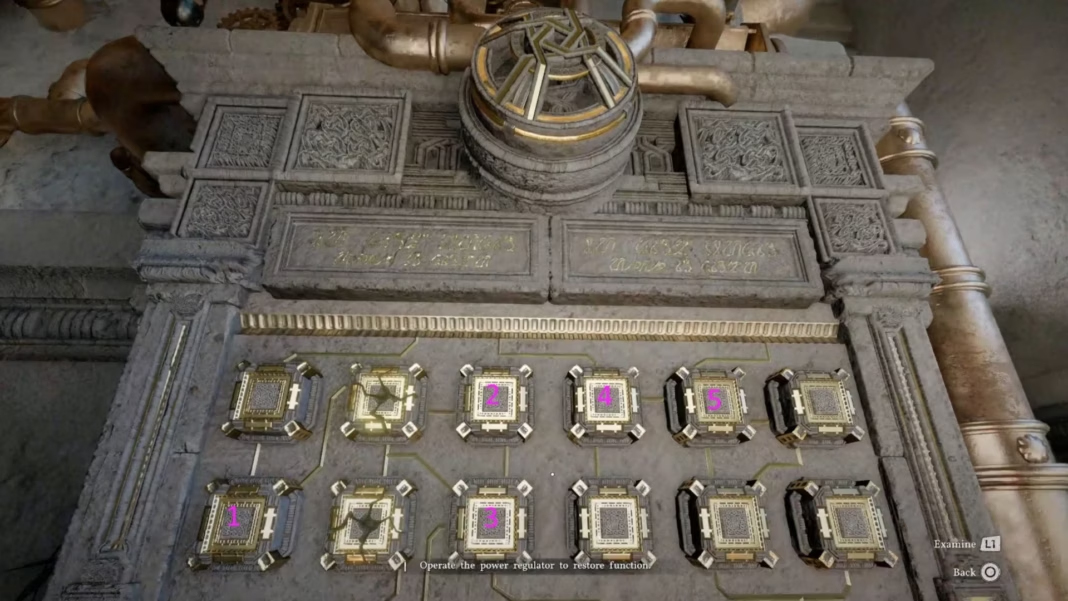


Early in Oongka’s chapter of Crimson Desert’s DLC, you’ll have to fix the broken device as a part of the Unfamiliar Workshop quest. All you really know from the outset is that if you press too many buttons, you’ll wind up overloading the circuit, and you will be unable to proceed. It’s possible there are multiple solutions, but we found one that works and will progress the story.
If you’re struggling with the broken device puzzle in Crimson Desert Charting the Unknown, we know how to clear it as Oongka, so you can continue his journey as an engineer. Here is the order you need to press the buttons, so the device will power on again.
Crimson Desert Charting the Unknown Unfamiliar Workshop quest: How to fix the broken device
While at Scholastone in the Crimson Desert DLC, Oongka will need to prove his worth by fixing the broken device without any aid from his teacher during the Unfamiliar Workshop quest. Two of the buttons are broken, and cannot be pushed, but thankfully, neither of those two are necessary. Here’s the order you need to push the buttons:
- Column 1, Row 2
- Column 3, Row 1
- Column 3, Row 2
- Column 4, Row 1
- Column 5, Row 1
The game gives you a vague hint, if you examine the device. The hint reads as follows:
“Base Sequence: 110110. When a position’s signal reaches its limit, the calculation carries over to the next position. If the total exceeds the allowed limit, the device may overload.”
To make it easier, we’ve divided them into rows and columns, but you can see in the image above the order we pressed them in. All you need to do is press those five buttons, and the machine will whir to life in Crimson Desert, allowing you to complete the broken device puzzle and wrap up Unfamiliar Workshop.
After a lengthy cutscene, you’ll resume Oongka’s story, which has several puzzles you’ll have to complete on his quest to become a master engineer. His story has far less combat than one might expect, but don’t worry; there’s a challenging foe lurking off in the distance.
Check out our other Crimson Desert guides and features
Are you stuck on today’s Wordle? Our Wordle Solver will help you find the answer.
Edited by Jason Parker