
When an AI agent fails to complete a task, upgrading the model can seem like the obvious next step. Yet an agent’s performance also depends on how it receives instructions, uses tools, and manages its work. Understanding those factors can reveal opportunities to improve reliability with the model already in place.
Google Research’s Harness² examines that surrounding setup and its role in agent performance. I installed and ran the project to explore the idea firsthand. In this article, I look at the research, the implementation, and what developers can learn from it when building their own agents.
Table of contents
No single harness wins everywhere!
A harness shapes how an AI agent behaves through its prompts, tools, memory, and control loop. But different harnesses excel at different tasks. Claude Code performs better on coding and spreadsheets, while Codex leads on web tasks.
The takeaway: A fixed harness leaves performance on the table.
Harness² aims to close that gap by adapting at test time even for tasks its designers never anticipated.
Why Self-Editing Prompts Fail?
Letting an agent rewrite its own system prompt sounds promising. In practice, it can make performance worse.
The problem? Every added instruction comes at a cost.
System prompts are processed repeatedly throughout a task. As they grow, they consume more tokens, leaving less room for the actual work.
And when the token budget runs out, the agent may fail before finishing.
What it edits instead
Harness² exposes eight components, most of which stay dormant until something triggers them. That is the point: they cost nothing when unused, unlike prompt text.
| Group | Components | What it controls |
|---|---|---|
| Context | System prompt, guardrails, memory, skills | What the model sees before acting |
| Tool interface | Tool guidance, scripts | How tools are described and invoked |
| Delegation | Subagents | What work gets handed off to a clean context |
| Middleware | Plugins | Behaviour inside the tool loop |
The distinction that matters: a rule in a prompt is advice. A rule in the control loop is enforced.
Two Fixes That Actually Work
- Prevent endless research: The agent built a watchdog to track its steps and force it to start writing before exhausting its token budget.
- Catch incomplete spreadsheets: It blocked task completion until a script verified that no formulas were missing.
Why it works: Unlike prompt instructions, these safeguards are enforced by code not just the model’s willingness to follow them.
Propose, Probe, Compose
The hard problem is knowing whether an edit helped. On a benchmark you have an answer key. On a real task you do not.
| Stage | What happens |
|---|---|
| Propose | The agent runs the task once. Two separate editors read the execution log: one looks at workflow mechanics such as broken tool calls, the other acts as a domain specialist and proposes subject-matter rules. |
| Probe | The edited harness runs on the same task, producing a second attempt to compare against the first. |
| Compose | The two runs are compared. An edit is kept only if it fixed a concrete, observable failure from the first run. Everything else is discarded. |
The signal comes from differences between executions, not from a score against a known answer. That is what lets it run on tasks it has never seen.
The probe step is not ceremony. Without it, performance dropped by about 10%.
Letting the agent edit its own harness and simply trusting the edit was tested, and it was worse than not editing at all.
Evaluation
What the research reported
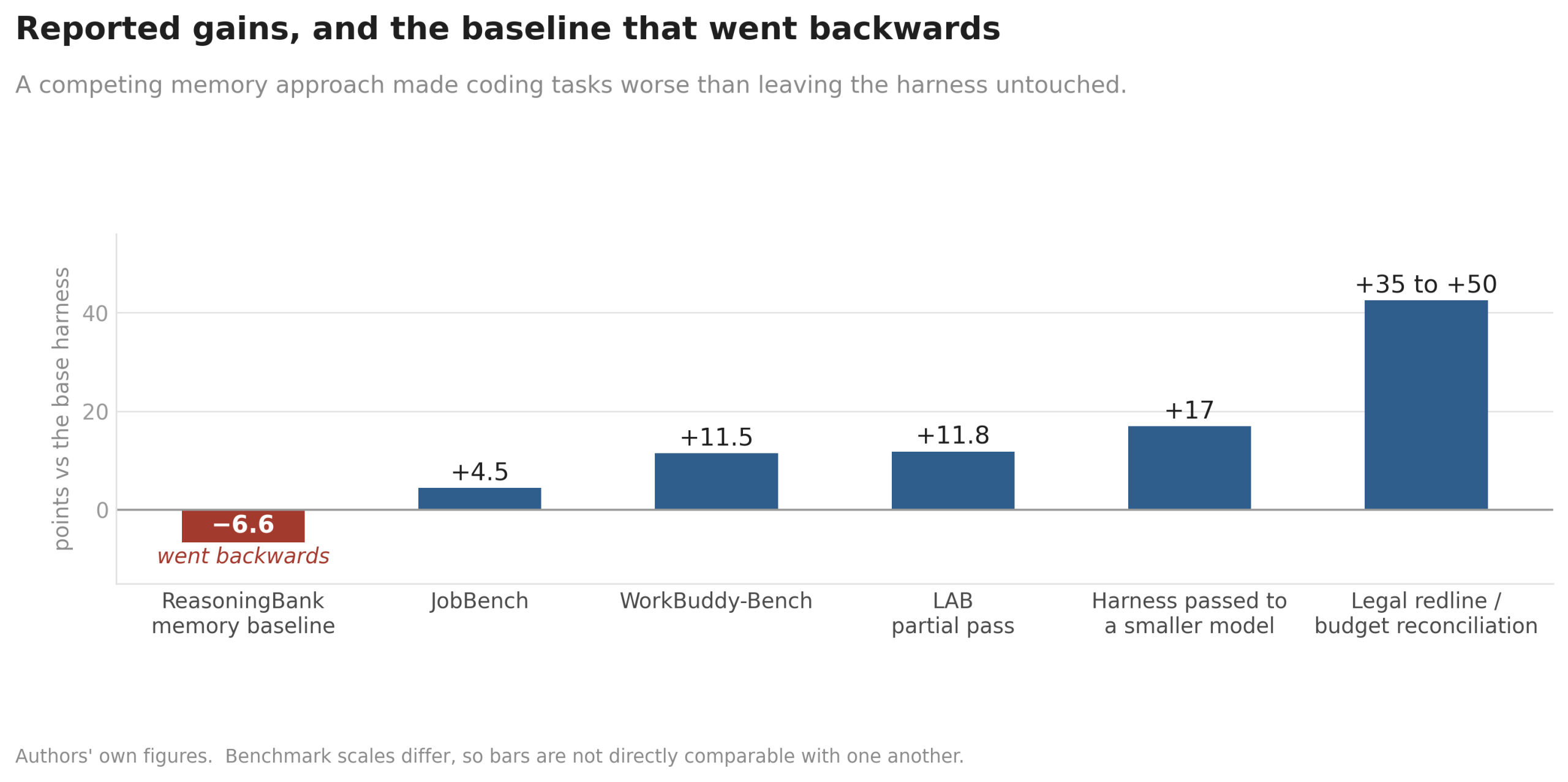
Tested on three professional benchmarks across four model-harness configurations, using GLM-5 and Gemini 3.5 Flash. A single step improved on the base harness in every configuration tried.
| Result | Figure |
|---|---|
| WorkBuddy-Bench | up to 11.5 points |
| JobBench | up to 4.5 points |
| LAB, partial pass rate | up to 11.8 percentage points |
| Five candidates probed in parallel | a further 2.9 to 3.9 points on WorkBuddy-Bench |
| Legal redlining and budget reconciliation | 35 to 50 points in a single step |
| Harness evolved on a strong model, handed to a smaller one | 17 points, immediately |
| ReasoningBank, a memory baseline, on coding | 6.6 points BELOW the base harness |
Two Results Worth Noticing
- Memory isn’t always better. ReasoningBank underperformed even the baseline on coding tasks, suggesting that storing memories alone may not improve an agent’s performance.
- Build expensive, run cheap. A harness evolved with an expensive model also worked with a cheaper one potentially reducing deployment costs.
Implementation
Installing it
Linux, Python 3.12, uv. This is what I ran.
Commands
git clone --depth 1 https://github.com/google-research/harness2.git
cd harness2

uv venv --python 3.12 .venv
. .venv/bin/activate
uv pip install -e '.[render]'
Output:
- Repository is 15 MB. The install pulled 8 packages:
lxml,openpyxl,pillow,python-pptx,typing-extensions,xlsxwriteranddependencies. - pyproject pins Python to >=3.12,<3.14. Earlier versions fail at the venv step.
- Seven CLI commands are installed:
harness2,harness2-demo,harness2-setup,harness2-check,harness2-judge,harness2-report,harness2-bridge.
Running the demo
No API keys, no cloud account. It runs both recursion modes with deterministic editors.
Command
harness2-demo --output runs/demo --k 2Output:

The demo completing both accounting tasks.
  [accounting] 1/2 ok           ledger-1
  [accounting] 2/2 ok           ledger-2
Local demo: 2 tasks completed; 0 failed. runs/demo/demo.json
What the run produced
| Measurement | Value |
|---|---|
| Tasks | 2 completed, 0 failed |
| Executions | 28 |
| Editor calls | 32 |
| Files written | 2,360 |
| Actual content | 265 KB |
| Disk used | varies by filesystem |
A 2-task run writes 2,360 files holding about 265 KB between them. How much disk that actually occupies depends on the filesystem: ext4 gave 13 MB because each tiny file claims a 4 KB block, while APFS on macOS packed the same run into 0.3 MB. Worth knowing before a benchmark run with hundreds of tasks.
Where the 28 executions came from
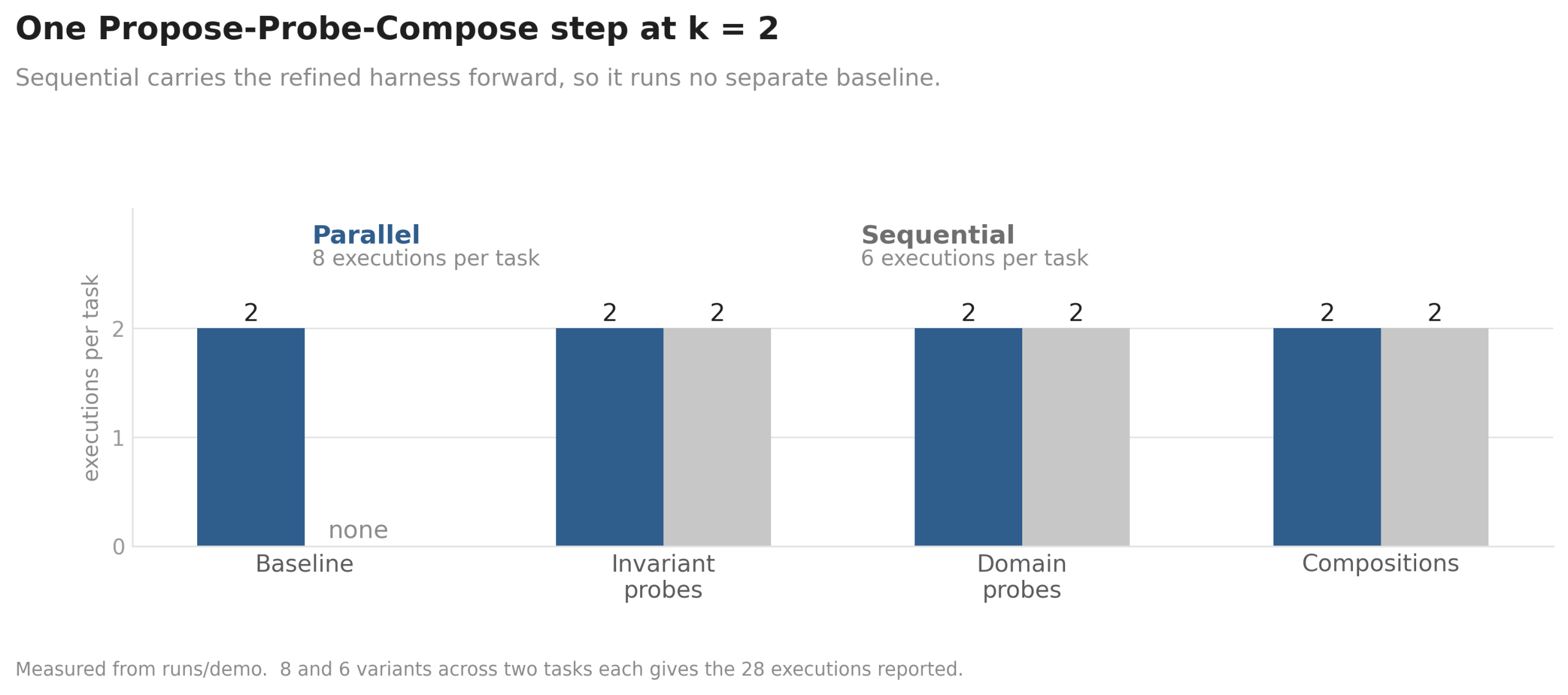
Measured from the run. Parallel keeps explicit baselines; sequential does not.
| Mode | Variants per task | Names |
|---|---|---|
| Parallel | 8 | base1, base2, inv1, inv2, dom1, dom2, agg1, agg2 |
| Sequential | 6 | inv1, inv2, dom1, dom2, c1, c2 |
8 and 6 variants across 2 tasks each gives 16 plus 12, which is the 28 the summary reported. The names map onto the algorithm: inv for invariant edits, dom for domain-specific edits, agg or c for compositions.
The research puts the cost at 4 to 20 full agent runs per task. My run landed at 6 to 8 with k=2, which sits at the bottom of that range.
What the free demo hides
This is the finding I have not seen stated anywhere else, and it matters if you plan to evaluate the project by running the demo.
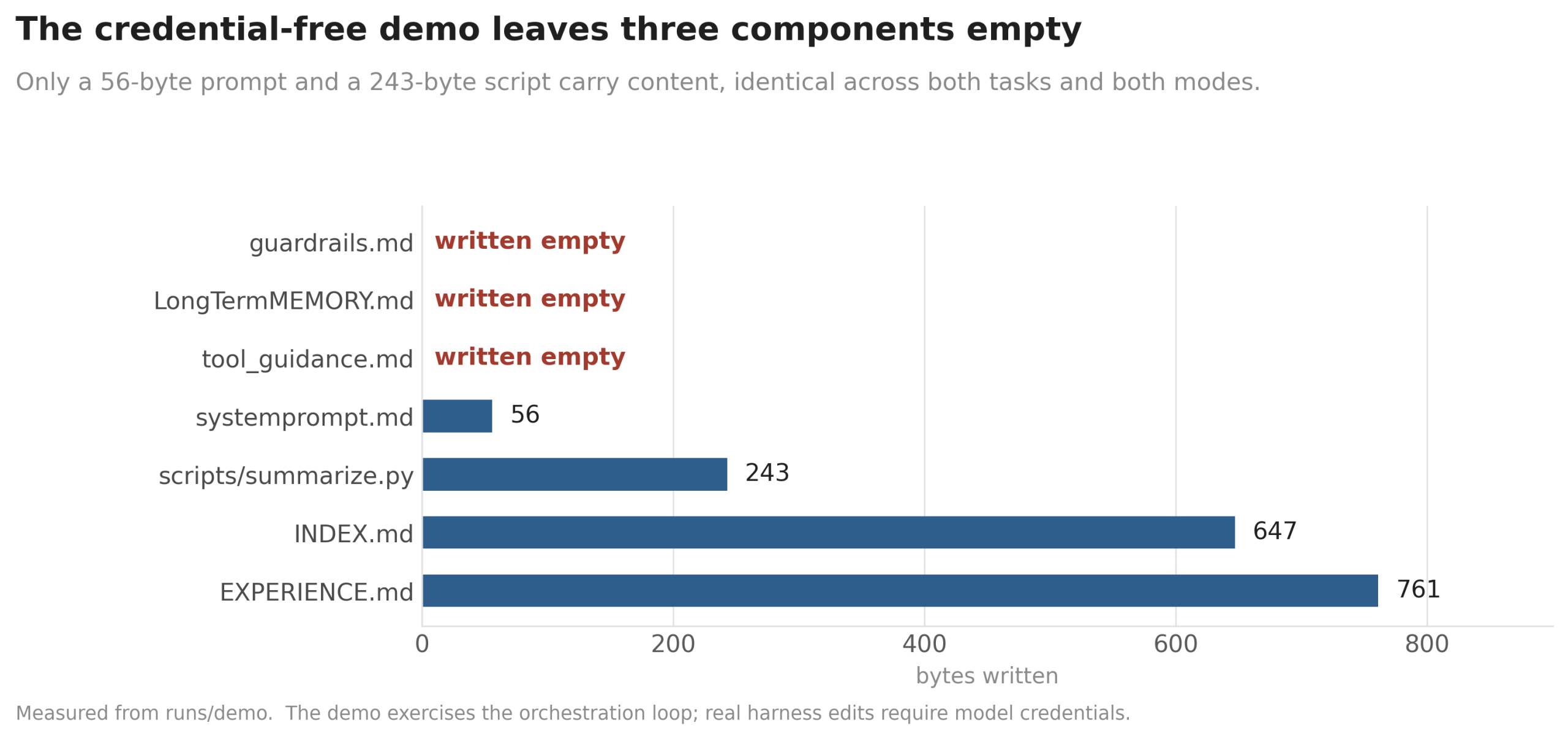
Measured byte counts from the demo run.
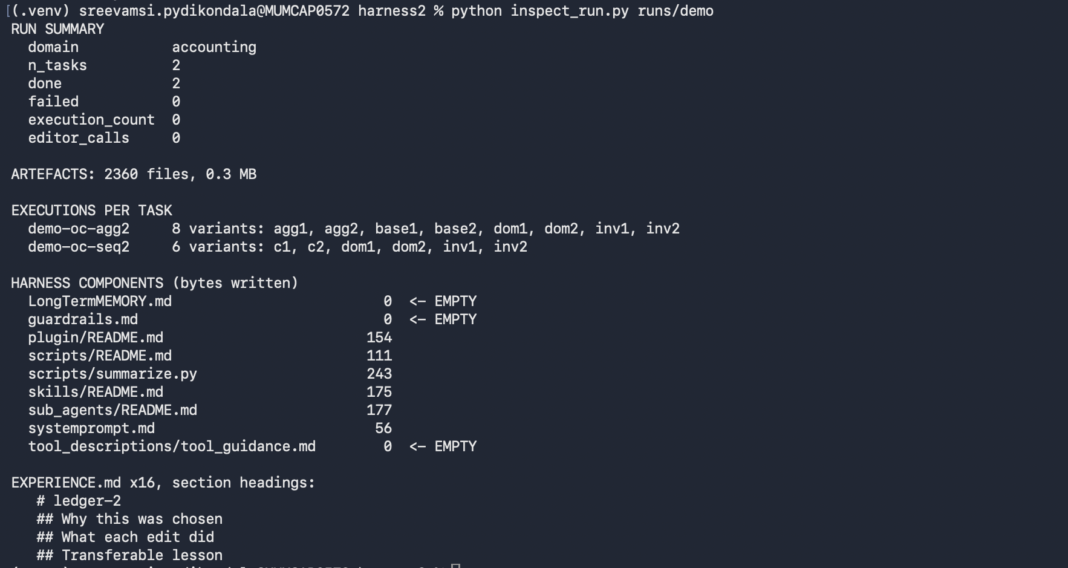
- All eight components are scaffolded, but guardrails, long-term memory and tool guidance were written empty.
- Four more exist only as placeholder READMEs: plugins, scripts, skills, subagents.
- Only two files carry content: a 56-byte system prompt and a 243-byte script, identical across both tasks and both modes.
- Execution traces are 75 bytes; answers are 13 bytes.
The demo proves the plumbing works. It does not demonstrate the method.
The recursion loop runs, probes fire, compositions are produced, the library is written and experience is recorded. But the deterministic editors never generate real content, so no harness is meaningfully rewritten. To see that you need model credentials and a real benchmark.
What the library does record
Each task writes an EXPERIENCE.md, and its headings show what the second loop keeps:
# ledger-2
## Why this was chosen
## What each edit did
## Transferable lesson
That third heading is the whole point of harnessing-level recursion. My run produced 16 of these across modes and tasks.
Inspecting a run
Run directories are large and deeply nested. This pulls out the numbers that matter. Not part of the repository.
inspect_run.py
"""
Inspect a harness2 run directory. Written for this article, not part of the repo.
Usage: python inspect_run.py runs/demo
"""

import json
import pathlib
import sys
import collections


root = pathlib.Path(
    sys.argv[1] if len(sys.argv) > 1 else "runs/demo"
)


# --- headline numbers from the run summary -------------------------

summary = root / "demo.json"

if summary.exists():
    d = json.loads(summary.read_text())

    print("RUN SUMMARY")

    for k in (
        "domain",
        "n_tasks",
        "done",
        "failed",
        "execution_count",
        "editor_calls"
    ):
        if k in d:
            print(f"  {k:<16} {d[k]}")

    print()


# --- how many artefacts did a run actually produce? ----------------

files = [
    p for p in root.rglob("*")
    if p.is_file()
]

total_mb = sum(
    p.stat().st_size for p in files
) / 1024**2

print(
    f"ARTEFACTS: {len(files)} files, {total_mb:.1f} MBn"
)


# --- execution variants, grouped by mode ---------------------------

print("EXECUTIONS PER TASK")

for mode_dir in sorted((root / "executions").glob("*")):

    tasks = sorted(
        p for p in mode_dir.glob("*")
        if p.is_dir()
    )

    if not tasks:
        continue

    variants = sorted(
        p.name for p in tasks[0].glob("*")
        if p.is_dir()
    )

    print(
        f"  {mode_dir.name:<16} "
        f"{len(variants)} variants: {', '.join(variants)}"
    )

print()


# --- which harness components actually got content? ----------------

print("HARNESS COMPONENTS (bytes written)")

sizes = collections.defaultdict(set)

for p in root.rglob("harness/**/*"):

    if p.is_file():

        key = (
            str(p.relative_to(p.parents[1]))
            if p.parent.name != "harness"
            else p.name
        )

        sizes[key].add(p.stat().st_size)


for name, vals in sorted(sizes.items()):

    v = sorted(vals)

    flag = "  <- EMPTY" if v == [0] else ""

    size_display = (
        v[0]
        if len(v) == 1
        else f"{v[0]}-{v[-1]}"
    )

    print(
        f"  {name:<34} {size_display:>8}{flag}"
    )

print()


# --- the harnessing-level memory -----------------------------------

exp = list(root.rglob("EXPERIENCE.md"))

if exp:

    print(
        f"EXPERIENCE.md x{len(exp)}, section headings:"
    )

    for line in exp[0].read_text().splitlines():

        if line.startswith("#"):

            print("  ", line)
Output:
One gotcha worth knowing. Re-running the same output directory skips tasks that already finished, which is the intended resume behaviour, but it also rewrites demo.json with execution_count and editor_calls at zero. The artefacts from the first run survive, so the variant counts and component sizes above are still accurate. Point –output at a fresh directory if you want the counts.
RUN SUMMARY
  domain           accounting
  n_tasks          2
  done             2
  failed           0
  execution_count  28
  editor_calls     32

EXECUTIONS PER TASK
  demo-oc-agg2     8 variants: agg1, agg2, base1, base2, dom1, dom2, inv1, inv2
  demo-oc-seq2     6 variants: c1, c2, dom1, dom2, inv1, inv2

HARNESS COMPONENTS (bytes written)
  LongTermMEMORY.md                         0  <- EMPTY
  guardrails.md                             0  <- EMPTY
  plugin/README.md                        154
  scripts/README.md                       111
  scripts/summarize.py                    243
  skills/README.md                        175
  sub_agents/README.md                    177
  systemprompt.md                          56
  tool_descriptions/tool_guidance.md        0  <- EMPTY
Moving to a real benchmark
Model-backed runs need Node.js 20+, the Google Cloud CLI and Vertex AI credentials. LAB also needs Pandoc and Poppler; WorkBuddy needs Docker.
Commands
cp .env.example .env            # add your Vertex AI project and model IDs
gcloud auth application-default login

harness2-setup lab
harness2-check --bench lab

harness2 --bench lab --k 1 --mode parallel
  --only-domains antitrust-competition --max-tasks 1

harness2-judge  --bench lab --k 1 --mode parallel
harness2-report --bench lab --k 1 --mode parallel- Judging and reporting must match the refinement run on benchmark, executor, subset, k, mode and seed, or the numbers will not line up.
- Add
--dry-runto preview task selection without spending anything. - Start with
--max-tasks 1. Each task fires multiple executions. - Use
--substratecxfor the Codex executor instead of the default OpenCode.
Conclusion
Harness² is a working implementation of a clear argument. Keep the weights fixed, optimise the scaffolding, and use contrasts between runs instead of ground-truth labels to decide what to keep.
The research behind it is more interesting than the headline numbers. Prompt-stuffing made things worse. Skipping validation made things worse. A competing memory baseline made coding worse. Those negative results are what make the positive ones credible.
The install is clean and the demo runs in seconds without credentials, which makes it cheap to verify the machinery. Just do not mistake that demo for the method: the components it fills in are stubs, and the part the paper is about only shows up once a model is wired in.
Read more: How to Use Jev AI: A Hands-On Guide to TypeSafe’s System One Model
Frequently Asked Questions
A. Excessive system prompts consume valuable token budgets and increase processing costs, which can cause the agent to fail before completing its assigned tasks.
A. It uses a Propose, Probe, and Compose cycle, keeping only those edits that demonstrate a concrete, observable improvement between two execution attempts.
A. Yes, research shows that a harness evolved using an expensive, high-capacity model can successfully improve performance when applied to a cheaper, smaller model.

Hi , I am Sree Vamsi a passionate Data Science enthusiast currently working at Analytics Vidhya. My journey into data science began with a curiosity for uncovering insights from complex data and has evolved into building end-to-end Generative AI applications, RAG pipelines, agentic AI workflows, and multi-agent systems that solve real-world business problems.
Login to continue reading and enjoy expert-curated content.