

Proprietary models are amazing! But sometimes what is of importance is configurability rather than raw power. This has led to the emergence of locally hosted models. Running AI locally gives users more control over their setup. With suitable hardware and tools like Ollama and LM Studio, capable models can run entirely on-device.
But which models are worth running, and would they run on your device?
In this article, we look at five LLMs you can run locally in 2026 and help you choose one that suits your needs and hardware.
| Model | Start with it for |
|---|---|
| Llama 3.1 8B Instruct | General chat and fine-tuning projects |
| Qwen2.5 7B Instruct / Coder | Multilingual text and coding assistance |
| Mistral 7B Instruct v0.3 | Everyday drafting and documentation |
| Gemma 4 E2B / E4B | Text, image, and audio understanding |
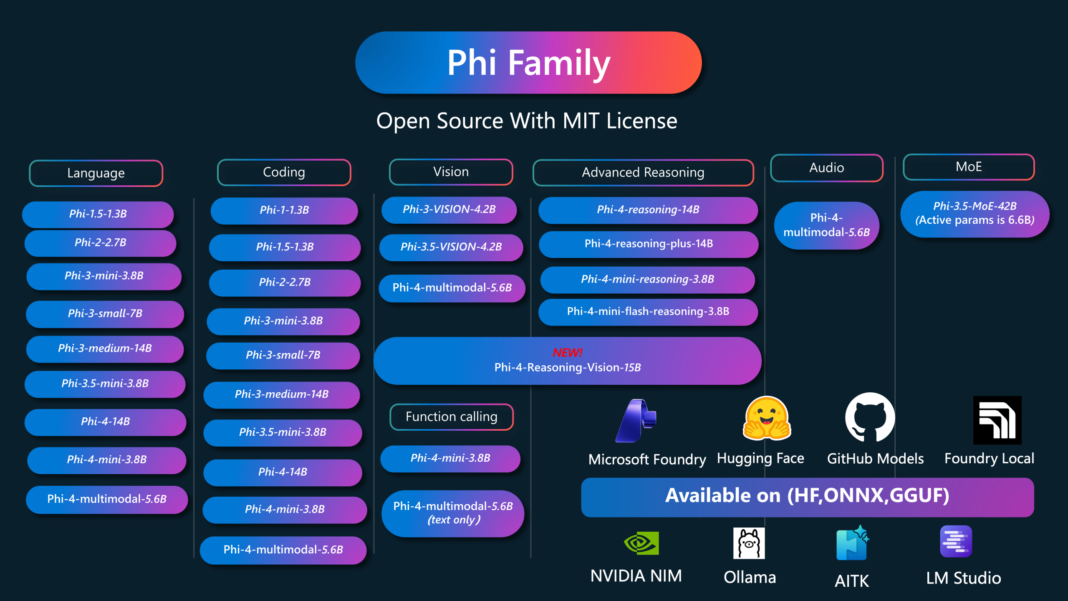
| Phi-4-mini-instruct | Lightweight Q&A and reasoning tasks |
Chat families are roughly ordered by cumulative Ollama library pulls, which favor older releases and do not measure quality. The embedding model is listed separately. GitHub links provide code or family resources; exact model downloads appear below.
1. Llama 3.1 8B Instruct: A general-purpose baseline
Start here for local chat, summarization, classification, and an established ecosystem of adapters and fine-tunes. It is a practical baseline when your project needs a familiar model family and broad tooling support.
Choose the Instruct model for assistant-style use. It is text-only and uses Meta’s Llama Community License, so check its terms before redistribution or deployment.
2. Qwen2.5 7B: Choose the version for the job
- The general
Qwen2.5-7B-Instructsuits multilingual conversations, document processing, and structured outputs such as JSON. Qwen2.5-Coder-7B-Instructfocuses on code generation, explanation, and repair.
Writing Python functions? Start with Coder. Extracting fields from a multilingual document? Try the Instruct model. Both are text models: screenshots require a vision-capable alternative.
3. Mistral 7B Instruct v0.3: Everyday writing

Mistral 7B Instruct v0.3 is a seven-billion-parameter text model for rewriting, summarization, documentation, and everyday chat. Its instruction tuning makes it a useful starting point for turning rough notes into polished paragraphs, README files, or commit messages.
Version v0.3 supports function calling, enabling integrations with tools your application executes. Its Apache 2.0 license supports customization projects. As an older generalist, it is worth comparing with newer models on your own prompts before settling on it.
4. Gemma 4 E2B / E4B: Multimodal work on smaller devices

These variants accept text, images, and audio and generate text. Consider them for document questions, image understanding, transcription, and on-device assistance, provided your runtime supports the input type.
The names describe effective parameters. Including embeddings, E2B has approximately 5.1B parameters and E4B 8B. Do not size your hardware from the names alone.
5. Phi-4-mini: When memory is the constraint
Microsoft’s 3.8B-parameter model targets memory-constrained and latency-sensitive applications. Try it for compact local assistants, extraction, math or logic prompts, and function-calling experiments.
It is a text model. Choose Phi-4-mini-instruct specifically: the similarly named reasoning and multimodal models are separate checkpoints with different behavior and requirements.
Installing Local Models using Ollama
Ollama is probably the easiest option for developers. Install it, download a model, and run it from the terminal:
ollama run gpt-oss:20b Ollama provides local packages for models including phi-4, Gemma 4, Qwen3-Coder, and many others. It also exposes a local API, making it useful when you want to connect a model to your own applications or coding agents.
Frequently Asked Questions
A. Qwen2.5-Coder-7B-Instruct is the coding-focused option here. Test generated code before using it.
A. The model can run on your device, but connected tools, cloud fallbacks, and application telemetry may still send data elsewhere. Check the whole setup.
A. This shortlist combines established releases with newer options. Popularity indicates adoption; your task and hardware determine the useful choice.

Studying, evaluating, and explaining AI systems for over 6 years.
“𝘖𝘯𝘤𝘦 𝘮𝘦𝘯 𝘵𝘶𝘳𝘯𝘦𝘥 𝘵𝘩𝘦𝘪𝘳 𝘵𝘩𝘪𝘯𝘬𝘪𝘯𝘨 𝘰𝘷𝘦𝘳 𝘵𝘰 𝘮𝘢𝘤𝘩𝘪𝘯𝘦𝘴 𝘪𝘯 𝘵𝘩𝘦 𝘩𝘰𝘱𝘦 𝘵𝘩𝘢𝘵 𝘵𝘩𝘪𝘴 𝘸𝘰𝘶𝘭𝘥 𝘴𝘦𝘵 𝘵𝘩𝘦𝘮 𝘧𝘳𝘦𝘦. 𝘉𝘶𝘵 𝘵𝘩𝘢𝘵 𝘰𝘯𝘭𝘺 𝘱𝘦𝘳𝘮𝘪𝘵𝘵𝘦𝘥 𝘰𝘵𝘩𝘦𝘳 𝘮𝘦𝘯 𝘸𝘪𝘵𝘩 𝘮𝘢𝘤𝘩𝘪𝘯𝘦𝘴 𝘵𝘰 𝘦𝘯𝘴𝘭𝘢𝘷𝘦 𝘵𝘩𝘦𝘮.” — 𝖥𝗋𝖺𝗇𝗄 𝖧𝖾𝗋𝖻𝖾𝗋𝗍, 𝖣𝗎𝗇𝖾
Login to continue reading and enjoy expert-curated content.